
CookieHub is best for single-site and few-site owners who want a Google-certified, automated cookie banner and value its ISO-27001 credential. Skip it if you run many client domains or need a fixed, predictable bill. Paid plans start at EUR6 per month, and the free plan is real but capped at 1,000 sessions.
The key caveat: pricing meters by traffic with a per-session overage, and several frameworks sit behind the EUR30 Business tier.
Verdict: a credible, well-certified CMP that scores 3.9 out of 5. It fits simple sites far better than multi-domain agencies.
Below: CookieHub's setup, real features and limits, current pricing, genuine pros and cons, and who should and should not use it.
CookieHub Review Scorecard
CookieHub scores 3.9 out of 5 in our review. It earns its strongest marks on certifications and consent experience. It loses ground on metered pricing and monthly, page-capped scanning.
| Dimension | Score |
|---|---|
| Compliance and framework coverage | 4.5/5 |
| Cookie scanning and auto-blocking | 3.5/5 |
| Banner and consent experience | 4.0/5 |
| Ease of setup and integrations | 4.0/5 |
| Pricing and value | 3.0/5 |
| Performance and reliability | 4.0/5 |
| Support and reputation | 3.5/5 |
| Overall | 3.9/5 |
Verdict: a certified, well-supported CMP for single-site owners, held back from the top tier by metered pricing, monthly page-capped scanning, and per-domain multi-domain setup.
How we score: we rate every consent platform across seven weighted dimensions. The evidence is current documentation, the live pricing page, hands-on time in the free tier, a page-speed test of the banner, and verified reviews. See our full methodology.
Full disclosure: this review is published by Consently, which competes with CookieHub in the consent-management category. Consently scores CookieHub with the same seven-dimension method it applies to every CMP. Every figure and limitation below traces to CookieHub's own documentation, current pricing, and verified user reviews.
What Is CookieHub?
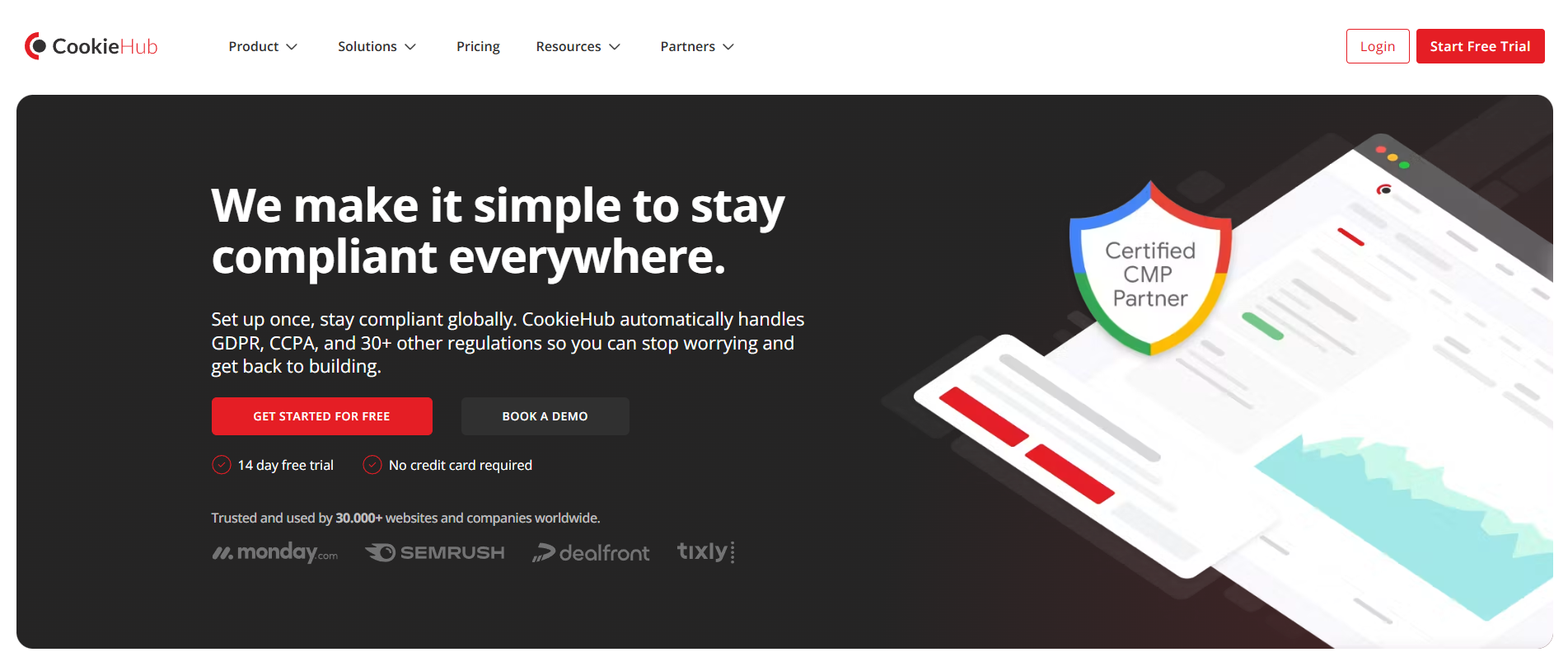
CookieHub is a Google Certified, ISO-27001 consent management platform (CMP) from Iceland. It scans a site for cookies and blocks non-essential cookies and scripts before consent. It shows a customizable geo-targeted banner, logs consent, and signals consent to Google and ad-tech frameworks. It prices by monthly sessions, not per domain.
CookieHub has been in the market since 2018, which makes it one of the more established names in the SMB and mid-market CMP tier. It holds three credentials that matter to risk-averse buyers: Google Certified CMP Partner status, ISO-27001 certification, and IAB TCF certification. CookieHub displays all three on its certifications page.
Named customers on its homepage include monday.com, Semrush, Dealfront, and Tixly. It states it serves a large website base, but the figure is inconsistent in its own copy. The homepage says 30,000+ websites while the cookie-checker page says 20,000+, so treat the count as approximate.
On organic visibility, CookieHub sits among the top consent management platforms in the category, well ahead of newer entrants.
It is a credible, certified tool. The question for a buyer is whether its scanner-led, usage-priced model fits your specific site or client portfolio.
Who CookieHub Is For
CookieHub is the right choice in five situations.
-
SMBs and marketing teams that want certified, low-touch compliance with Google Consent Mode v2 working out of the box on every plan, including the free tier.
-
Single-site or few-site owners on WordPress, Wix, Shopify, or Webflow who value automatic scanning and a native plugin or app over manual setup.
-
Ad-tech-dependent publishers that need IAB TCF 2.3 and IAB GPP for programmatic advertising are available on the Business plan and above.
-
Risk-averse buyers who weigh credentials heavily and want a Google CMP Partner and ISO-27001 vendor behind their banner.
-
Teams that need a DSAR workflow alongside cookie consent, which CookieHub ships as a built-in module on the Business plan.
Who CookieHub Is Not For
CookieHub is a poor fit in six situations.
-
Agencies and freelancers running many client domains who do not want to configure each domain individually, since CookieHub has no standard-plan way to clone settings across sites.
-
Buyers who need a fixed, predictable bill, because pricing is metered by session and paid plans add a per-session overage fee when you exceed your limit.
-
Teams that also need a terms-and-conditions document from the same tool, which CookieHub does not generate.
-
Sites on common caching or optimizer stacks (WP Rocket, LiteSpeed, Cloudflare Rocket Loader) that cannot absorb manual workarounds, because CookieHub’s own docs warn that auto-blocking can malfunction on those setups.
-
Buyers who want every framework on the entry tier, since GPC, IAB TCF 2.3, IAB GPP, and DSAR all start at the Business plan.
-
Teams that want live chat support, which CookieHub does not offer on any tier.
How Easy Is CookieHub to Set Up?
CookieHub installs through a JavaScript snippet, a Google Tag Manager template, or a native CMS plugin, and is widely rated easy to set up. Every one of its 12 G2 reviews is a perfect 5 stars, and the praise centers on setup. The friction is concentrated on complex sites and caching stacks that need manual configuration, not on simple sites.
I set the evaluation up the way CookieHub's own documentation lays it out. The path from signup to a working banner is short for a standard site. The harder parts are predictable and documented. The scanner runs on a monthly cadence, and pre-consent blocking can break behind caching unless you add manual exclusions.
Getting Started: From Signup to a Live Banner
Getting from signup to a published banner takes a handful of documented steps. CookieHub installs the widget one of three ways: a JavaScript snippet, a Google Tag Manager template, or a native CMS plugin or app.
WordPress, Wix, Shopify, Webflow, Squarespace, Magento, Weebly, Umbraco, and Drupal are all supported, plus a React library. For the GTM route, you add your CookieHub domain code from the console into the tag template, the path G2 reviewers call out by name.
One G2 reviewer flagged that pasting the raw snippet into the site head "does not work as expected," then found the WordPress plugin smoother. On WordPress, the plugin is the lower-friction path.
From there, the flow runs in four short steps.
1. Create a domain in the dashboard and copy its install code.
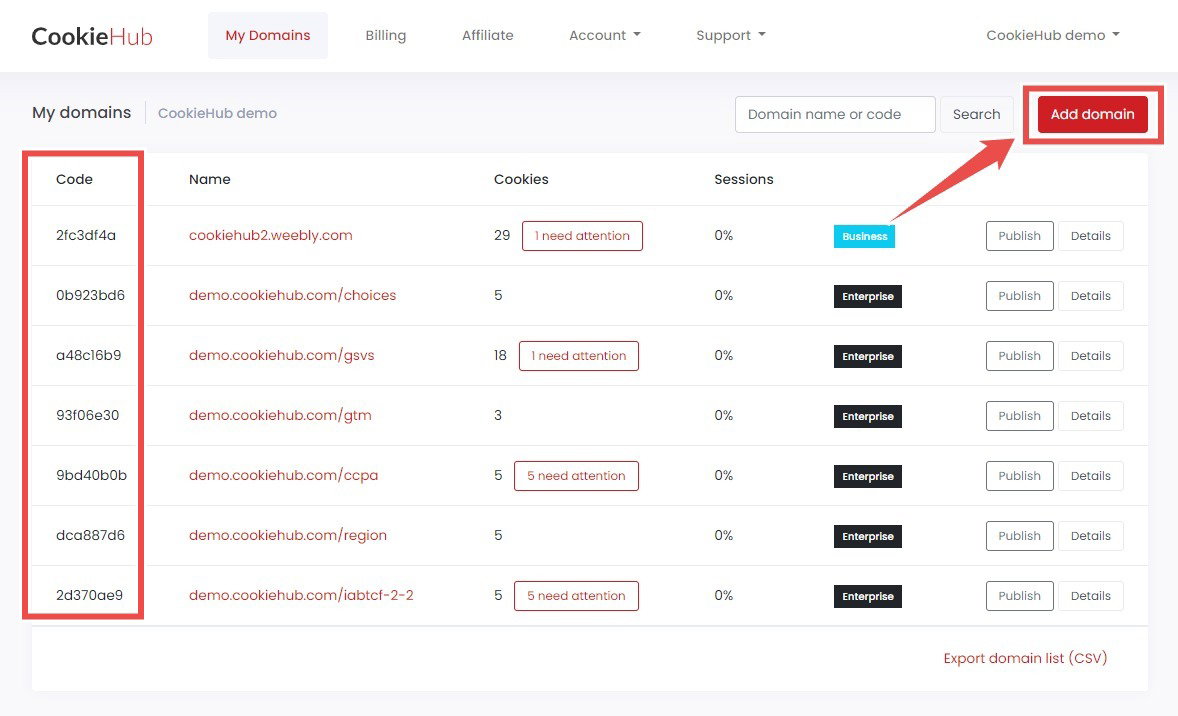
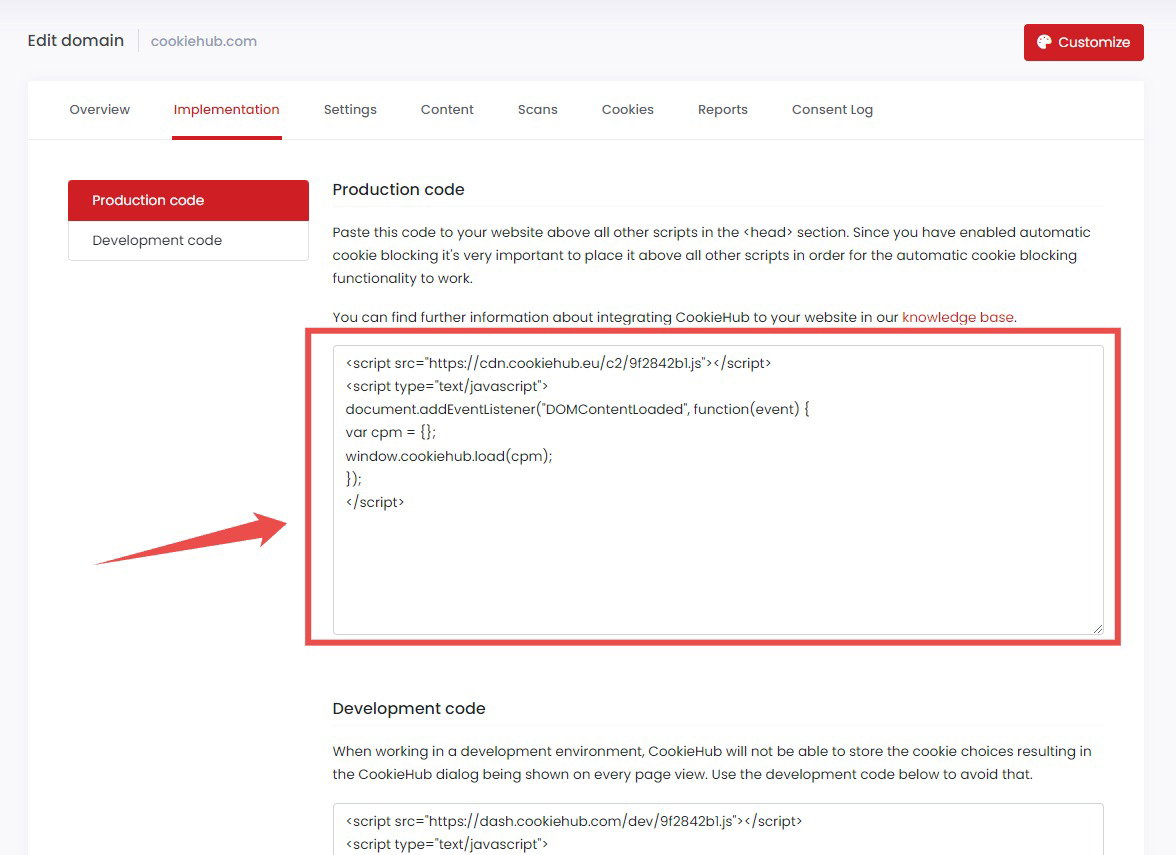
2. Add the snippet or GTM tag to your site, or activate the native plugin.
3. Enable scanning so CookieHub crawls the site and inventories cookies.
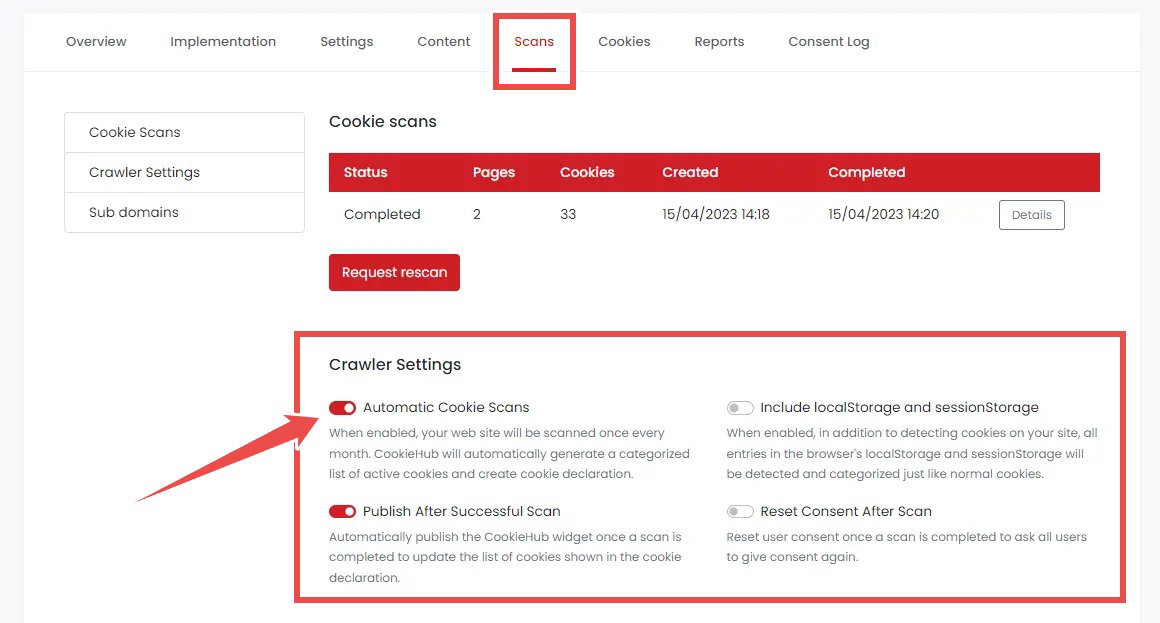
4. Customize & Publish the banner, at which point CookieHub auto-publishes a cookie declaration from the scan.
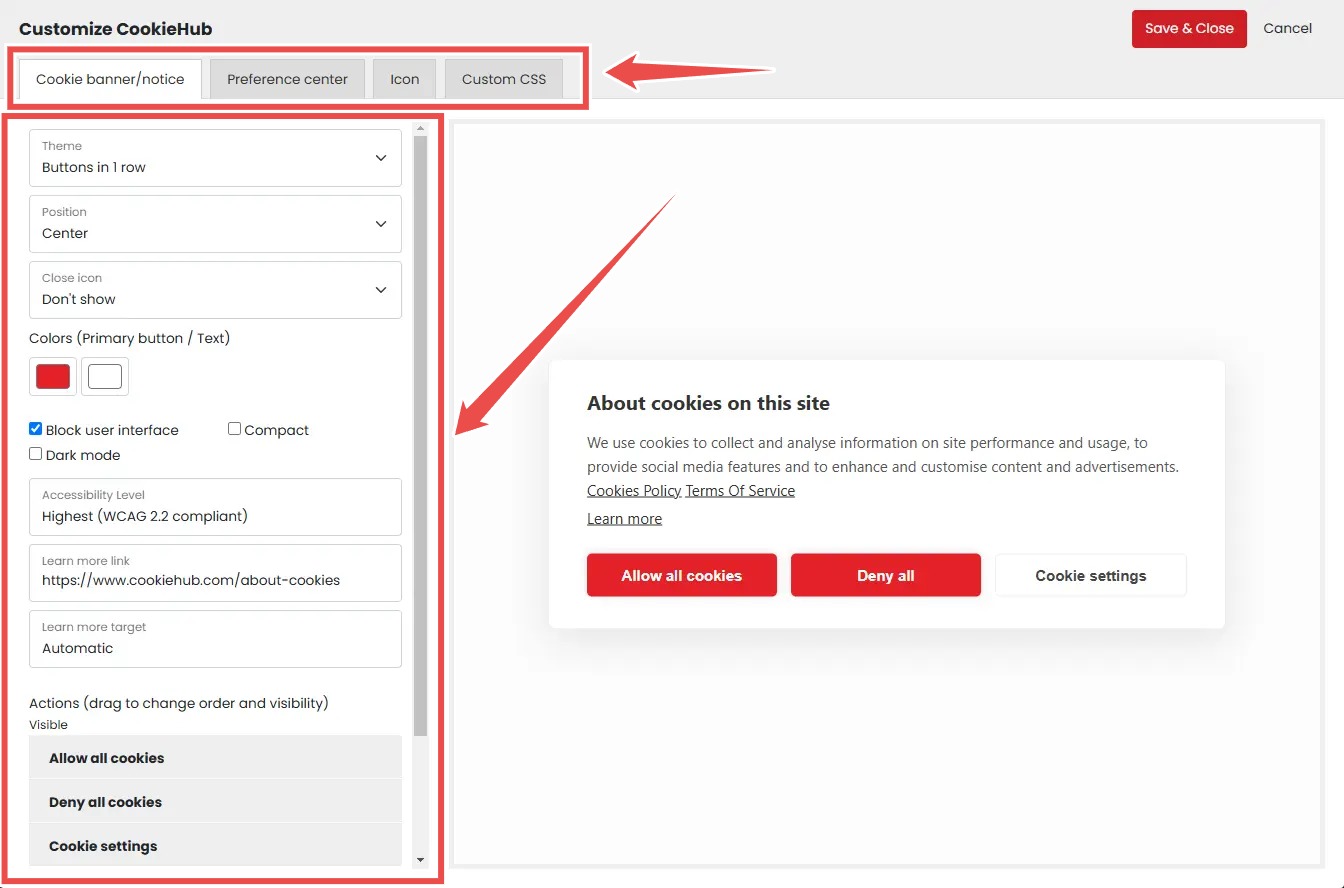
The activation event is a live banner backed by a published cookie declaration, and it depends on that first crawl completing. The scanner runs on a 30-day cycle ("Once every month, your website is automatically crawled").
The Free and Starter plans include automated one-time scans plus on-demand manual scans, so you can force a fresh scan rather than wait. None of this is heavy.
The consensus across G2, Capterra, and an independent review on cookiebannerguide is that setup is fast, and the widget is easy to customize.
The Learning Curve: Who Will Struggle
The people who breeze through CookieHub are those installing on a simple site through GTM or a CMS plugin. Its G2 reviewers consistently call it easy to use. One reviewer says CookieHub is "generally easier than building a compliant setup manually" from scratch.
The people who hit friction run complex sites or third-party scripts that need manual adjustment for blocking. So do teams on caching stacks, where CookieHub's own docs say auto-blocking "may malfunction" without manual exclusions.
The perfect 5-star G2 rating skews toward simple-site owners, so the difficulty is not general. It is concentrated on complex and cached sites. One practical note: independent, current video walkthroughs of CookieHub are thin, so most public how-to content is CookieHub's own.
What Are CookieHub's Key Features?
Four features form CookieHub's core. They are automatic monthly cookie scanning, pre-consent blocking, a customizable geo-targeted banner, and broad framework signaling led by Google Consent Mode v2. Each is capable, and each carries a documented limit.
Automatic Cookie Scanning and the Cookie Declaration
CookieHub's scanner crawls your site and records each cookie's expiration, hostname, and path. It auto-categorizes detections against its Cookie Database, marking anything it cannot match as "Uncategorized" for manual review. It then auto-publishes a cookie declaration that stays in sync as the scan finds changes. That is a genuine, low-effort capability.
The documented limits are two.
The crawl runs every 30 days. It is also page-capped by plan tier: 50 pages on Free and Starter, 100 on Basic, and 1,000 to 10,000 on Business.
CookieHub's own support article on missed cookies confirms the scanner stops at the page cap. Larger or dynamic sites can have cookies missed until the next scan or a manual addition. On-demand manual scans soften this, but a high-traffic store launching new tags weekly should expect to add some cookies by hand.
Auto-Blocking Before Consent (and When It Breaks)
Pre-consent blocking is the core job of a CMP, and CookieHub does it: it blocks non-essential cookies, scripts, and tags before a visitor consents. The caveat is documented by CookieHub itself, which is what makes it credible rather than speculative. Under WP Rocket, LiteSpeed, and Cloudflare Rocket Loader, the widget can load late.
CookieHub's known-issues documentation warns that "automatic cookie blocking may malfunction, creating compliance risks." The fix is manual. You exclude CookieHub's scripts from your caching or JS-optimizer rules. VWO can also cause banner flickering that needs a CSS workaround.
This is the single sharpest tension in the product. The marketing says "fully automated," while the vendor's own docs describe a setup where automation can fail silently on a very common stack. It is fixable, but it is not set-and-forget on those configurations.
Multi-Domain Management
One CookieHub account holds unlimited paid domains and up to 100 free domains from a single dashboard. That is genuinely convenient for anyone managing a portfolio. The friction is in configuration. Adding a domain is a discrete dashboard task ("Go to the My domains page, click Add domain").
On standard plans, there is no documented way to clone or template one domain's banner settings onto the next, so configuration is repeated per domain. One G2 reviewer who migrated 16-plus sites puts it directly. Configuration changes "require cloning settings for each domain individually," which the reviewer calls time-consuming. A second reviewer adds that "syncing settings across domains could be easier" on the platform.
CookieHub does market a Bulk Configuration Management capability. But it sits inside the Agency and Partner Program rather than the standard plans. Cross-domain consent forwarding is gated to the Business tier and forwards consent state rather than replicating banner settings.
For an agency running many client sites, the per-domain setup is the documented reality. It is the main reason a portfolio owner might look elsewhere.
Frameworks, Certifications, and the DSAR Module
This is where CookieHub is genuinely strong. It is a Google Certified CMP Partner, ISO-27001 certified, and IAB TCF certified, with WCAG 2.2 alignment on the banner. Google Consent Mode v2 is on every plan, including Free, and Microsoft UET Consent Mode is supported.
The heavier ad-tech and regional frameworks (GPC detection, IAB TCF 2.3, and IAB GPP) begin at the Business plan. CookieHub also ships a real DSAR-management module on the Business tier. It includes a Shadow DOM widget, email identity verification, centralized request tracking with deadlines, AES-256-GCM encrypted disclosure delivery, and full audit logging.
A built-in DSAR workflow is a meaningful capability that most budget CMPs do not offer at all, so it deserves full credit. The honest qualifier is tier placement: the frameworks and DSAR that distinguish CookieHub require the Business plan, not the entry tiers.
How Much Does CookieHub Cost?
CookieHub runs a permanent free plan (up to 1,000 sessions), then Starter at EUR6/mo, Basic at EUR10/mo, Business at EUR30/mo, and custom Enterprise pricing. It prices by monthly sessions, not per domain. It adds a EUR0.10 per 1,000-session overage on paid plans and gates several frameworks to Business.
Here are the current plans, verified on CookieHub's pricing page.
| Plan | Price (EUR/mo) | Monthly sessions | Page-scan cap | Notable inclusions and limits |
|---|---|---|---|---|
| Free | 0 | up to 1,000 | 50 | 1 user, Consent Mode v2, proof of consent, 1 banner template, no multilingual or CSS; banner stops at the session limit |
| Starter | 6 | 5,000 | 50 | 1 user, all Free features |
| Basic | 10 | 30,000 | 100 | Unlimited users, multilingual (60+), customizable CSS, 3 templates, geolocation settings, advanced scan reports |
| Business | 30 | 120,000 to 1,000,000 | 1,000 to 10,000 | Adds GPC, IAB TCF 2.3, IAB GPP, cross-domain consent, branding removal, DSAR Management, SSO |
| Enterprise | Custom | 1,000,000+ | from 10,000 | API configuration, advanced consent reports, implementation and optimization services |
A session is roughly 25 page views by CookieHub's own conversion, so 1,000 free sessions cover about 25,000 page views. One account holds unlimited paid domains plus up to 100 free domains. The pricing page lists a 14-day free trial with no card required, a 30% reseller discount, and a 50% lifetime non-profit discount.
So is CookieHub expensive? For a single low-traffic site, no: the free plan is real and the EUR6 and EUR10 tiers are inexpensive. But two things move the bill.
First, cost meters to traffic, and on paid plans exceeding your session limit adds a per-session overage to your next invoice.
Second, the cheapest plan that includes GPC, IAB TCF 2.3, IAB GPP, and DSAR is Business at EUR30. So feature-complete ad-tech compliance is a mid-tier purchase, not an entry-tier one.
One G2 reviewer calls it "bit costly but its worth every penny" in balance. A Trustpilot cohort's concern over unexpected charges traces to the same metered structure.
CookieHub's Free Plan: What You Actually Get
Yes, CookieHub is free at the entry level, and the free plan is permanent rather than a trial. It includes up to 1,000 sessions (about 25,000 page views), a 50-page scan, and one user. You also get Google Consent Mode v2, proof of consent, automated one-time scans, and up to one month of consent record retention. The limits are real. You get one banner template, no multilingual support, and no CSS customization. The banner stops showing once monthly sessions exceed 1,000, until the next billing cycle. It is genuinely usable for a small personal or brochure site. It also doubles as an honest funnel into the paid tiers once traffic grows.
Session Overage and Feature Tiers: Why Bills Move
Two documented mechanics drive CookieHub's cost.
The first is the session overage. On paid plans, exceeding your monthly session limit adds a small fee, as low as EUR0.10 per 1,000 sessions, to your next invoice. The banner keeps running. CookieHub ran a 2026 pricing reset it described as "fully predictable." Yet the live pricing page still carries this per-session overage.
That is the basis of the Trustpilot "unexpected charges" concern. On the Free plan, there is no overage; the banner simply stops at the limit and reactivates next cycle.
The second mechanic is tier-gating. GPC, IAB TCF 2.3, IAB GPP, cross-domain consent, and DSAR Management all begin at Business (EUR30/mo). None of them are available on Free, Starter, or Basic. So getting ad-tech and cross-domain features means moving up a tier, not paying for usage.
Neither mechanic is hidden in the documentation; the surprise reported by some buyers is the experience of the bill moving with traffic.
What Are the Pros of CookieHub?
CookieHub's genuine strengths are its top-tier certifications, well-rated ease of setup and support, a frictionless free-tool funnel, and a real DSAR module. These are evidenced, not generic, and most hold up against direct scrutiny.
-
Top-tier certifications: Google Certified CMP Partner, ISO-27001, and IAB TCF certification together form a trust edge that many budget CMPs cannot match, and ISO-27001 in particular is uncommon at this price.
-
Well-rated ease of setup and support: CookieHub holds a perfect 5.0 out of 5 across all 12 of its G2 reviews. Reviewers single out easy Google Tag Manager setup and fast, competent support, echoed by a “support is top notch” testimonial on Trustpilot.
-
Broad framework coverage: Google Consent Mode v2 on every plan, plus Microsoft UET Consent Mode, IAB TCF 2.3, IAB GPP, and GPC detection on Business, covers both Google measurement and programmatic ad-tech.
-
A real DSAR-management module: An encrypted, identity-verified, audit-logged DSAR workflow with deadline tracking is a capability beyond cookie consent that most SMB CMPs do not offer at all.
-
A frictionless free-tool funnel: A free Cookie Checker with no signup, a Consent Mode Checker, a privacy policy generator, and a permanent free plan give buyers a genuine low-commitment way to evaluate the platform.
What Are the Cons of CookieHub?
CookieHub's limitations are specific and, in several cases, documented by CookieHub itself. The main ones are per-domain configuration, auto-blocking that can break behind caching, and monthly page-capped scanning. The rest are a metered bill with overage, Business-tier framework gating, and no terms generator or live chat.
-
Multi-domain settings are configured per domain: On standard plans, there is no clone-or-template feature, so each domain is set up individually, which G2 reviewers call “time-consuming for sites with 16+ websites” (bulk configuration is an Agency Program feature, not a standard-plan one).
-
Auto-blocking can malfunction behind caching: CookieHub’s own known-issues documentation states blocking “may malfunction, creating compliance risks” under WP Rocket, LiteSpeed, and Cloudflare Rocket Loader without manual exclusion rules.
-
Scanning is monthly and page-capped: The crawl runs every 30 days and caps pages by tier (50 to 10,000), so it can miss cookies on larger or dynamic sites and need manual additions, per CookieHub’s support article on missed cookies.
-
Cost scales with traffic and adds an overage: Sessions meter the bill, and paid plans carry a live EUR0.10 per 1,000-session overage, despite the 2026 “predictable pricing” messaging.
-
Key frameworks are gated to Business: Reaching GPC, IAB TCF 2.3, and IAB GPP means jumping to the Business plan at EUR30/mo, since none of the three is available on Free, Starter, or Basic.
-
No terms generator and ticketing-only support: The policy generator produces a privacy policy only (no terms-and-conditions document), and support is ticketing-only with no live chat, on SLAs of 4 business days (Free and Starter) and 2 business days (Basic and Business).
What Do Real Users Say About CookieHub?
CookieHub's user sentiment is positive but thin and split. G2 sits at 5.0/5 across 12 reviews, Trustpilot much lower at 1.9/5 across 26 votes, and Capterra carries a listing with zero user reviews. Praise centers on setup and support; criticism on multi-domain management and cost.
The rating split is worth explaining rather than hiding. On G2, all 12 reviews are 5 stars. The base is small but consistent: mostly European small businesses (10 of 12) and a few agencies praising easy GTM setup and fast support.
On Trustpilot, the aggregate is 1.9/5 across 26 votes, a cohort that skews toward billing and cost complaints. Even there, the top-displayed Trustpilot review is itself a five-star endorsement. CookieHub's homepage cites a Trustpilot 4.5 that conflicts with the 1.9 on the live review page; the live figure is the current one. Both small bases pull in different directions, which is why the platforms disagree so sharply.
A representative spread:
"CookieHub was straightforward to setup and easy to implement using Google Tag Manager." (G2, enterprise admin who migrated 16-plus sites)
"Among the most affordable solutions we have found. They offer both a reseller and affiliate program, which is very helpful when running an agency." (G2, agency)
"The service is bit costly but its worth every penny." (G2, the cost caveat in balance)
"I'm happy to recommend CookieHub. It's straightforward to implement, works well and the support is top notch too." (Trustpilot)
Two honesty notes. Capterra lists CookieHub with marketing copy but zero actual user reviews, so it is a listing, not a sentiment source. And independent, current video reviews of CookieHub are scarce, consistent with its modest community footprint despite eight years in the market.
Is CookieHub Worth It?
CookieHub is worth it for single-site and few-site owners who want certified, automated, Consent-Mode-ready compliance and value Google CMP Partner and ISO-27001 credentials. It is harder to justify for multi-domain agencies and budget-fixed buyers. They will feel the per-domain configuration, the session overage, and the Business-tier framework gating.
Choose CookieHub if:
-
You run one or a few straightforward sites and want certified, set-and-forget compliance.
-
Google Ads and Analytics continuity through Consent Mode v2 is a priority, since it is on every plan.
-
You weigh trust signals heavily and want a Google CMP Partner and ISO-27001 vendor.
-
You need a built-in DSAR workflow alongside cookie consent.
Look elsewhere if:
-
You run many domains and do not want to configure settings on each one individually.
-
You need a predictable, fixed bill without a per-session overage.
-
You want GPC, IAB TCF 2.3, or IAB GPP without moving up to the Business plan.
-
You also need a terms-and-conditions document or live chat support in the same tool.
CookieHub remains a strong, credible choice for the certified-and-automated single-site buyer. If any of the "look elsewhere" conditions describe you, it is worth comparing the best CookieHub alternatives before you commit.
Considering an Alternative to CookieHub?
If CookieHub's per-domain setup, session overage, or Business-tier gating is your sticking point, Consently is built around those specific gaps. It bundles multiple domains at a flat price, prices by capacity instead of metered sessions, and includes every feature on every plan.
Three differences map directly to the limitations above.
-
First, where CookieHub configures each domain individually, Consently uses flat multi-domain bundling: five domains for $199/year and ten for $499/year, from one dashboard. That answers the "16+ websites" cloning pain.
-
Second, where CookieHub meters by session and adds a per-session overage, Consently prices by capacity: domains plus monthly pageviews, with no overage fee. The bill does not move with traffic.
-
Third, where CookieHub gates GPC-era frameworks and live chat to higher tiers, Consently includes all features on every plan. That set covers IAB TCF, Google Consent Mode v2, weekly and on-demand scanning, three policy generators (with a terms-and-conditions generator), and live chat support.
In fairness, CookieHub is genuinely stronger in several places Consently does not yet match. Those are ISO-27001 certification, confirmed Google CMP Partner status, the DSAR module, GPC and IAB GPP support, and enterprise SSO. If you specifically need any of those, CookieHub is the better fit.
Consently is the better fit for the cost-conscious, multi-domain, simplicity-first buyer, rather than a like-for-like replacement. For a feature-by-feature breakdown, see Consently vs CookieHub, side by side, and you can review Consently's plans and pricing.
FAQs
Is CookieHub really "set up once"?
Mostly, for simple sites. CookieHub's own documentation shows that complex sites and caching stacks (WP Rocket, LiteSpeed, Cloudflare) need manual configuration to keep auto-blocking working. The scanner also runs monthly. So "set up once" is closer to "set up, then check" for harder setups and high-change sites.
How often does CookieHub scan for cookies?
CookieHub scans automatically every 30 days, with on-demand manual scans available between cycles. The scan is page-capped by plan tier, from 50 pages on Free and Starter up to 10,000 on Business. Larger or dynamic sites can have cookies missed until the next scan or a manual addition.
Can I manage multiple domains in CookieHub without cloning settings?
One account covers unlimited paid domains from a single dashboard. But on standard plans there is no bulk-configuration feature, so settings are configured per domain, which G2 reviewers call time-consuming past 16 sites. If you run many client sites, compare the best CMP for agencies options that bundle domains.
Is CookieHub free?
Yes, CookieHub has a permanent free plan: up to 1,000 sessions, a 50-page scan, one user, and Google Consent Mode v2. It is tightly capped, the banner stops showing once monthly sessions exceed 1,000, and several features (multilingual, CSS, GPC, IAB TCF) require a paid tier.
Is CookieHub Google-certified?
Yes. CookieHub is a Google Certified CMP Partner and is also ISO-27001 certified and IAB TCF certified. These are genuine trust signals, and the Google certification supports Google Consent Mode v2, which CookieHub includes on every plan including the free tier.
Does CookieHub offer live chat support?
No. CookieHub provides ticketing support only, with no live chat or phone channel on any tier. Response SLAs are 4 business days on Free and Starter, 2 business days on Basic and Business, and 24 hours on Enterprise. Despite the ticketing-only model, support quality is well rated, with G2 reviewers repeatedly praising fast, competent responses.
Is CookieHub better than CookieYes?
It depends on your priority. CookieHub leads on certifications (ISO-27001, confirmed Google CMP Partner) and its DSAR module. CookieYes leads on a larger budget install base and per-domain simplicity. Neither offers flat multi-domain bundling. For the other side, see our CookieYes review.
What are the best alternatives to CookieHub?
The alternatives that surface most often are CookieYes, Cookie Script, and Cookiebot for budget and WordPress sites. Osano and OneTrust sit at the enterprise end, and Consently competes on flat-priced multi-domain bundling. The right one depends on your domain count, framework needs, and budget. Our best CookieHub alternatives roundup compares them against CookieHub directly.

