
CookieYes is the easiest, best-supported budget cookie consent platform for one site or a few. Skip it if you run many domains or need ungated features, because the cost climbs fast. The price floor is a real free plan, then $10 to $55 per month per domain. The key caveat is that pricing is per domain, and the features most businesses need sit on Pro or higher.
Verdict: a genuinely simple, certified CMP that fits a single site well and punishes scale.
CookieYes Scorecard and Verdict
The scorecard below rates CookieYes on the seven dimensions that decide a consent platform, weighted by what a buyer relies on most.
| Dimension | Score |
|---|---|
| Compliance and framework coverage | 4.5/5 |
| Cookie scanning and auto-blocking | 3.5/5 |
| Banner and consent experience | 3.5/5 |
| Ease of setup and integrations | 4.5/5 |
| Pricing and value | 2.5/5 |
| Performance and reliability | 3.0/5 |
| Support and reputation | 4.5/5 |
| Overall | 3.8/5 |
Verdict: the easiest, best-supported budget CMP for one site or a few, and an expensive fit once you run many domains or need ungated features.
How we score: we rate every consent platform across seven weighted dimensions. The evidence is the live pricing page, current documentation, framework and certification records, and verified user reviews. See our full methodology for the weights behind each number.
Disclosure: this review is written by the team at Consently, which operates a competing consent management platform. We scored CookieYes with the same method and weights we apply to every product on this site. The one section that compares the two tools is kept clearly separate at the end.
What Is CookieYes?
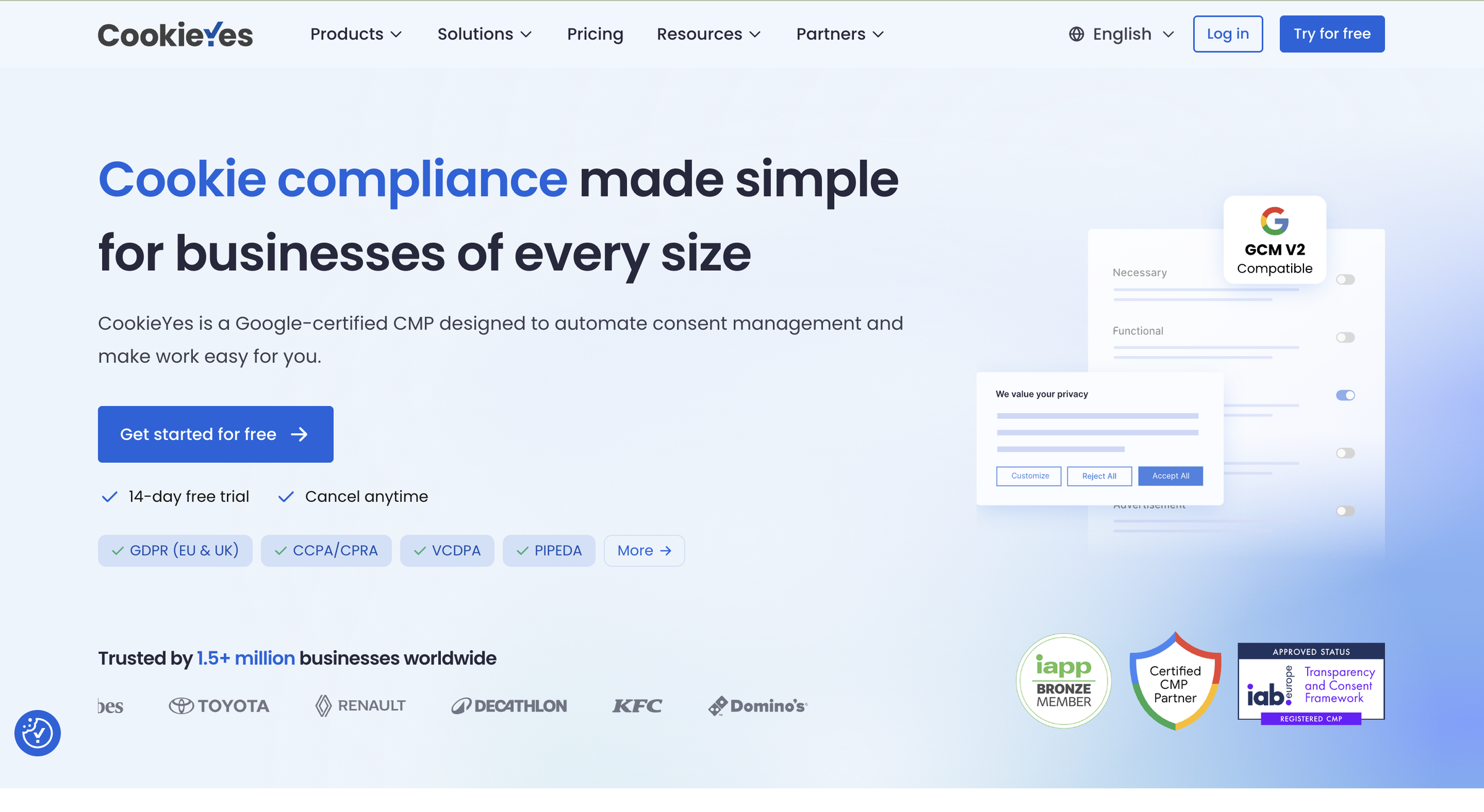
CookieYes is a Google-certified consent management platform that deploys a cookie banner, auto-scans and blocks cookies, logs consent, and generates privacy and cookie policies. You install it with a one-line snippet, a WordPress plugin, a Shopify app, or a Wix app. More than 1.5 million sites run it.
CookieYes started in 2018 as the WordPress plugin “Cookie Law Info” and grew into a standalone CMP run by CookieYes Limited in the UK. The product covers the compliance basics most websites need. It shows visitors a consent banner, scans the site against a database of more than 100,000 known cookies, and blocks non-essential scripts until consent.
It keeps a consent record for audits and signals consent to Google through certified Google Consent Mode v2. It supports GDPR opt-in and CCPA opt-out models out of the box.
Who CookieYes Is For
CookieYes fits four audiences well, all of them non-technical or running on WordPress.
-
Non-technical founders, small business owners, and bloggers who want compliance live fast without writing code
-
WordPress site owners, since the product was born as a WordPress plugin and still runs its largest install base there
-
Agencies and resellers managing many client domains through the Agency Partner Program (900-plus partners across 80+ countries, with reseller licenses at up to 50% off)
-
Marketers, online stores, and publishers who need certified Google Consent Mode v2 and IAB TCF support to keep analytics and ads running after consent
Who CookieYes Is Not For
Four situations make CookieYes the wrong fit, mostly tied to cost and feature-gating.
-
Teams running many sites on a tight budget, because pricing is per domain and the cost compounds with every site you add
-
Anyone who needs core customization (banner colours, custom CSS, multilingual banners), IAB TCF, Global Privacy Control, or geo-targeting without paying up at least one tier
-
Anyone who wants a terms and conditions generator inside the same tool, since CookieYes generates only privacy and cookie policies
-
WordPress owners who specifically want a free, self-hosted plugin with no usage caps, where community favourites like Complianz often come up instead
What Are CookieYes’s Key Features?
CookieYes covers the core CMP toolkit, with several capabilities gated behind higher-priced tiers. The set includes a customizable cookie banner, an automated scanner backed by a 100,000-plus cookie database, and automatic cookie and script blocking. It also adds consent logging with CSV export, certified Google Consent Mode v2 plus IAB TCF v2.3, and two policy generators.
The product is feature-complete for the SMB compliance job. So the question that matters is not what each feature is called, but how well it works and what it costs to reach. Below I evaluate the features that decide the buying choice.
Cookie Consent Banner and Customization
The banner is the part of CookieYes most people interact with, and it does the standard job well. It offers GDPR opt-in and US opt-out templates, plus accept, reject, and preference actions. It also includes a preference center and a floating revisit button, so visitors can change their choice later.
The free and Basic plans give you two pre-built layouts. The popup layout and a third style arrive on Pro. CookieYes claims banner display in over 170 languages with automatic translation in 40-plus. Its own product pages elsewhere say 30-plus, so treat the exact count as inconsistent.
The catch is customization depth on the cheaper plans. On the free plan you cannot change the banner colours, add a second language, or write custom CSS. Those controls, the ones most owners reach for first, require at least the Basic plan. Geo-targeting waits until Pro.
Automated Cookie Scanner
The scanner is CookieYes’s time-saver. It crawls your site against a database of more than 100,000 categorised cookies and trackers, then produces an audit report. It auto-categorises what it finds into essential, analytics, advertising, and other groups. In a hands-on review, BlogVault found the automated scanner “saves hours of manual work,” which matches the pitch.
Two limits are worth knowing before you rely on it. First, the scan is capped by tier: 100 pages per scan on the free plan, 600 on Basic, 4,000 on Pro, and 8,000 on Ultimate. Scheduled scans run only monthly on Pro and weekly on Ultimate, while the free plan allows five scans a month. Scanning behind a login is reserved for Ultimate. Second, the first scan is a separate manual step you trigger and verify by email, not something that runs automatically when you deploy the banner.
Accuracy is the most common complaint. CookieYes’s own G2 reviews flag inaccurate detection as the top con. BlogVault’s hands-on test confirmed the scanner “can occasionally miss certain cookies” in practice. Whatever CMP you choose, scan your own site and check the results before trusting them.
Automatic Cookie and Script Blocking
Blocking is where a CMP earns its compliance claim, and CookieYes handles it on every plan, including free. It auto-blocks third-party scripts such as Google Analytics and the Facebook Pixel until a visitor consents. You can also specify scripts to block manually, and it blocks iframes from embeds.
It fires tags only after consent through Google Tag Manager and Microsoft UET integrations. This is solid, standard behaviour, though some reviewers report banner glitches and plugin conflicts on specific setups, so test it against your own stack.
Consent Logging and Google Consent Mode
CookieYes records each visitor’s consent for audit proof. It stores an anonymised IP address, country, consent status, and timestamp, and lets you export the log as CSV. On the integration side, it is a certified Google Consent Mode v2 platform, a genuine strength for anyone running Google Ads or Analytics. IAB TCF v2.3 (for programmatic advertising) and Global Privacy Control are both supported, but only from the Pro plan up.
Publishers and ad-tech buyers who need TCF will not find it on the cheaper tiers. One honesty note on the logging: in BlogVault’s hands-on test, the reviewer “struggled to get it to log” any consent attempts at all. Verify your own log fills correctly after setup.
Legal Policy Generators
CookieYes includes a privacy policy generator and a cookie policy generator on every plan, and the cookie policy auto-updates with each scan. You can publish the documents or link them directly in the banner.
The clear gap is that these are the only two generators. No terms and conditions generator appears anywhere in CookieYes’s product, pricing, or documentation. So if you want your terms drafted inside the same tool, you will need a separate solution.
How Easy Is CookieYes to Use?
Getting from signup to a live banner takes about seven documented steps, plus a separate first cookie scan. CookieYes is genuinely beginner-friendly to set up, and reviewers consistently call the dashboard clean. The learning curve appears mainly when you customize the banner deeply or wire up Google Consent Mode.
Getting Started: From Signup to a Live Banner
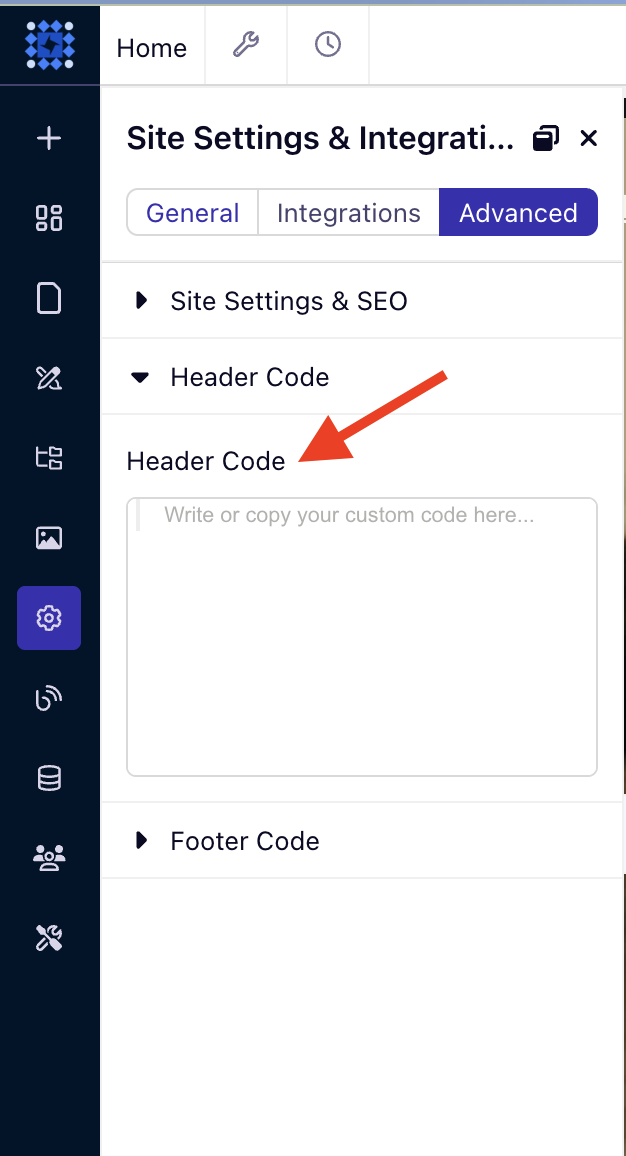
Setting up the banner is not a two-click affair, but it is straightforward. Working through CookieYes’s own setup documentation, the path runs about seven steps across four to five screens:
1. Create an account.
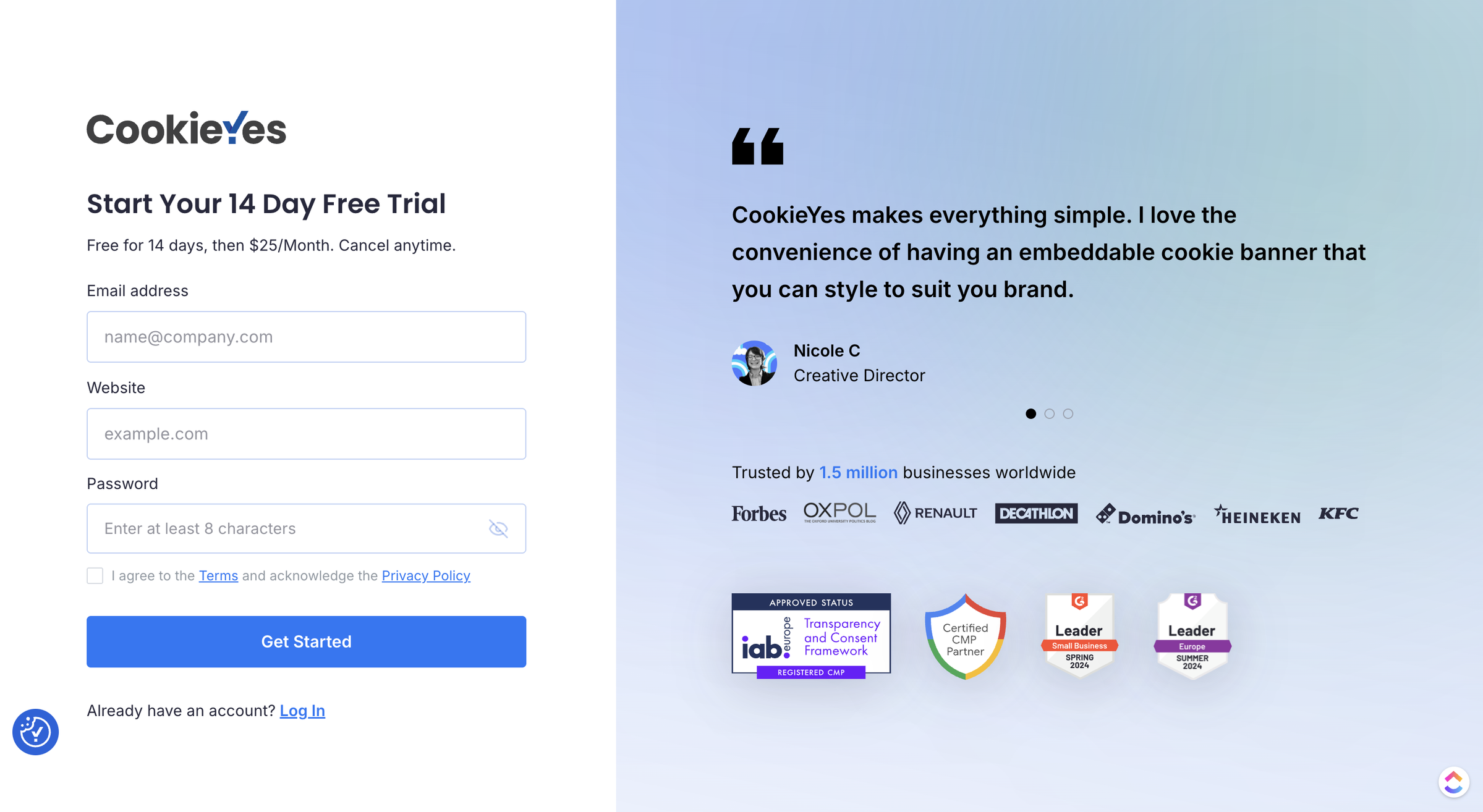
2. Pick a banner layout and language.
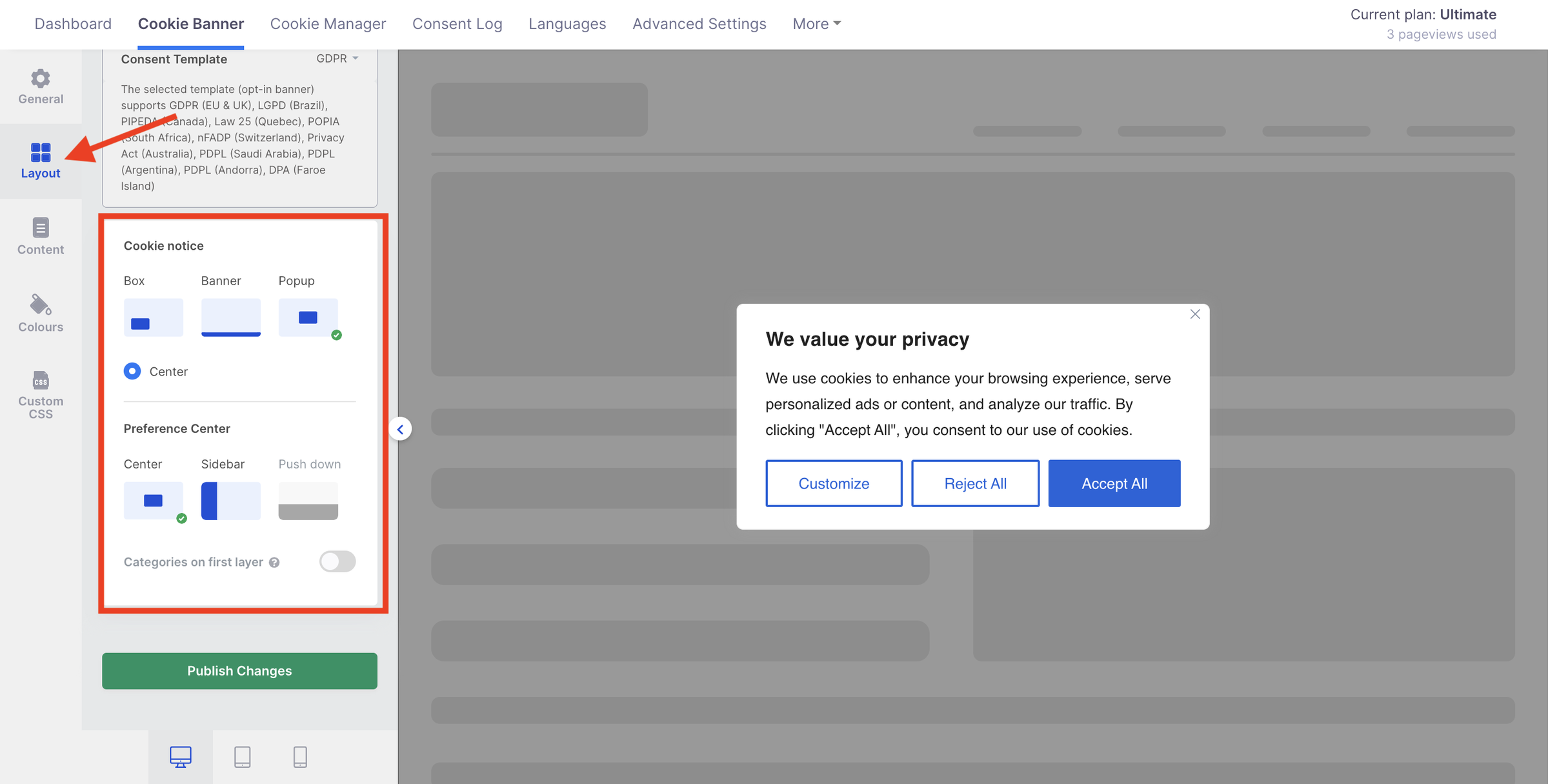
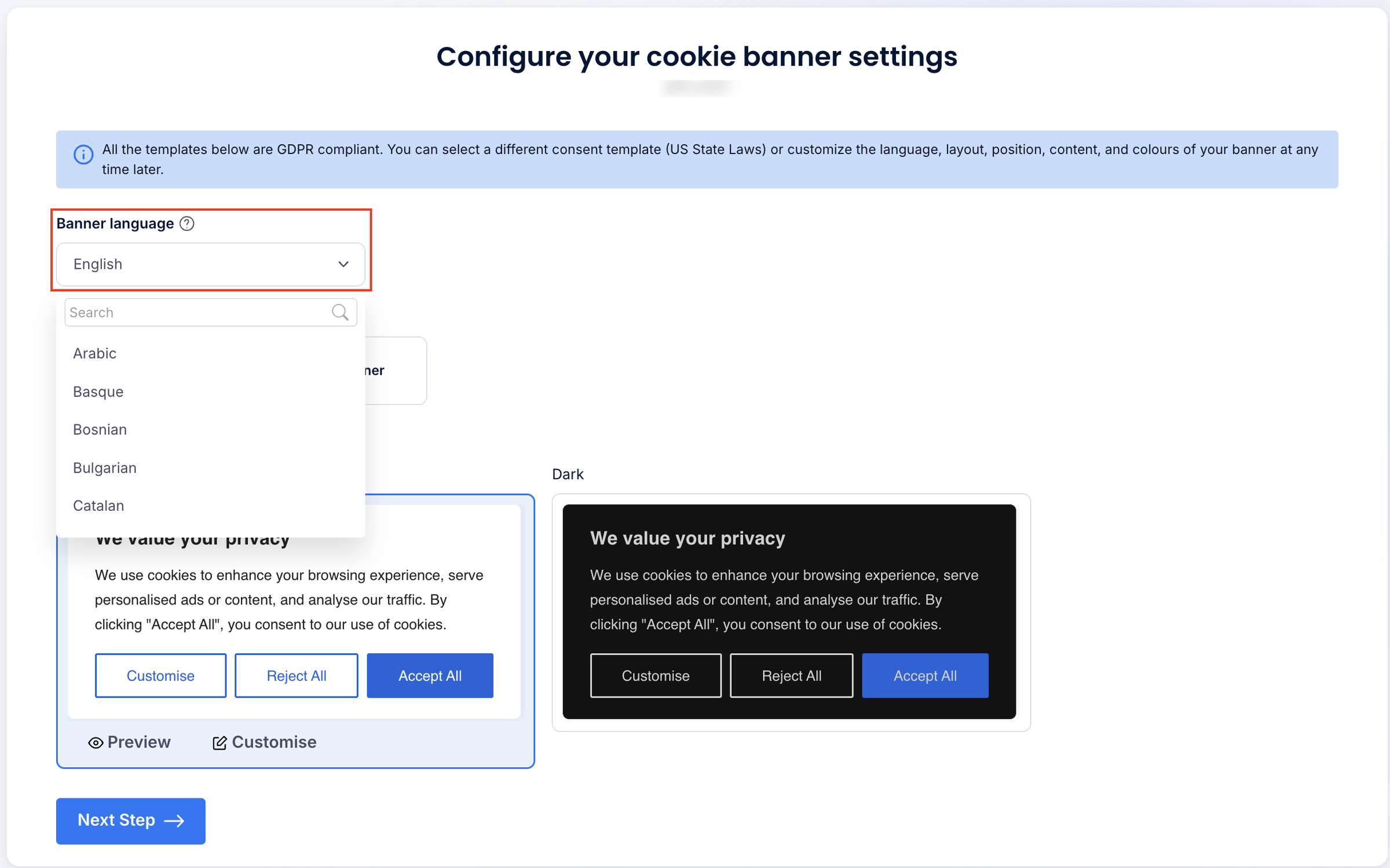
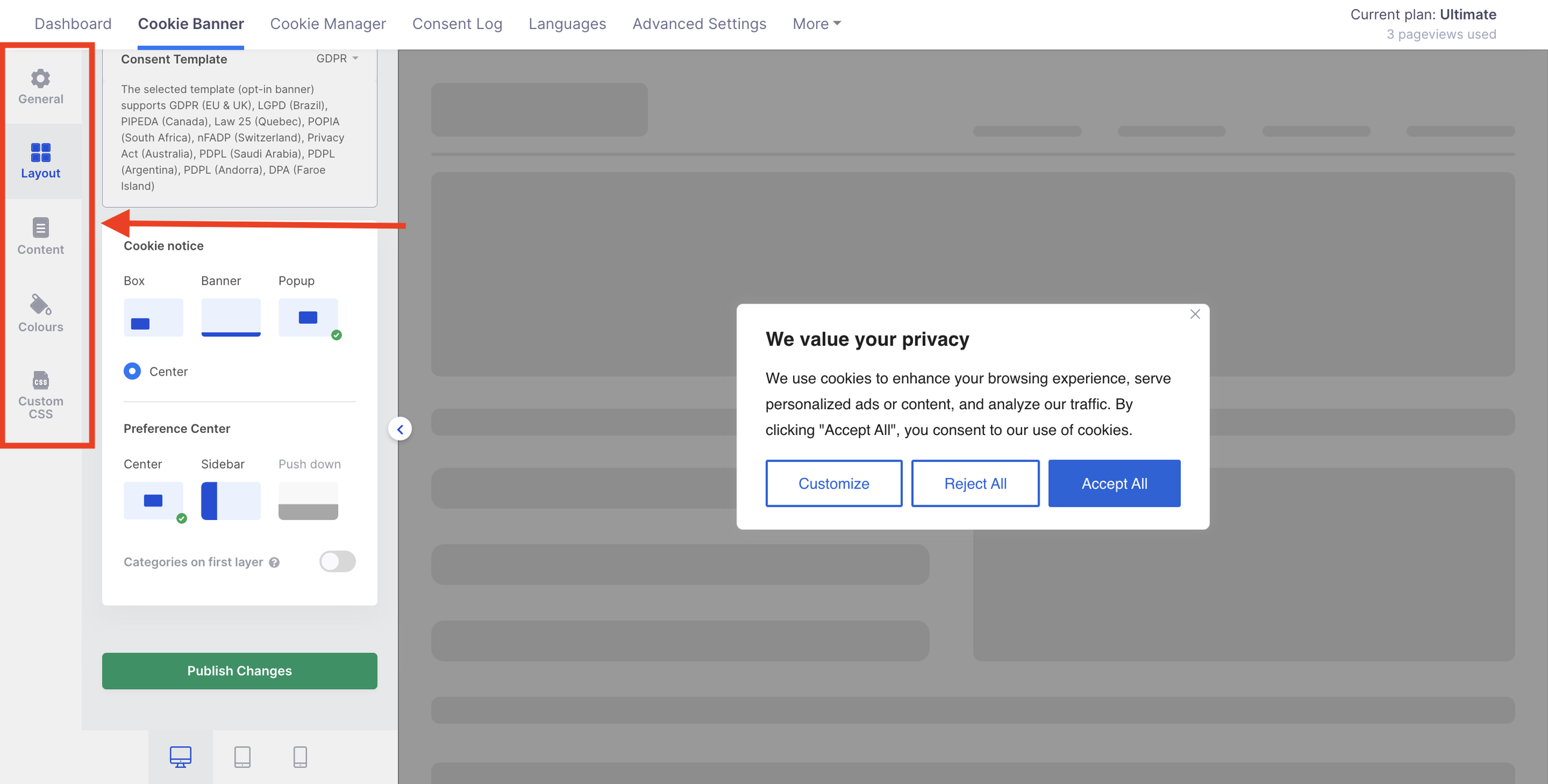
3. Optionally customize the banner across five tabs (General, Layout, Content, Colours, and Custom CSS).
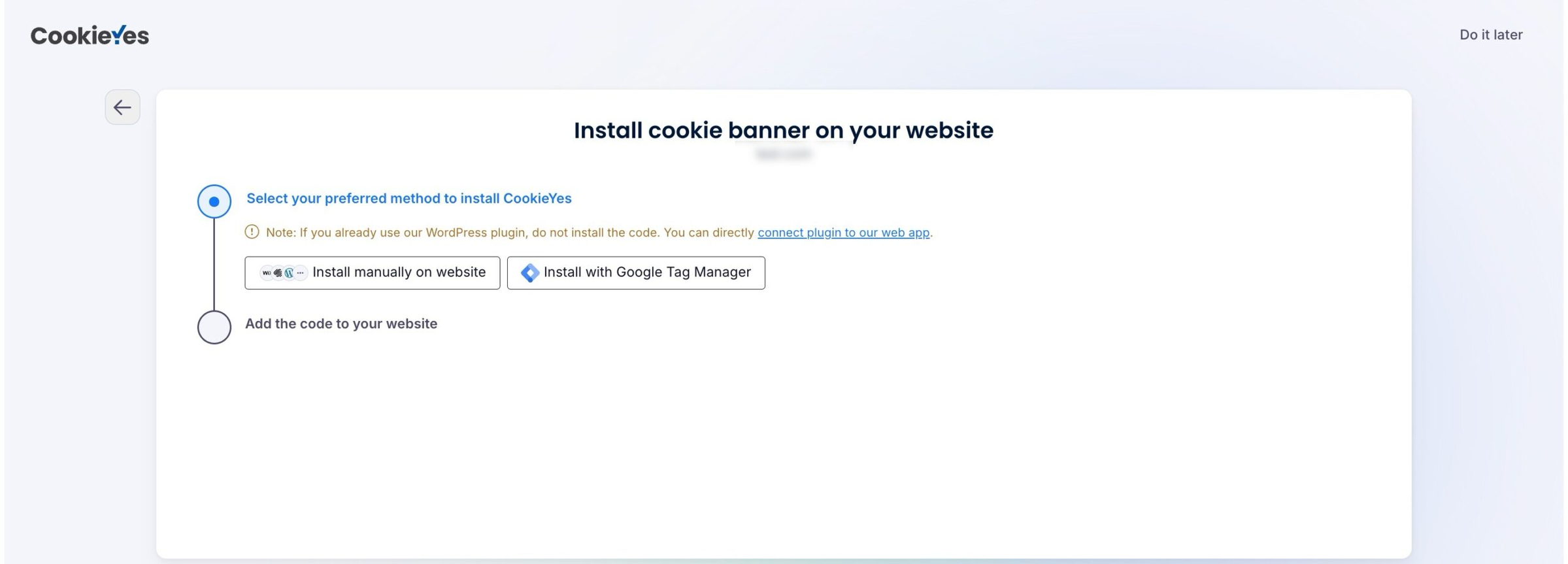
4. Choose an installation method (manual code or Google Tag Manager).
5. Copy the installation snippet.
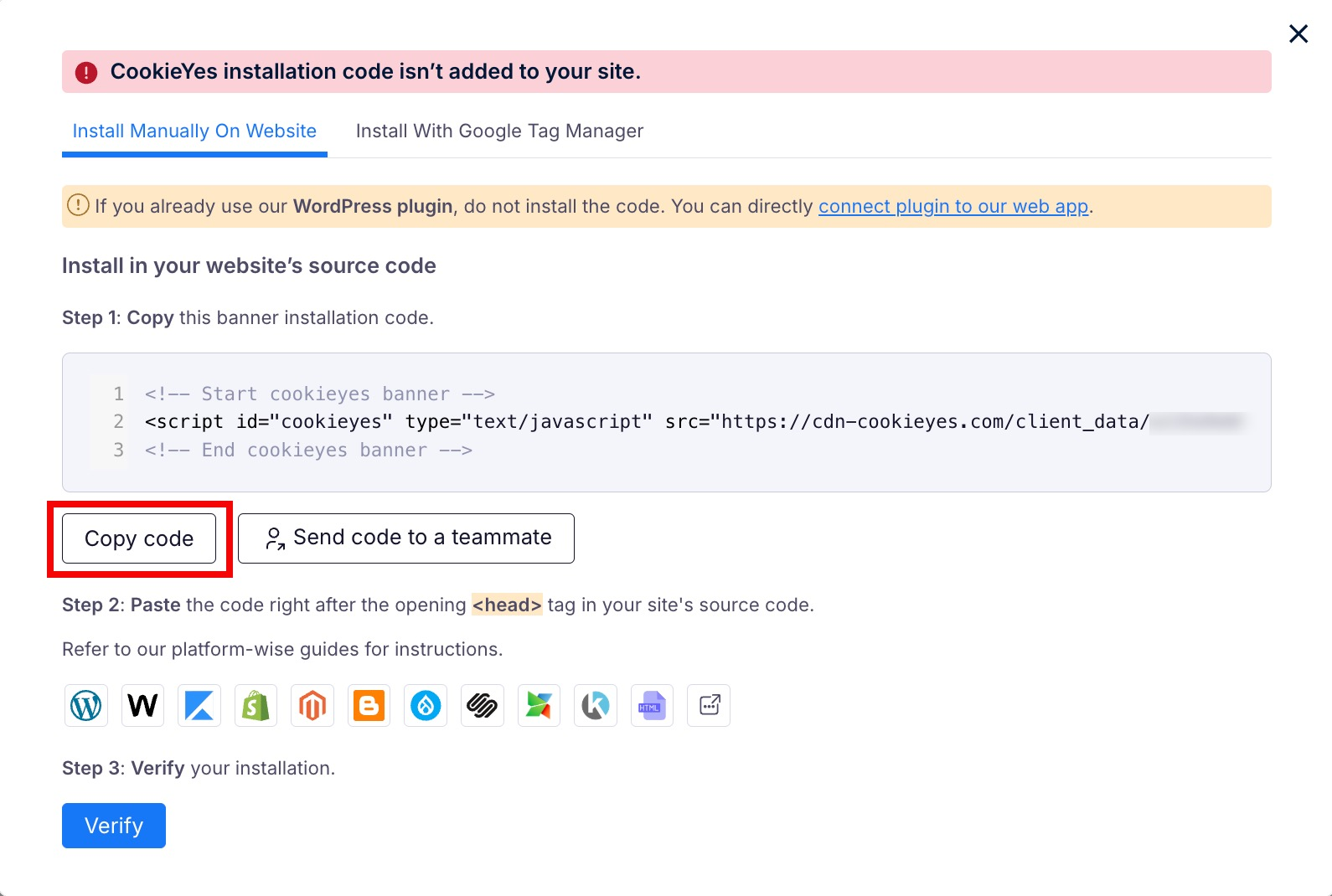
6. Paste it between your page’s <head>
7. Start a first cookie scan, which you trigger separately, verify by email, and review.
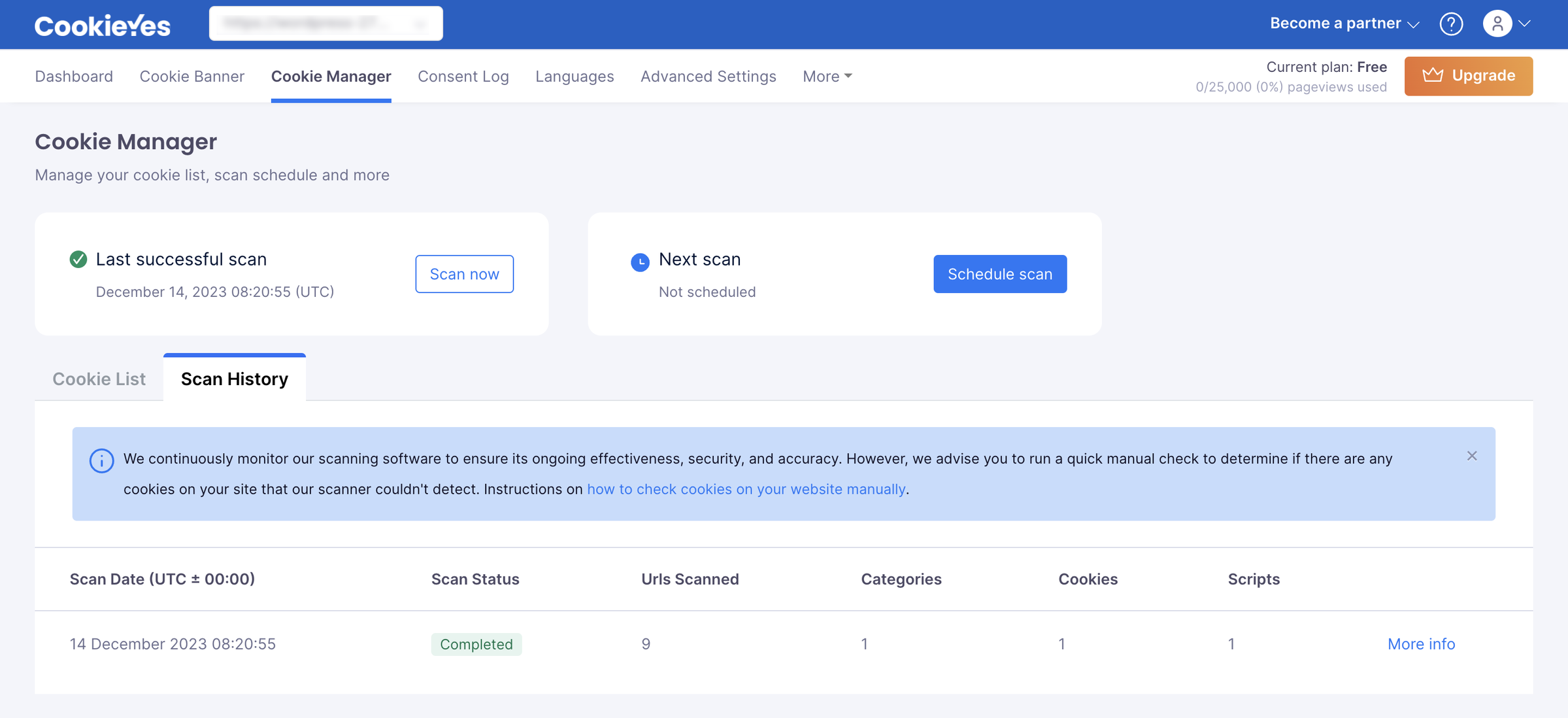
The activation event is two things, not one. It is the banner showing on your site, plus a first cookie scan you start separately. The scan does not run automatically when the banner goes live.
For a non-technical owner, that flow is manageable, and the independent evidence backs it up. BlogVault’s hands-on review describes CookieYes as “very easy to use” with a “clean, intuitive dashboard” throughout. It also calls the free plan “genuinely useful for smaller sites” in its verdict.
The friction shows up later. Deeper customization is gated to paid tiers, and TermsFeed flags setup and customization as an area where some users hit snags.
How Much Does CookieYes Cost?
CookieYes ranges from a free plan to Ultimate at $55 per month, and pricing is per domain, so each site needs its own paid plan. The Basic ($10) and Pro ($25) tiers add $0.30 per 1,000 pageviews over their caps. Pro is marked “Most Popular.”
| Plan | Monthly (per domain) | Pageviews per month | Pages per scan | Notable inclusions and gating |
|---|---|---|---|---|
| Free | $0 | 5,000 | 100 | Banner, auto-blocking, both policy generators, Consent Mode v2; no custom colours, no multilingual, no chat support |
| Basic | $10 | 100,000 (then $0.30 per 1,000) | 600 | Adds custom colours and CSS, multilingual banner, chat support |
| Pro (Most Popular) | $25 | 300,000 (then $0.30 per 1,000) | 4,000 | Adds IAB TCF v2.3, Global Privacy Control, geo-targeting, monthly scheduled scans, popup layout |
| Ultimate | $55 | Unlimited | 8,000 | Adds branding removal, scan behind login, weekly scans |
Pricing verified from CookieYes’s pricing page on 2026-06-23. Paid plans include a 14-day trial, and annual billing gives two months free.
CookieYes Free Plan
The free plan is real and useful for a small single site. It includes the banner, automatic cookie blocking, both policy generators, a consent log, and certified Google Consent Mode v2. You get 5,000 pageviews a month, 100 pages per scan, and five scans a month.
Worth noting: CookieYes’s pricing page lists 5,000 free pageviews, while its product page and some comparison pages cite 15,000. That is an inconsistency across the company’s own pages, so I used the 5,000 figure from the authoritative pricing page.
The free plan excludes custom colours, custom CSS, multilingual banners, geo-targeting, IAB TCF, Global Privacy Control, and chat support. You also get only one free plan per account. CookieYes recently moved colour customization from the free plan to paid. The change drew fresh complaints on WordPress.org.
One agency user, posting in February 2026, said the free tier “is useless now” for their clients. The same user said CookieYes had “trapped us with a good free tier” and kept making it worse each year. They were removing CookieYes from every client site over it. CookieYes’s support replied that the company “had to make some difficult decisions” about how features are structured.
Is CookieYes Pricing Worth It?
For a single site, the entry price is competitive for the category, and the free plan covers a basic brochure site at no cost. The math turns against you at scale. Because pricing is per domain, an agency or owner with five sites on Ultimate pays $55 per domain per month.
That is $3,300 a year at list before any partner discount. Add pageview overage at $0.30 per 1,000 on Basic and Pro. Add the fact that the features many businesses need (TCF, GPC, geo-targeting) sit on Pro or higher. The real cost then climbs well past the headline $10. CookieYes is priced sensibly for one site and expensively for many.
What Are the Pros of CookieYes?
CookieYes’s genuine strengths are outstanding customer support, a genuinely easy setup, and credibility at scale. The scale shows in more than 1.5 million installs, a full certification stack, and a useful free plan. These are real advantages, evidenced across review platforms and a hands-on test.
-
Support is the standout. It is the single most-praised attribute, with around 51 mentions on G2, and reviewers on Trustpilot (4.8 out of 5) consistently describe the team as fast and helpful. TermsFeed reaches the same conclusion, labelling support “High Quality.”
-
It carries distribution and trust at a scale rivals cannot match. That includes more than 1.5 million installs, a Domain Rating of 92, recognizable client logos, and a certification stack covering Google CMP Partner, IAB TCF v2.3, ISO 27001, SOC 2, WCAG, and PCI DSS.
-
The free-forever plan and free WordPress plugin are a useful entry point for a small site, which BlogVault found “genuinely useful for smaller sites.”
-
The certified Google Consent Mode v2 integration and the 100,000-plus cookie database automate categorization that would otherwise be manual, which BlogVault credits with saving “hours of manual work.”
What Are the Cons of CookieYes?
CookieYes has three main weaknesses. Cost climbs because pricing is per domain with feature-gating, scanner accuracy and site performance draw recurring complaints, and there is no terms and conditions generator. None of these makes it a poor tool. They define who it fits.
-
Per-domain pricing plus pageview overage make costs balloon for multi-site and high-traffic owners. Five domains on Ultimate is $3,300 a year at list, and “expensive” appears repeatedly in CookieYes’s G2 reviews (cited around six times), usually tied to needing a higher tier for one feature.
-
Core features are gated behind higher tiers. Custom colours, custom CSS, and multilingual banners require Basic. IAB TCF, Global Privacy Control, and geo-targeting require Pro. Branding removal waits until Ultimate. As one G2 reviewer put it, “some options for customisation are only available at the second pricing level.”
-
The free tier was recently narrowed. Colour customization moved from free to paid, which prompted fresh switching complaints on WordPress.org, including an agency that began pulling CookieYes from its client sites over the change.
-
Cookie-scanner accuracy can miss cookies, sometimes forcing manual audits. It is the top con in CookieYes’s own G2 summary (around eight mentions), and BlogVault’s hands-on test confirmed the scanner “can occasionally miss certain cookies.” This is not unique to CookieYes; any CMP’s scan should be tested on your own site before you trust it.
-
Site performance can take a hit after install. A Capterra reviewer reported their site was “very slow on mobile after installing the banner,” and BlogVault observed a “slight impact on mobile site performance and scrolling smoothness.” That sits awkwardly against CookieYes’s “lightweight” marketing.
-
There is no terms and conditions generator. CookieYes generates a privacy policy and a cookie policy only, so the third common legal document is not covered inside the tool.
One smaller note: CookieYes documents that its application data is “stored in AWS data centre” without naming a specific region. If a documented data-residency region matters to you, confirm it directly.
What Do Users Say About CookieYes?
CookieYes is strongly rated overall, with a consistent minority of complaints about cost and gating, scanner accuracy, and performance. The platforms sourced here are G2, Capterra, Trustpilot, Gartner Peer Insights, the Shopify and Wix app stores, and WordPress.org.
The headline ratings are consistent across the major platforms. G2 sits at 4.8 out of 5 (around 298 reviews) and Capterra at 4.7 out of 5 (45 reviews). Trustpilot also shows 4.8 out of 5 (330 reviews), and the WordPress.org plugin holds 4.8 out of 5 across thousands of reviews.
Per-platform app-store ratings vary more. The Shopify App Store shows 4.9 out of 5 (8 reviews), while the Wix App Market sits lower at 3.7 out of 5 (21 reviews). The clearest outlier is Gartner Peer Insights at 3.0 out of 5, though that rests on a single review. A representative spread of voices:
-
“CookieYes is a really easy tool to set-up, customise, and deploy. Customer service is…” (Capterra, positive, on ease and support)
-
“CookieYes is a really solid cookie consent solution. It does what it’s supposed to do.” (
-
“Straightforward and functional solution that covers the basics well, but it’s not great when more complexity is needed.” (Gartner Peer Insights, mixed, one reviewer)
-
“Horrible experience. Our websites were very slow on mobile after installing the banner.” (Capterra, negative, on performance)
The pattern is clear. Most users are happy, especially with support and ease, while the unhappy minority cluster on the same three issues this review documents.
Is CookieYes Worth It?
CookieYes is worth it for non-technical owners of one or a few sites who value responsive support and a fast setup. It is not worth it for budget-conscious multi-site owners, or anyone needing un-gated features or a built-in terms generator. The verdict turns on your site count and feature needs.
Choose CookieYes if:
-
You run one or a few sites and the per-domain price stays manageable
-
You value fast, responsive support, which is its most consistently praised strength
-
You want the most-installed WordPress cookie plugin with a large, proven user base
-
You need certified Google Consent Mode v2 working out of the box
Look elsewhere if:
-
You manage many domains and per-domain pricing compounds with every site, in which case it is worth weighing the best CookieYes alternatives
-
You need IAB TCF, Global Privacy Control, geo-targeting, or multilingual banners without paying up a tier
-
You want a terms and conditions generator inside the same tool
-
You were relying on the free plan’s customization that has now moved to paid
Want to see how CookieYes stacks up against the field? Our roundup of the best consent management platforms compared puts it side by side with the category.
Considering an Alternative to CookieYes?
If the cons above are your dealbreakers, specifically per-domain cost, tier-gating, and the missing terms generator, Consently is the consent platform I work on. It is built to close exactly those gaps.
When per-domain pricing balloons across your sites, Consently bundles multiple domains into one flat plan. That is five domains for $199 a year and ten for $499 a year, priced by capacity rather than per site (see Consently’s pricing).
The feature-gating gap is the second wedge. Consently includes IAB TCF, Google Consent Mode v2, weekly scanning, region-based consent, geo-targeting, and live chat on every plan. It does not reserve them for higher tiers. And where CookieYes stops at privacy and cookie policies, Consently adds a third generator for terms and conditions. That keeps all your core legal documents in one tool.
To be fair to CookieYes, it is the larger, more established product. It has a 1.5-million-strong install base, a deeper certification record, and the responsive support reviewers love. Consently does not try to win on scale, and it makes no claim to out-scan CookieYes or load faster.
For the full picture, see the Consently vs CookieYes breakdown, or start your free Consently trial with no credit card required.
FAQs
What is CookieYes?
CookieYes is a Google-certified consent management platform that adds a cookie banner, scans and auto-blocks cookies, logs consent, and generates privacy and cookie policies. It installs via a one-line snippet, a WordPress plugin, a Shopify app, or a Wix app, and runs on more than 1.5 million sites.
Is CookieYes free?
Yes, CookieYes has a free-forever plan, one per account, with 5,000 pageviews a month and 100 pages per scan. It excludes custom colours, multilingual banners, IAB TCF, Global Privacy Control, geo-targeting, and chat support, so most growing sites eventually upgrade to a paid tier.
What is the difference between Cookiebot and CookieYes?
CookieYes leads on WordPress install base, ease of setup, and customer support, and starts from a real free plan. Cookiebot markets deeper automated scanning and broader language coverage. For a single WordPress site, CookieYes is often the easier start. Read the full CookieYes vs Cookiebot comparison for a head-to-head.
Is CookieYes good for agencies and multiple websites?
It can be, through the Agency Partner Program (900-plus partners across 80+ countries), with reseller licenses at up to 50% off. Pricing is still per domain underneath, so costs compound across many sites even with partner discounts. Agencies running several domains should price it carefully against flat multi-domain alternatives that bundle sites into one plan.
Is CookieYes easy to use for beginners?
Yes. Setup runs about seven documented steps to a live banner, plus a separate first scan, and reviewers consistently describe the dashboard as clean and easy. The learning curve appears mainly when you customize the banner deeply or configure Google Consent Mode for analytics and ads.
What are the best alternatives to CookieYes?
The main alternatives are Cookiebot, Termly, iubenda, Complianz, and Consently. Each has a different strength: deeper scanning, policy breadth, WordPress-native delivery, or flat multi-domain pricing. You can also compare CookieYes vs Termly directly, or see the full roundup for the rest of the field.

