
Termly is best for one small site that wants attorney-backed legal policies and an easy cookie banner, fast and cheap.
Skip it if you run several sites or need core CMP features without paying. Paid plans run $10 to $15 a month per website. The free plan is real but narrow: one policy, quarterly scans, and a Termly watermark.
The key caveat is structural: licensing is per website, and the essentials sit behind the $15-a-month Pro+ plan.
Verdict: a genuinely easy, affordable single-site compliance tool that gets expensive and gated the moment you scale. We score it 3.8 out of 5.
Below: Termly’s features, pricing, the true free-plan limits, evidenced pros and cons, and who it fits.
Termly Review Scorecard
Termly scores 3.8 out of 5 overall. It rates highest on compliance coverage and ease of setup, and lowest on pricing and value, where per-website licensing and feature-gating drag the number down.
| Dimension | Score |
|---|---|
| Compliance and framework coverage | 4.5/5 |
| Cookie scanning and auto-blocking | 3.5/5 |
| Banner and consent experience | 3.5/5 |
| Ease of setup and integrations | 4.5/5 |
| Pricing and value | 2.5/5 |
| Performance and reliability | 3.5/5 |
| Support and reputation | 4.0/5 |
| Overall | 3.8/5 |
Verdict: the easiest, cheapest way to get one small site compliant with attorney-backed policies, and an awkward, gating-heavy fit the moment you add a second.
How we score: we rate every consent platform across seven weighted dimensions, weighting compliance and scanning most and reputation least. The evidence is the live pricing page, hands-on use, framework and certification records, and verified user reviews. See our full methodology.
Disclosure: this review is published by the Consently team. Consently runs a cookie consent management platform that competes with Termly. We scored Termly with the same methodology we apply to every consent platform we review. Our evidence is its own documentation, its current pricing page, and verified user reviews.
What Is Termly?
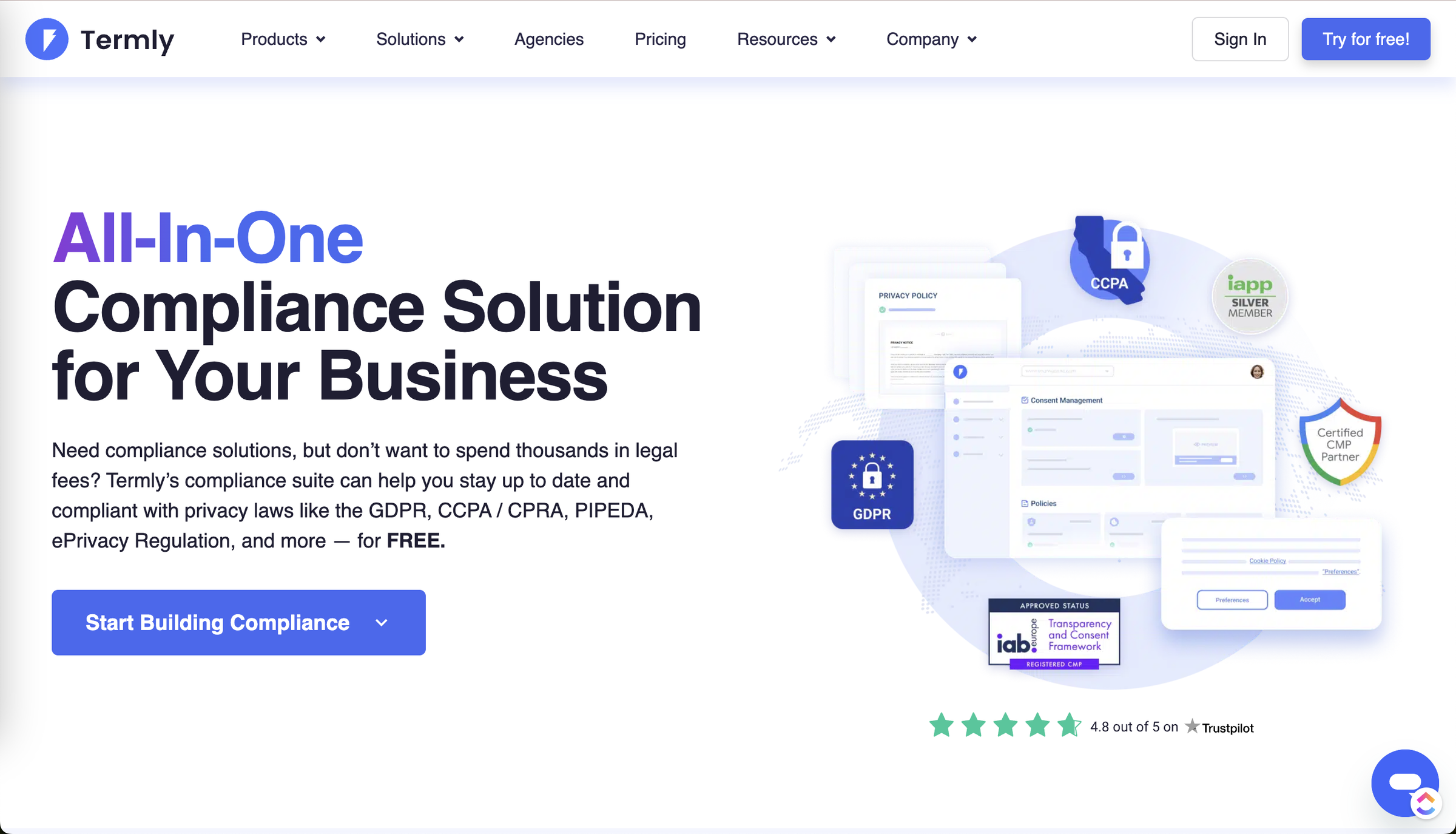
Termly is an all-in-one data-privacy-compliance platform that combines ten legal-policy generators with a cookie consent management platform. It was founded in 2017 and is used by more than 2 million businesses. It helps small businesses, freelancers, and agencies meet GDPR, CCPA/CPRA, and PIPEDA requirements without hiring a lawyer.
Two product families sit under one Termly account. The first is a library of guided document generators. They produce a privacy policy, terms and conditions, a cookie policy, and seven other legal documents. The second is a consent management platform (CMP).
It scans your site for cookies, blocks scripts before consent, shows a consent banner, and logs each visitor’s choice. Termly is a Google Certified CMP Partner (Gold). group.one acquired it in January 2024, so it carries the financial backing and track record most SMB tools lack.
The honest framing for the rest of this review: Termly does the basics genuinely well and starts cheap. Its value then depends heavily on which plan you land on and how many sites you run.
Who Termly Is For
-
Cost-conscious small businesses, bloggers, and solopreneurs launching a single site who want compliance handled without becoming privacy experts.
-
Non-technical owners who want guided, attorney-crafted documents rather than a blank legal template.
-
App developers who need app-store-ready privacy and terms documents fast.
-
Marketers and ecommerce operators on one site who need Google Consent Mode v2 to keep analytics and ad data flowing.
-
Buyers who value brand reassurance, since Termly’s Google CMP Partner status and 2-million-business track record carry real weight for risk-averse owners.
Who Termly Is NOT For
-
Agencies or anyone running several sites: Termly licenses per website, and reviewers describe friction the moment they add a second one. One mid-market marketing lead noted “confusion around adding a second domain.” Multi-site management only arrives on the custom-quote Agency tier.
-
Businesses with niche or highly specialized legal needs: A billing coordinator on Capterra warned that “businesses with highly specialized legal requirements or those in niche industries may find them limiting.” Termly’s own AI-summarized reviews concede that complex needs “may still require custom attorney drafting.”
-
Teams that need core CMP features without paying for Pro+. Consent logs, multi-language banners, custom banner styling, regional consent rules, and IAB TCF 2.3 are all locked to the $15-a-month Pro+ plan.
-
Buyers who want to own their policy outright rather than rent it through a subscription that hosts the document only while you keep paying.
What Are Termly’s Key Features?
Termly’s core features are its ten policy generators, a cookie consent banner with automatic script blocking, an automatic cookie scanner, and consent logs. DSAR tools, Google Consent Mode v2, and IAB TCF 2.3 round out ad-tech consent. The strongest pieces sit on higher tiers.
Below, each feature is evaluated on what it does, how well it does it, and where its limits sit.
Policy Generators (10 Legal Documents)
Termly generates ten legal documents from a three-step guided questionnaire. You answer questions about your business, publish, then embed the document. The ten documents are:
-
Privacy policy
-
Terms and conditions
-
Cookie policy
-
Impressum
-
EULA (end-user license agreement)
-
Acceptable-use policy
-
Disclaimer
-
Return or refund policy
-
Shipping policy
-
Accessibility statement
This is the widest free-to-start document library in the SMB tier. Termly’s in-house legal team maintains the templates and emails you when a law changes, which is a genuine differentiator worth full credit.
The limits are tier-based. The free plan covers one policy with zero edits. Starter raises that to two policies and ten edits. Only Pro+ adds unlimited policies and multi-language versions.
The documents are a strong starting point, not legal advice. A top Reddit reply put it bluntly: review the draft yourself, then hire a lawyer. Termly’s own review summary agrees that niche cases may still need an attorney.
Cookie Consent Management Platform (CMP)
Termly’s CMP shows a customizable banner, available as a banner, modal, or tooltip, with Accept, Decline, and Preferences buttons. It supports both GDPR opt-in and CCPA opt-out models and includes a preference center plus cross-domain consent. As a Google Certified CMP Partner (Gold), it carries real ad-tech credibility.
The gating is where the free experience thins out. Custom banner styles, regional consent rules, and multi-language banners are all Pro+ only. The free banner runs on default styling with a Termly watermark until you reach Pro+, where “Remove Termly logo” lives. The CMP works on every plan, but a banner that looks fully your own and follows region-specific rules is a paid upgrade.
Cookie Scanner and Auto-Blocker
The scanner crawls your site, sorts cookies into six categories, and auto-blocks non-essential scripts before a visitor consents. Scan frequency is tier-gated: quarterly on Free, monthly on Starter, and weekly on Pro+, with subdomain scanning reserved for Pro+ and above.
In practice the scanner is good but not flawless. An IT manager reviewing Termly on Capterra found that it occasionally misses cookies or miscategorizes them, requiring manual adjustments.
I would not treat the first scan as the final word: plan to spot-check and correct categories by hand. The auto-blocker is similarly strong but not magic. One reviewer reported it blocking popular site apps like chat and search, forcing a manual workaround. That is the trade-off any aggressive pre-consent blocker makes.
Consent Logs, DSAR, and Compliance Frameworks
Termly stores consent logs for audit proof, with secure storage gated to Pro+. It includes an embeddable DSAR form even on the free plan. It also auto-generates the “Do Not Sell or Share My Personal Information” link for CCPA.
Termly honors the Global Privacy Control (GPC) signal where required by US state law, once the site owner enables it in dashboard settings. GPC is off by default. Google Consent Mode v2 is basic from Starter and advanced on Pro+. IAB TCF 2.3 for programmatic advertising is Pro+ only, and EU data storage is offered on the paid plans from Starter up.
Termly’s own site lists IAB TCF 2.3, though some third-party directory listings still show the older 2.2, so trust the live product version. The practical takeaway is that Termly covers the serious compliance frameworks. The publisher-grade pieces, advanced Consent Mode, IAB TCF, and secure consent-log storage, all cluster on Pro+.
How Easy Is Termly to Use?
Getting from signup to a live cookie banner takes about five documented steps: scan, block, customize, generate the policy, and log consent. Reviewers report real setups from five minutes to two hours. Termly is genuinely easy to start. The friction shows up later, at edge cases.
Getting Started: From Signup to a Live Banner
Standing up Termly’s CMP runs through five documented steps:
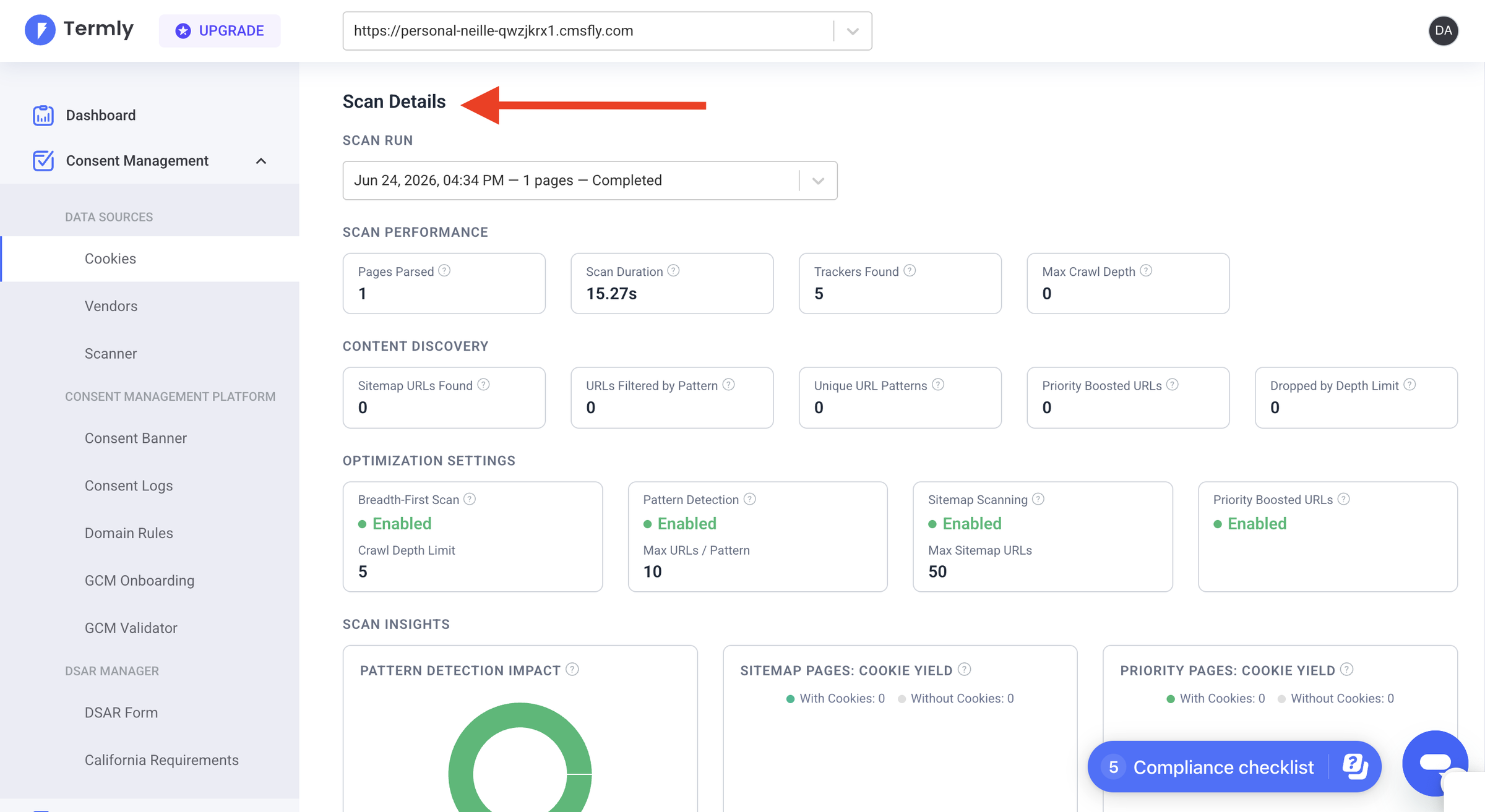
1. Enter your URL so the scanner can find and categorize your cookies.
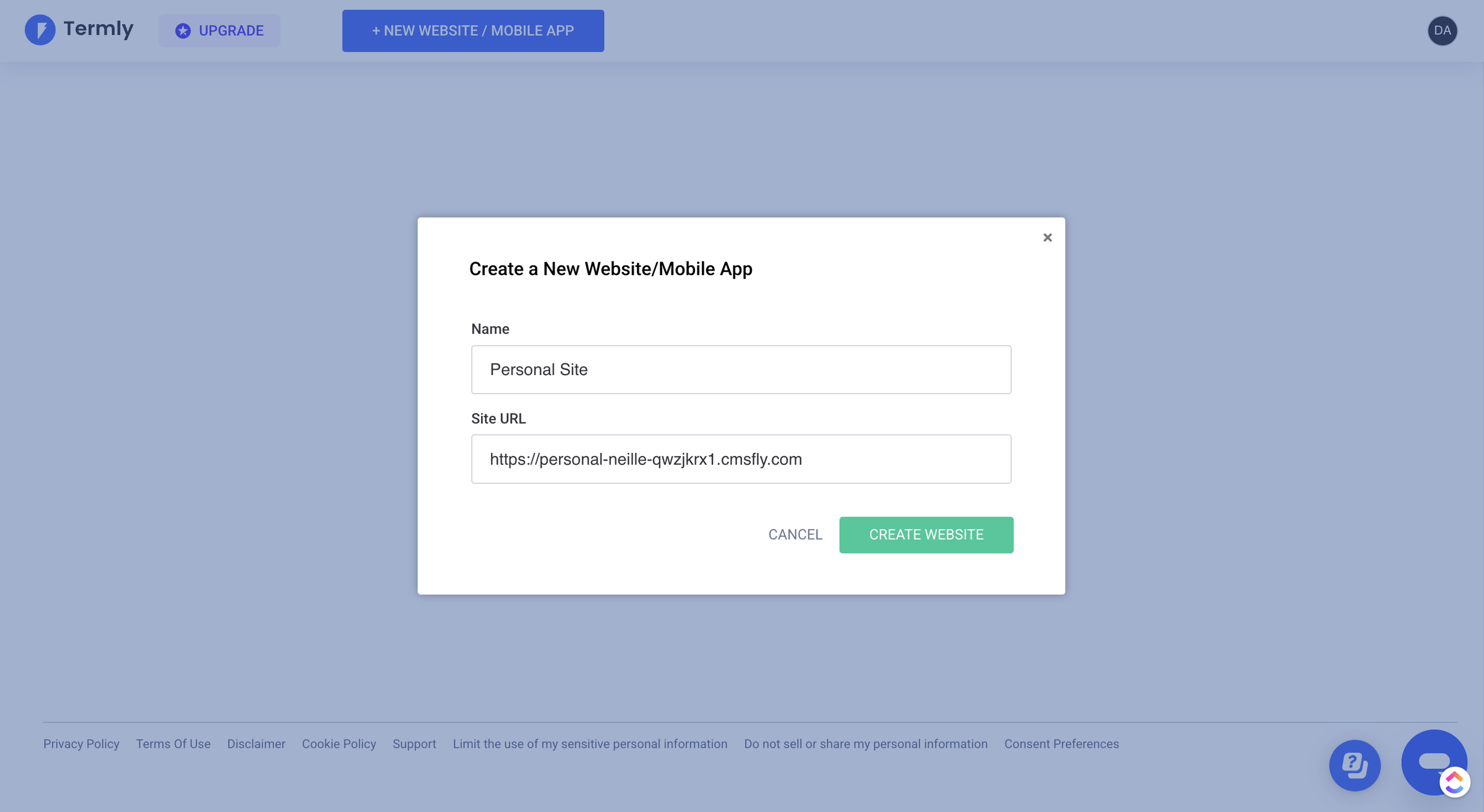
2. Let the auto-blocker hold scripts until a visitor consents.
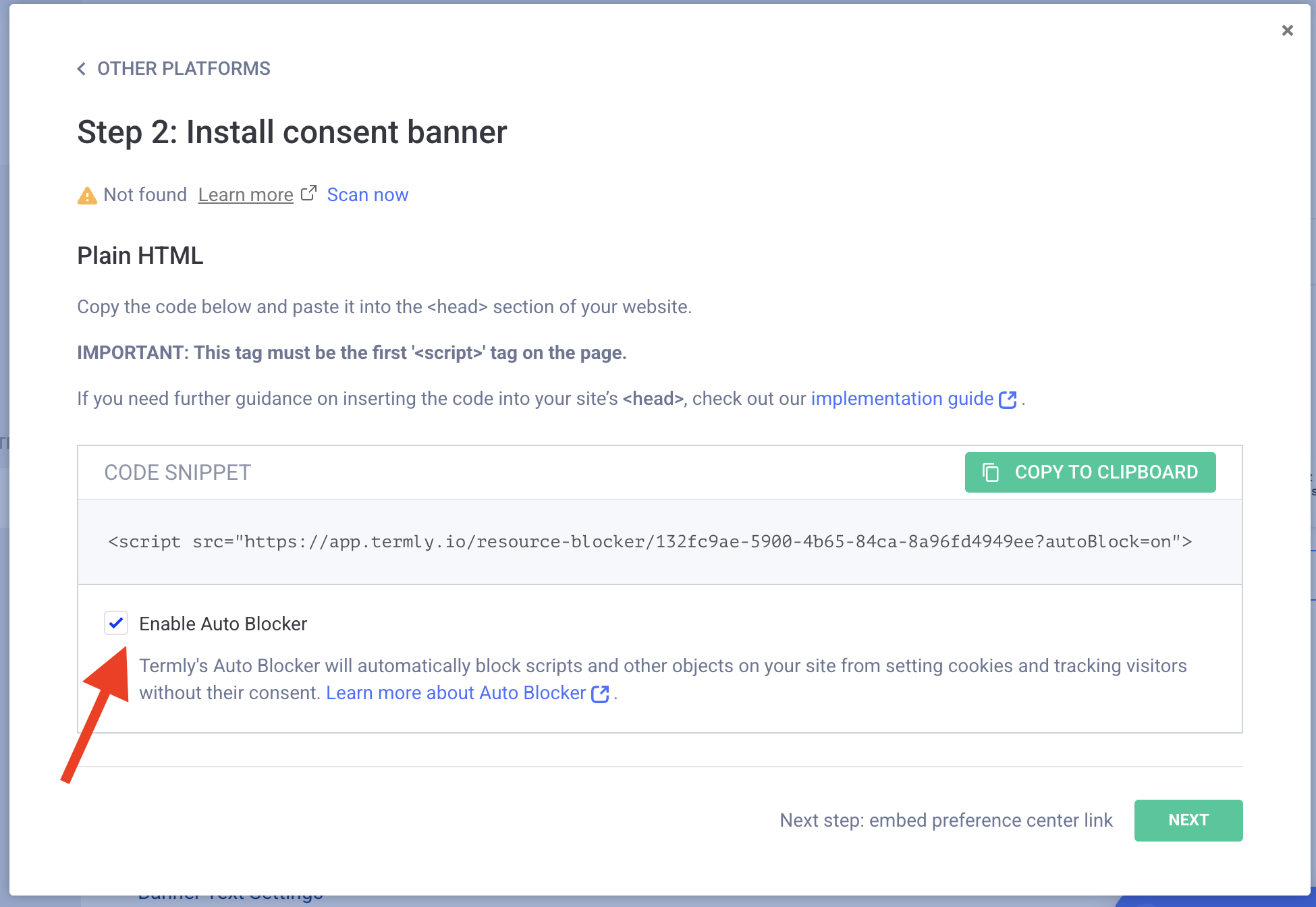
3. Customize the banner and copy an HTML snippet onto your site.
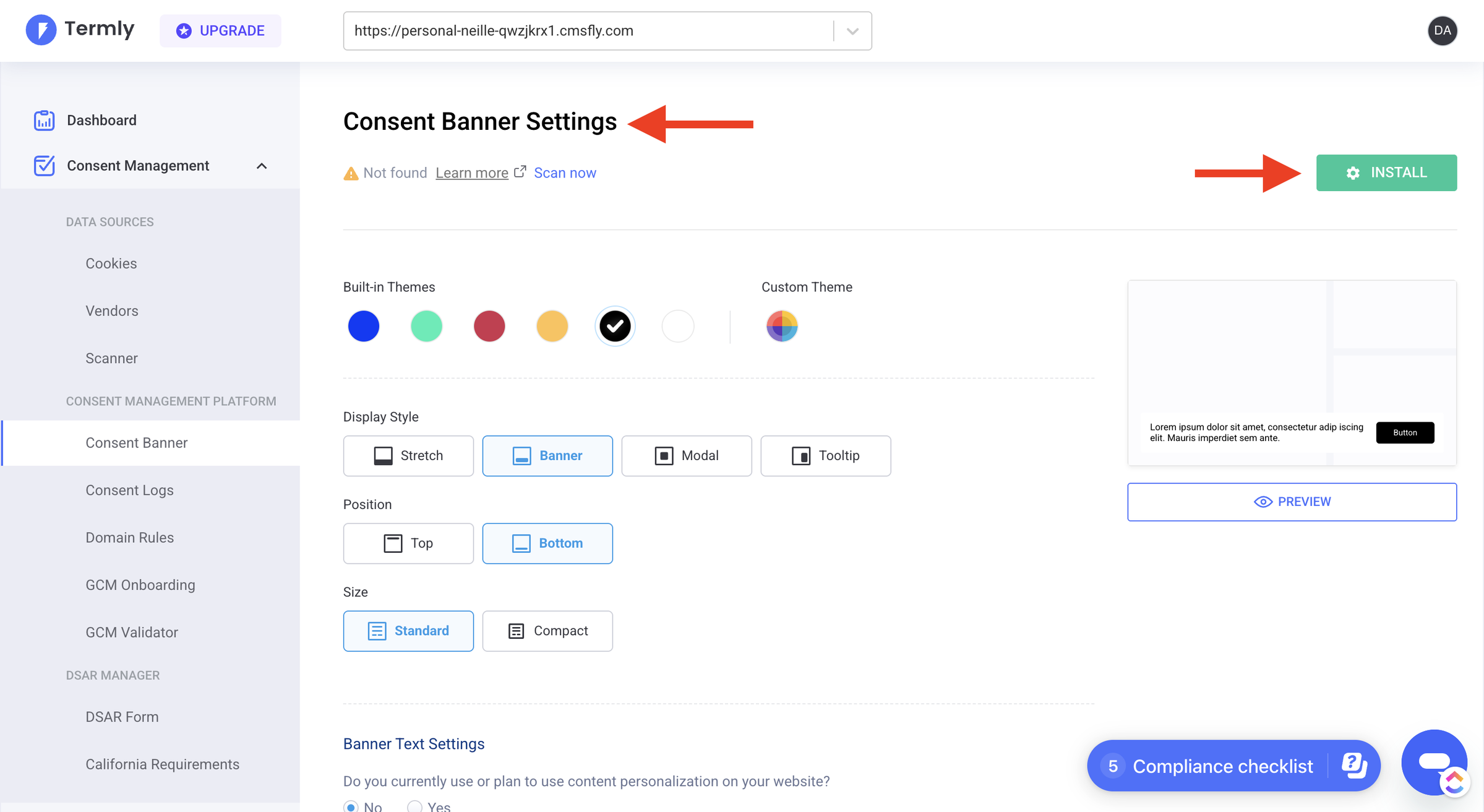
4. Generate a cookie policy that updates as the scan changes.
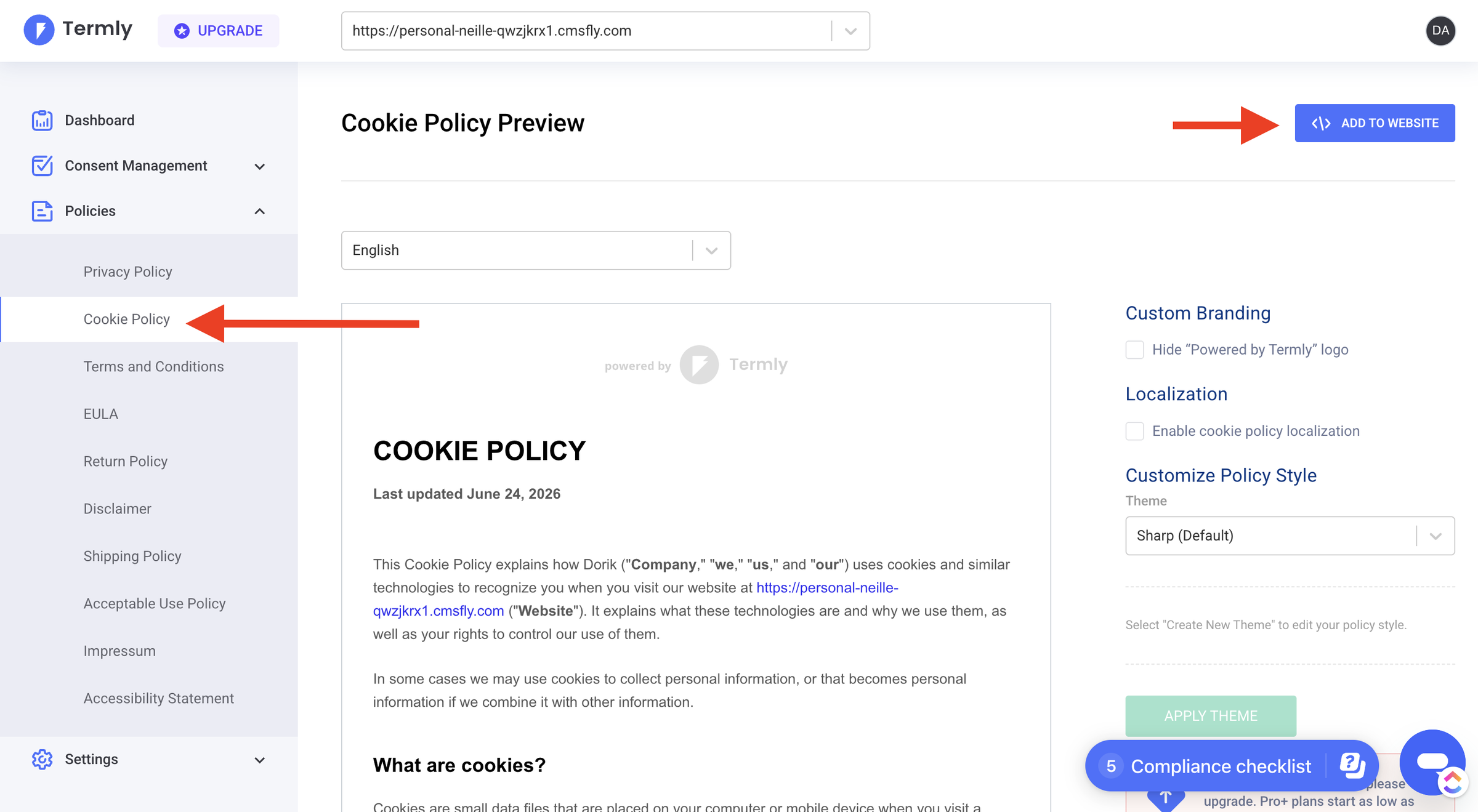
5. Watch consent records land in the dashboard.
Generating a standalone legal document is shorter still. It is a three-step questionnaire, from guided questions to publish to embed, with no credit card needed for the first free policy.
That documented flow matches what reviewers describe. One software engineer found generating the policies, embedding the codes, and running the scans “very intuitive,” and praised the documentation. Setup times skew fast.
One small-business reviewer was live in about thirty minutes, and another in roughly five. A mid-market marketer reported onboarding running about two hours. An independent hands-on review found the dashboard “clean and user-friendly,” with a compliance checklist and a guided generator that asks questions to build each document. The happy path is real: for a single straightforward site, you can be compliant quickly.
The honest friction shows up at the edges. Reviewers and community threads describe the free banner breaking after a downgrade. One diagnosis blamed something in the site’s localStorage wiping out the Termly script.
A separate Trustpilot account described content not displaying correctly after a visitor declined cookies. The scanner’s occasional misses mean some manual cleanup, and adding a second site was a recurring point of confusion.
None of this makes Termly hard to start. The smoothness you get on a simple first site can fray when you downgrade, hit a script conflict, or grow past one domain.
How Much Does Termly Cost?
Termly has a free plan plus paid tiers from $10 a month (Starter, billed annually) to $15 a month (Pro+). Each covers one website, and Agency is priced by custom quote. Pro+ adds the core compliance features, and because licensing is per website, every extra site adds cost.
| Plan | Monthly (billed annually) | Monthly (billed monthly) | Websites | Banner views/mo | Scans | Notable inclusions |
|---|---|---|---|---|---|---|
| Free | $0 | $0 | 1 | 10,000 | Quarterly | 1 policy (0 edits), GDPR only, Termly watermark, DSAR form |
| Starter | $10 | $14 | 1 | 50,000 | Monthly | 2 policies, 10 edits, EU data storage, Consent Mode v2 (basic) |
| Pro+ (Popular) | $15 | $20 | 1 | Unlimited | Weekly | Unlimited policies, remove logo, IAB TCF 2.3, consent logs, multi-language, custom banner styles, regional rules, subdomain scanning, Consent Mode v2 (advanced) |
| Agency | Custom | Custom | Starting at 10 | Unlimited | Weekly | Everything in Pro+, plus bulk/multi-domain management and reseller pricing |
Pricing is live as of June 2026 from Termly’s pricing page. Annual billing saves 25%, promotional codes run periodically, and paid plans carry a 30-day money-back guarantee. There is no separate trial because the free tier is permanent.
The value read is genuinely mixed, and reviewers feel both sides. For one single site, the entry price is fair. A G2 reviewer called the price “very reasonable.” A Capterra user said only that professional plans could be a bit cheaper.
The catch is structural. Each plan covers one website, and additional sites are billed per license, so costs climb fast for anyone running several. A five-site operator on Pro+ is buying five licenses, not one $15 plan.
Multi-domain management is a custom Agency quote rather than a published price. The essentials many businesses actually need (consent logs, multi-language, custom styling, IAB TCF) only appear on Pro+. Termly’s “affordable” promise holds best for exactly one simple site.
Is Termly Really Free?
Termly’s free plan is real but narrow. It covers one website, one legal policy with no edits, and 10,000 monthly banner views. You also get only quarterly scans, GDPR-only coverage, and a Termly watermark on your documents. It is fine for a tiny site testing the waters, not for ongoing, multi-law compliance.
This is the question Termly’s own search traffic keeps surfacing, and the honest answer is yes, with real limits. You can generate a policy and run a basic banner without entering a card, which is genuine. But the watermark and single-policy cap surprise people.
One developer thread captured the confusion: a user was unsure whether the free documents could even be used on a live site. For a hobby site the free tier is a reasonable starting point. For a business that needs more than one policy, weekly scans, or coverage beyond GDPR, “free” quickly becomes a paid plan.
What Are the Pros of Termly?
Termly’s strongest points are a fast, genuinely easy setup and the widest free-to-start library of attorney-crafted policy generators in its class. Its documents also auto-update as laws change, so you do not have to track regulations yourself.
-
Genuinely easy and fast onboarding: Reviewers report real setups in “about thirty minutes” and even “five minutes,” and an independent test found a “clean and user-friendly” dashboard with a built-in compliance checklist. For non-technical owners, this is the headline strength.
-
The broadest free-to-start policy library in the SMB tier: Ten document generators, from privacy policy and terms to impressum, EULA, and an accessibility statement, cover far more ground than most single-purpose tools. All run from one guided questionnaire.
-
Attorney-crafted, auto-updating policies: Termly’s in-house legal team maintains the templates and emails you when regulations shift. This lawyer-backed reassurance is Termly’s single most defensible advantage, and it is real.
-
A strong overall support reputation. Across
-
Real ad-tech credentials: Termly is a Google Certified CMP Partner (Gold) with Google Consent Mode v2 and IAB TCF 2.3 support, so analytics and advertising consent are handled to a recognized standard.
What Are the Cons of Termly?
Termly’s main limitations are clear. Core CMP features are locked behind the $15-a-month Pro+ plan, and it charges per website, so multiple sites get expensive fast. The free plan is also thin, with one policy, quarterly scans, and a watermark.
-
Essentials are gated to Pro+:. Consent logs, multi-language banners, custom banner styles, regional consent rules, subdomain scanning, and IAB TCF 2.3 all require Pro+ at $15 a month. The features many businesses consider baseline are not on the cheaper plans.
-
Per-website licensing punishes multiple sites:. Each plan covers one site, extra sites are billed per license, and multi-site management is a custom Agency quote. This is Termly’s most-cited weakness. Its own AI-summarized reviews note it can be “restrictive with domain licenses,” and a reviewer flagged “confusion around adding a second domain.”
-
The free tier is thin, with a watermark:. One policy, 10,000 banner views, quarterly scans, GDPR-only coverage, and a Termly watermark until you upgrade. It is a trial in everything but name.
-
Subscription lock-in on your policies:. You keep paying to keep hosted policies live. Termly’s own review summary states plainly that “discontinuing your subscription means you lose access to the hosted policy documents.” The same downgrade path is where users report the free banner breaking.
-
Rigid customization and limited integrations:. Templates can be too rigid for niche businesses, a recurring theme in reviews and Termly’s own summary. The live Google AI Overview also flags “limited options for third-party integrations” and a wish for deeper control of legal pages. The scanner “occasionally misses certain cookies or categorizes them incorrectly,” and there is no consent-rate analytics dashboard yet, which one engineer specifically wanted.
-
Support can lag on harder tickets: Support is well-rated overall but inconsistent on tougher issues. One non-profit user said she “did not receive any help” through the helpline, though Termly publicly responded asking her to email support directly.
What Do Users Say About Termly?
Termly is well-reviewed overall, holding 4.3/5 on G2 (45 reviews), 4.7/5 on Capterra (80 reviews), and 4.7/5 on Trustpilot (571 reviews). Praise centers on ease and value, while the recurring gripes are pricing, feature-gating, and support consistency on harder tickets.
Three excerpts capture the range:
-
Positive, a software engineer on G2: “Getting the embed codes, generating the policies, and doing the scans is very intuitive. The documentation is good too.”
-
Mixed, a product manager on Capterra: “The pricing structure could be more flexible… smaller businesses might find the cost a bit high… some advanced features require a bit of a learning curve.”
-
Critical, a reviewer who hit a support wall: “I had a problem with my Termly and when I tried to reach out to the customer helpline, I did not receive any help.”
For fairness, Termly responded publicly to that last review within two days, asking the reviewer to email support directly.
The pattern across platforms is consistent. Most users find Termly easy and worth the entry price. The friction concentrates where this review flags it: gating, multi-site cost, and the occasional slow support thread.
Is Termly Worth It? Our Verdict
Termly is worth it for a single small site that wants attorney-crafted policies and an easy cookie banner, fast and cheap. It is a poor fit for agencies, multi-site owners, or anyone who needs core CMP features without paying for Pro+.
Choose Termly if any of the following describe you.
-
You run one site and want the widest free-to-start policy library available.
-
You value attorney-crafted, auto-updating documents and the reassurance of a lawyer-maintained template.
-
You want a fast, guided setup with minimal technical work.
-
You are comfortable on the free or Starter tier for basic GDPR or CCPA cookie consent.
Look elsewhere if any of these apply.
-
You manage multiple sites or run an agency, where per-website licensing stacks up. The best Termly alternatives may serve you better.
-
You need consent logs, multi-language banners, custom styling, or IAB TCF without jumping to Pro+.
-
You want to own your policies outright rather than rent them through a subscription.
-
You want every compliance feature included on one affordable plan.
The overall read: Termly is the strongest choice for a single small site that wants broad, attorney-backed documents and an easy banner. Teams running several sites, or needing the core CMP features on a budget, will feel the per-license cost and the Pro+ gating quickly.
Considering an Alternative to Termly?
If Termly’s per-site cost or its Pro+ gating is your sticking point, Consently, the platform our team makes, is built to remove exactly those frictions.
It is a cookie consent management platform that includes every feature on every plan and bundles multiple domains at a flat price. The limits that frustrate Termly’s multi-site and agency users do not apply.
-
Termly locks IAB TCF, consent logs, multi-language, custom banner styles, regional rules, and weekly scans behind Pro+. Consently includes them all at its entry tier, plus Google Consent Mode v2, on-demand scanning, three policy generators, and live chat.
-
Termly bills per website. Consently bundles domains at a flat capacity price instead: Premium covers 5 domains at $199 a year, and Enterprise covers 10 at $499 a year.
-
Termly’s free banner carries a watermark and its free tier is thin. Consently offers a 14-day full-feature trial with no credit card and no forced branding.
-
Termly’s hosted policies depend on an active subscription. Consently uses predictable annual capacity pricing, and the banner keeps running as you approach your limits.
In fairness, Termly holds real advantages Consently does not match. Its attorney-crafted, auto-updating policy library is lawyer-maintained, its brand and track record are far larger, and it carries Google CMP Partner Gold status.
Consently’s generators are guided tools, not attorney-maintained documents. If a lawyer-backed policy is your priority, Termly earns that point.
To dig deeper, see how the two stack up in our Consently vs Termly breakdown. Since every feature is included on every plan, you can also see Consently’s plans and exactly what Consently includes. When you are ready, start a free 14-day Consently trial with no credit card.
FAQs
What is Termly used for?
Termly is used to make a website or app privacy-compliant without a lawyer. It generates legal policies (a privacy policy, terms, a cookie policy, and seven more). It also runs a consent management platform that scans cookies, blocks scripts before consent, shows a banner, and logs each choice. It supports GDPR, CCPA, and PIPEDA.
How much does Termly cost?
Termly is free for one basic policy and a watermarked banner. Paid plans are $10 a month (Starter) and $15 a month (Pro+), both billed annually and each covering one website. Pro+ unlocks the core compliance features. Agency pricing for multiple sites is a custom quote.
Do you have to pay for Termly?
Not to start. You can generate one legal policy and run a basic banner free, with no credit card. You pay once you need extras like weekly scans, custom banner styling, multi-language support, consent logs, or IAB TCF. Those all sit on the $15-a-month Pro+ plan.
Is Termly good for agencies managing multiple websites?
Termly works for agencies but charges per website, and multi-site management is a custom Agency quote. Reviewers also report friction adding a second domain. Agencies running several sites often find a flat multi-domain plan cheaper and simpler to manage than stacking per-site licenses.
Is Termly better than iubenda or TermsFeed?
It depends on your need. Iubenda is broader for web professionals tailoring policies to a specific tech stack. TermsFeed lets you buy documents once and keep them. Termly leads on free policy breadth and ease of setup. None is universally better, so match the tool to whether you prioritize document depth, one-time ownership, or fast all-in-one setup.
Is Termly free?
Yes, with real limits. The free plan covers one site, one legal policy, 10,000 banner views, quarterly cookie scans, GDPR-only coverage, and a Termly watermark on your documents. It is fine for a tiny site, and paid tiers from $10 a month add the rest.
Is Termly easy to use for beginners?
Yes. Termly uses guided questionnaires, a clean dashboard, and a built-in compliance checklist, so non-technical owners can publish a policy and a banner without code. Reviewers report real setups in roughly five minutes to two hours for a single straightforward site.
Does Termly keep your policies if you cancel?
No. Hosted policies depend on an active subscription. Canceling or downgrading can mean losing access to the hosted documents and their automatic updates. This subscription dependency is a common complaint, compared with one-time-purchase tools that let you download and keep a policy.
Is Termly legit and safe to use?
Yes. Termly was founded in 2017, serves more than 2 million businesses, and was acquired by the group.one software family in 2024. It is a Google Certified CMP Partner (Gold), an IAPP Silver Member, and BBB-accredited, and it offers EU data storage on paid plans. Its policies are a compliance aid, not a substitute for legal advice.
What are the best alternatives to Termly?
The most-named alternatives span budget CMPs and broader compliance suites, including CookieYes, iubenda, Cookiebot, Osano, and TermsFeed, each with a different strength. For the full breakdown of how they compare on price, features, and fit, see our guide to the best consent management platforms compared.

