
Cookiebot, by Usercentrics, is best for a single site that needs certified, set-and-forget cookie compliance and steady Google Ads measurement. Skip it if you run several domains or many subdomains on a budget. Pricing starts free for up to 50 subpages, then runs $8 to $96 per month per domain.
The key caveat is the billing: per-domain plans, per-subdomain charges, and a scan that can auto-upgrade your tier.
Verdict: a dependable, well-certified CMP for one site, and an expensive fit the moment you scale.
Cookiebot Review Scorecard
| Dimension | Score |
|---|---|
| Compliance and framework coverage | 5.0/5 |
| Cookie scanning and auto-blocking | 4.5/5 |
| Banner and consent experience | 4.0/5 |
| Ease of setup and integrations | 3.5/5 |
| Pricing and value | 2.5/5 |
| Performance and reliability | 3.5/5 |
| Support and reputation | 3.5/5 |
| Overall | 4.0/5 |
Verdict: the certified, set-and-forget standard for a single site, and an expensive fit the moment you add domains.
How we score: we rate every consent platform across seven weighted dimensions. The evidence is the live pricing page, the compliance and certification records, and verified user reviews.
See our full methodology for the rubric behind each score.
Full disclosure: this review is published by Consently, which competes with Cookiebot in the consent-management category. We score Cookiebot by the same seven-dimension method we apply to every CMP we review. Every figure and limitation below traces to Cookiebot’s own documentation, its current pricing page, or verified user reviews.
What Is Cookiebot?
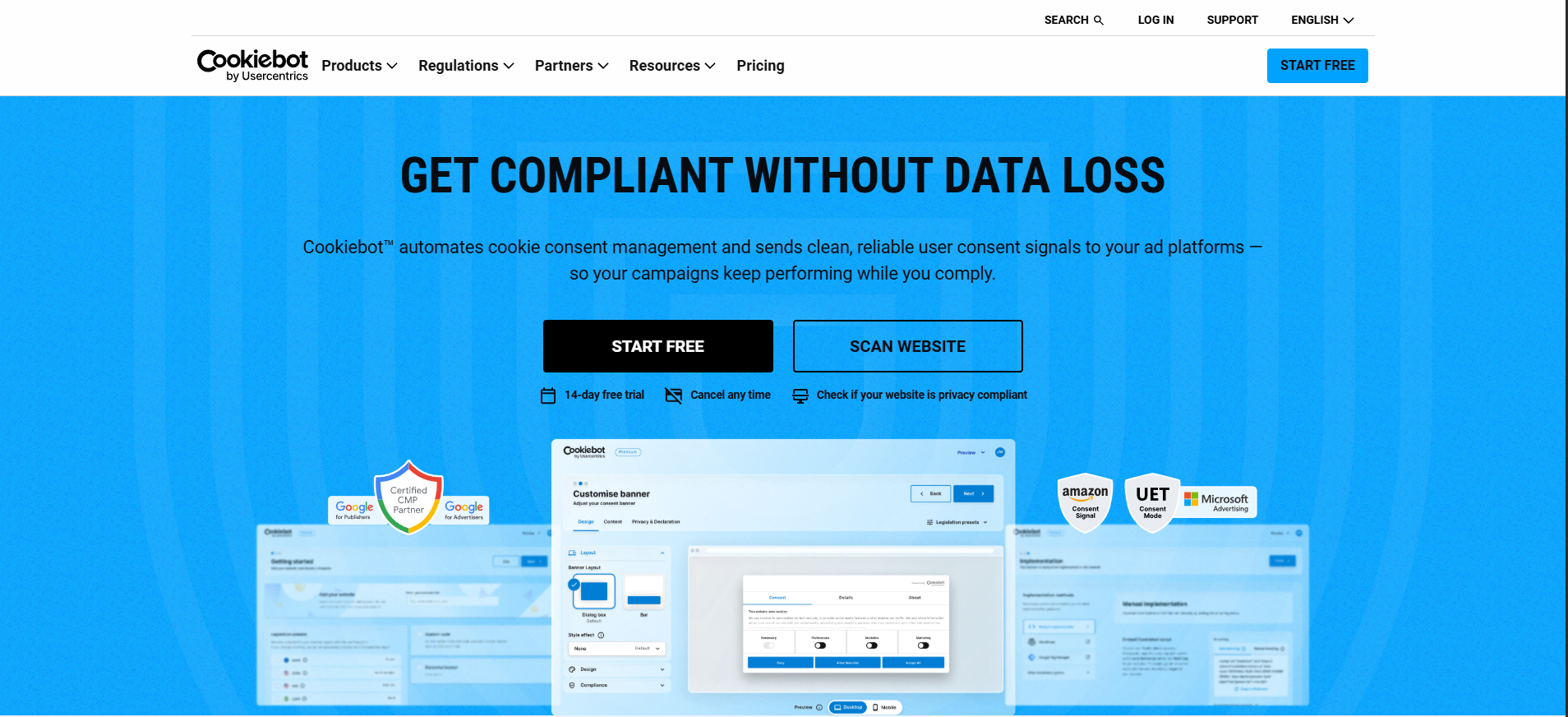
Cookiebot is a Google-certified consent management platform (CMP) from Usercentrics. It automatically scans a site for cookies, blocks non-essential trackers before consent, shows a customizable banner, logs consent, and signals consent to Google and ad-tech. It targets site owners, agencies, and marketing teams that need defensible cookie compliance.
Cookiebot earns its credibility from age and scale. Usercentrics has run the product since 2012. The homepage reports more than 600,000 customers, 2.4 million websites and apps, and Google Gold Tier CMP certification, backed by ISO 27001 and 27701.
Reviewers describe the payoff plainly. One G2 user wrote that after deploying it, they “no longer have to worry about compliance”. That trust at scale is the backdrop for every decision below.
Cookiebot is one of several established names you will weigh when choosing the best consent management platform for your stack.
Who Cookiebot Is For
Cookiebot fits buyers who value certified, automated compliance and can absorb per-domain pricing. The strongest-fit profiles are:
-
SMBs and marketing teams that need fast, Google-Ads-ready compliance on a single site and want scanning handled for them.
-
Single-site or few-site owners on WordPress, Wix, or Shopify who install through a plugin, app, or Google Tag Manager.
-
Agencies and freelancers that want one dependable, certified CMP to deploy per client and prize reliability over cost optimization.
-
Publishers and ad-tech-dependent sites that need IAB TCF and Google Consent Mode at scale, routed to the enterprise Usercentrics Advanced tier.
Who Cookiebot Is Not For
Cookiebot is a poor fit when budget, predictability, or simplicity matter more than pedigree. Look elsewhere if you are:
-
Running several domains or many subdomains on a budget: Billing is per domain, and Cookiebot counts each subdomain as a separate domain, so costs stack fast.
-
A buyer who needs predictable, fixed bills: The plan upgrades itself to the next tier when a scan finds more subpages than your plan allows.
-
A team that also needs a terms-and-conditions document: Cookiebot has no terms-and-conditions generator, so that task moves to a separate tool.
-
A beginner who wants one simple dashboard: New accounts span two separate interfaces, which adds friction before your banner is even live.
What Are Cookiebot’s Key Features?
Cookiebot’s core is four capabilities working together. It runs automated scanning over a 13,000-plus cookie repository and auto-blocks trackers before consent. It also shows a customizable geotargeted banner and signals Google Consent Mode v2 to keep ads measurable. Scanning is the standout, and ad-tech signaling is why most buyers choose it.
The five feature sections below evaluate each capability on what it does, how well, and where its limits sit.
Automatic Cookie Scanning and the Cookie Declaration
Automatic scanning is Cookiebot’s strongest feature, and it deserves full credit. The scanner is backed by a frequently updated repository that Cookiebot describes as holding 13,000-plus cookie entries. Cookiebot also claims it detects “63% more data processing services” than competing tools, a vendor claim rather than an independent benchmark.
It covers HTTP and JavaScript cookies, HTML5 local storage, pixel tags, and web beacons, and it can scan pages behind a login. From each scan, it auto-generates an embeddable cookie declaration, a current list of the cookies in use.
A TrustRadius reviewer called that declaration “awesome. Saves so much time.” Scans run monthly and on demand. One practical catch applies: a scan “can take up to 24 hours” to complete. That same scan sets your plan size, so neither the cookie declaration nor your final tier settles instantly.
Auto-Blocking Before Consent
Auto-blocking is the compliance engine. Cookiebot blocks non-essential cookies and trackers automatically so that, in its own words, consent is given “before any tracking takes place”. The moment a visitor lands, scripts that would set advertising or analytics cookies are held until the visitor accepts.
So does Cookiebot block cookies automatically? It does, by default. Manual categorization is available when you want to override how a specific cookie is classified.
The Consent Banner, Geotargeting, and Languages
The banner is customizable and globally aware. On Premium, you control content, colors, branding, and custom HTML, CSS, and JavaScript. The banner geotargets automatically, showing an opt-in model for the EU and UK and an opt-out model for US states.
Language coverage is a genuine strength: 47-plus banner languages, rising to 60-plus on the enterprise tier. That is broader than most budget CMPs offer. One honest caveat surfaces for beginners. Most users keep the default layout.
As one G2 reviewer put it, they “end up having the same design except for the brand color”. The banner looks polished, but it rarely turns distinctive without deliberate styling.
Google Consent Mode v2, IAB TCF, and Ad-Tech Signaling
This is the “keep your ads running” engine, and it is a top reason buyers pick Cookiebot. Cookiebot is a Google Gold Tier certified CMP with deep Google Consent Mode v2 integration across GA4, Google Ads, and Google Tag Manager. It also signals consent to Microsoft UET and Amazon, and it supports IAB TCF v2.3 for publishers running programmatic advertising.
For an ad-tech-dependent site, this pedigree is hard to match, and it is the clearest area where Cookiebot’s certification weight pays off.
Consent Logs, Analytics, and Global Privacy Control
Cookiebot keeps audit-ready records and respects browser-level opt-outs. Premium plans store consent logs, surface a consent analytics dashboard, and allow CSV export for audits. Cookiebot also honors the Global Privacy Control (GPC) signal automatically. When a visitor arrives with GPC enabled, the banner is suppressed, and the visitor sees confirmation that their preference was respected, with no extra configuration.
That matters for California’s CCPA requirements, effective January 1, 2026. Automatic GPC honoring is a real capability, and one worth weighing if browser opt-out signals are part of your compliance picture.
How Easy Is Cookiebot to Use?
Cookiebot’s own guide documents reaching a live banner in five steps across two separate interfaces. A scan that sizes your plan and finalizes the cookie declaration then takes up to 24 hours. It is capable, but not the effortless plug-and-play the marketing suggests.
The three sections below walk through the documented setup, compare it against another platform, and give an honest read on who will struggle.
Getting Started: From Signup to a Live Banner
I followed Cookiebot’s own getting-started guide and counted five steps from signup to a working banner.
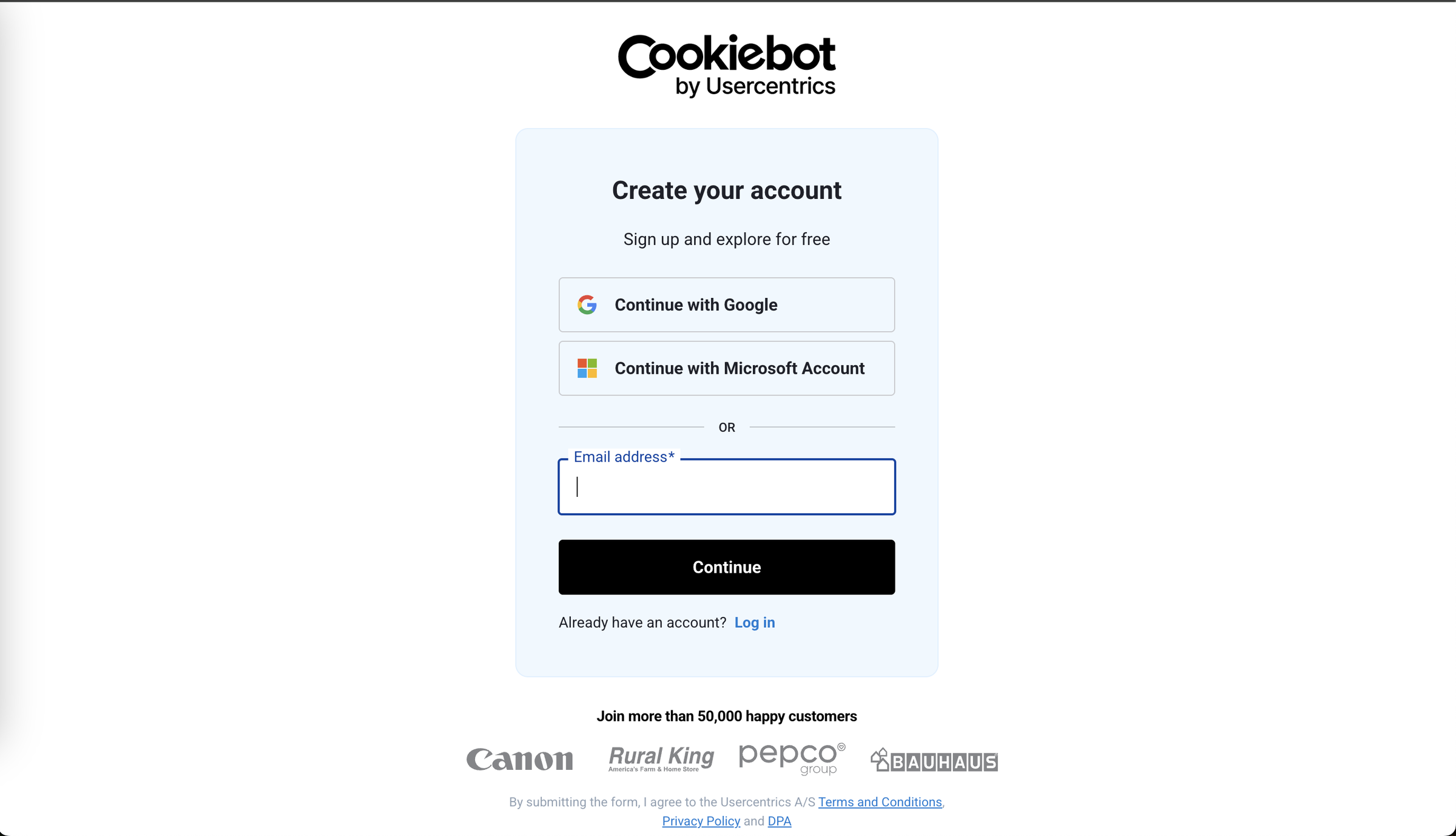
1. Create an account at admin.cookiebot.com using email and password, Google, or Microsoft sign-in, then verify the email and confirm a registration key.
2. Add your domain, noting that any subdomain needs its own separate subscription.
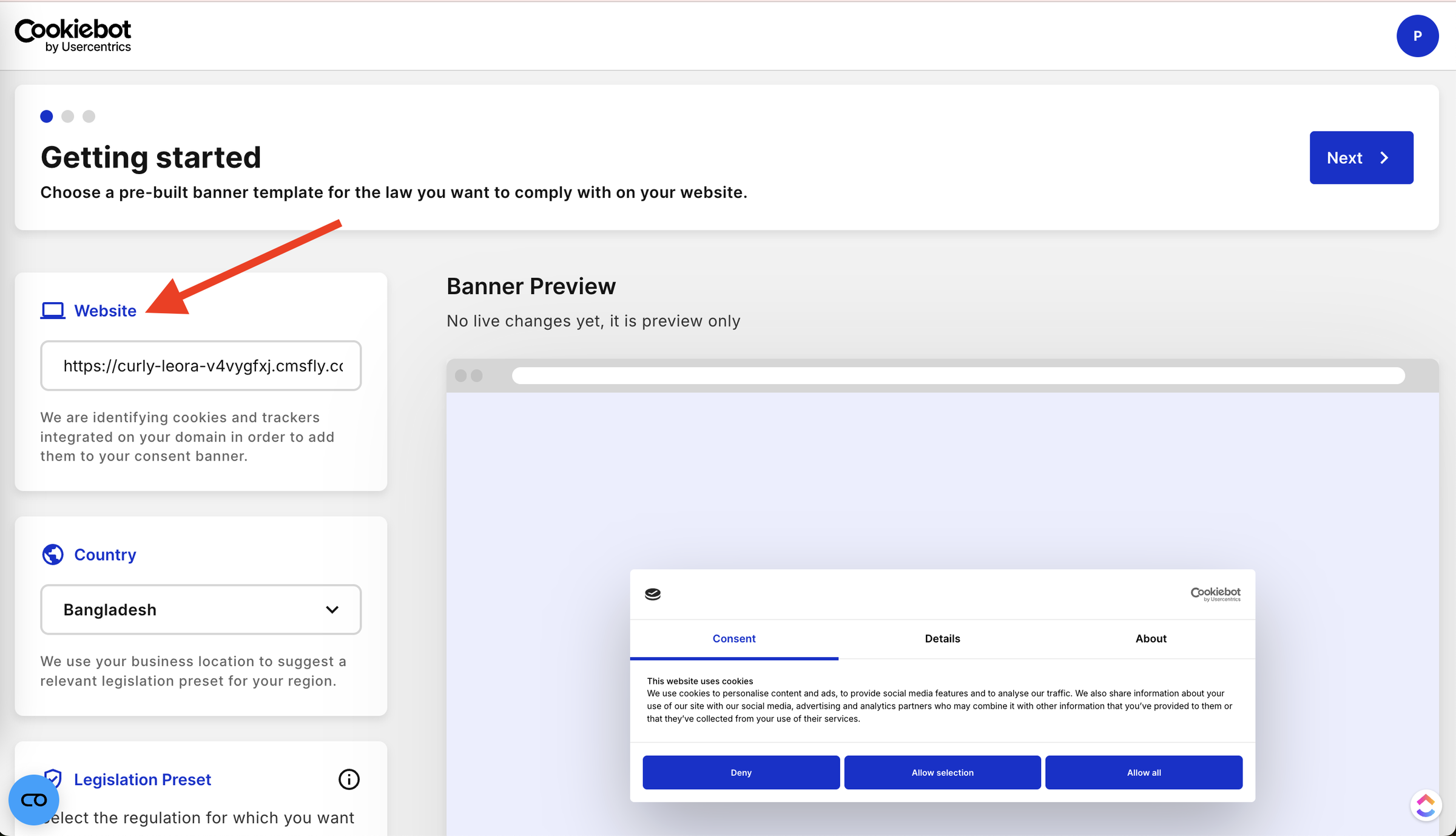
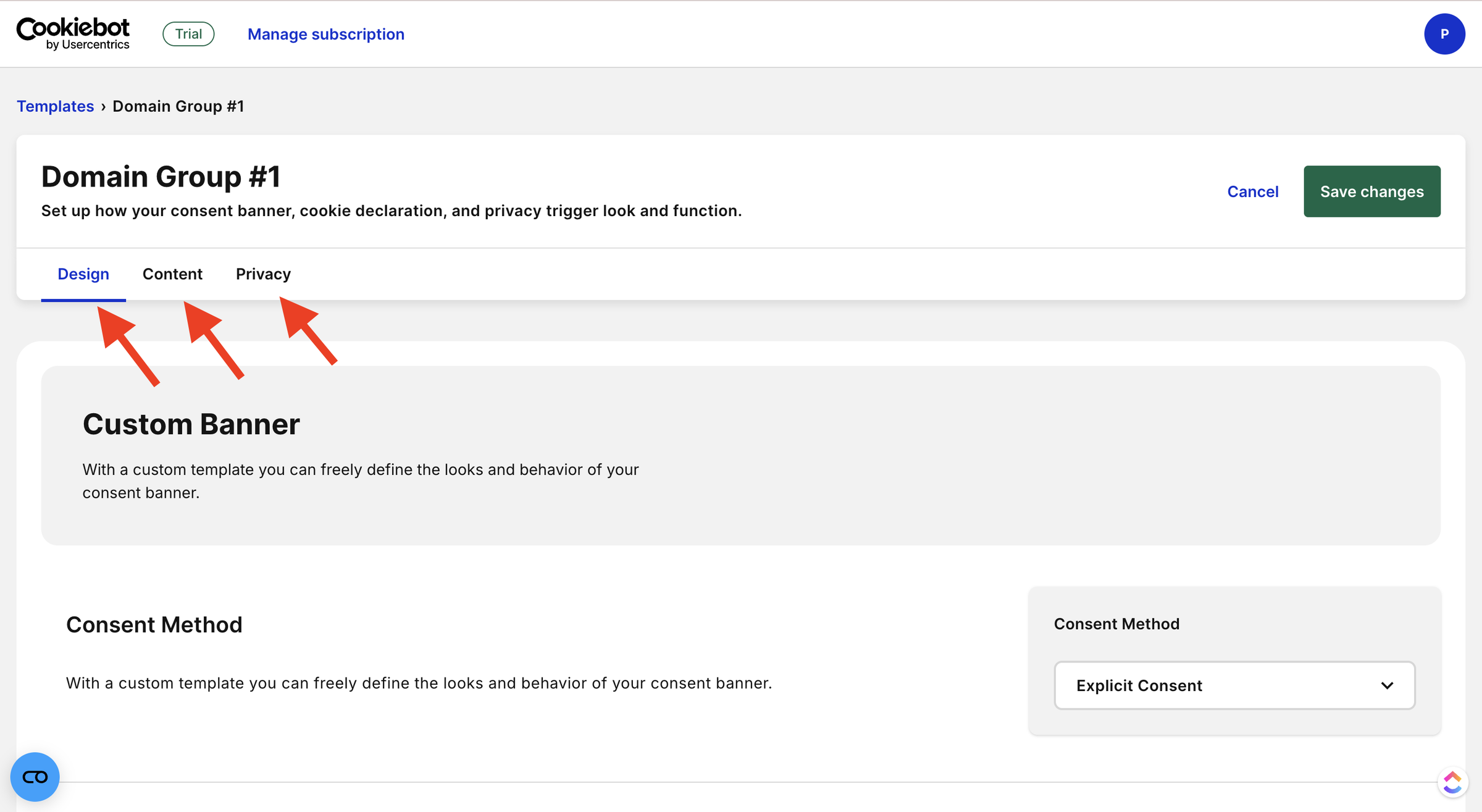
3. Configure the banner using the three main tabs: Design, Content, and Privacy. Here you can customize the banner's appearance, consent model, text and languages, privacy trigger, cookie declaration, and consent expiration.
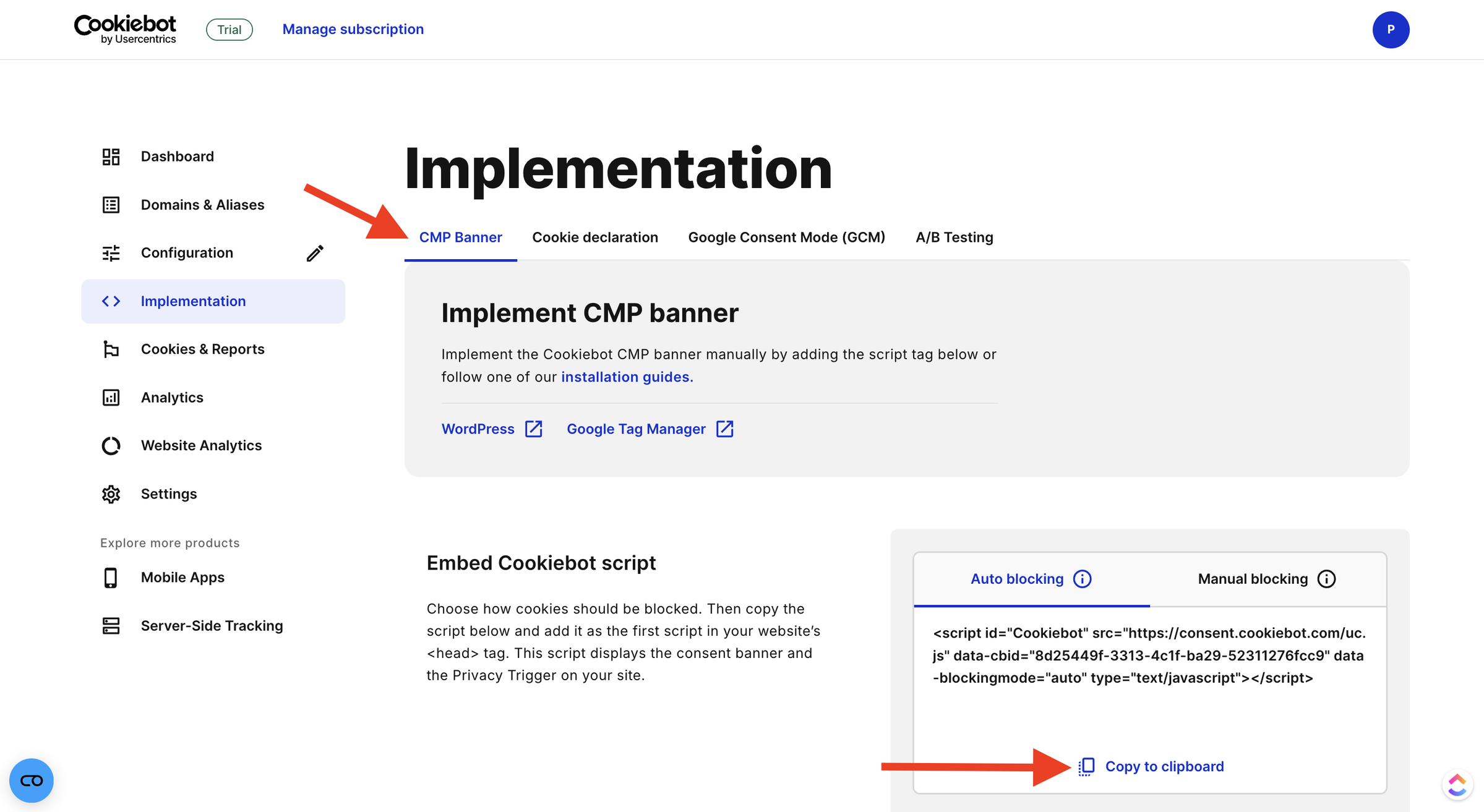
4. Add the script to your site’s <head>
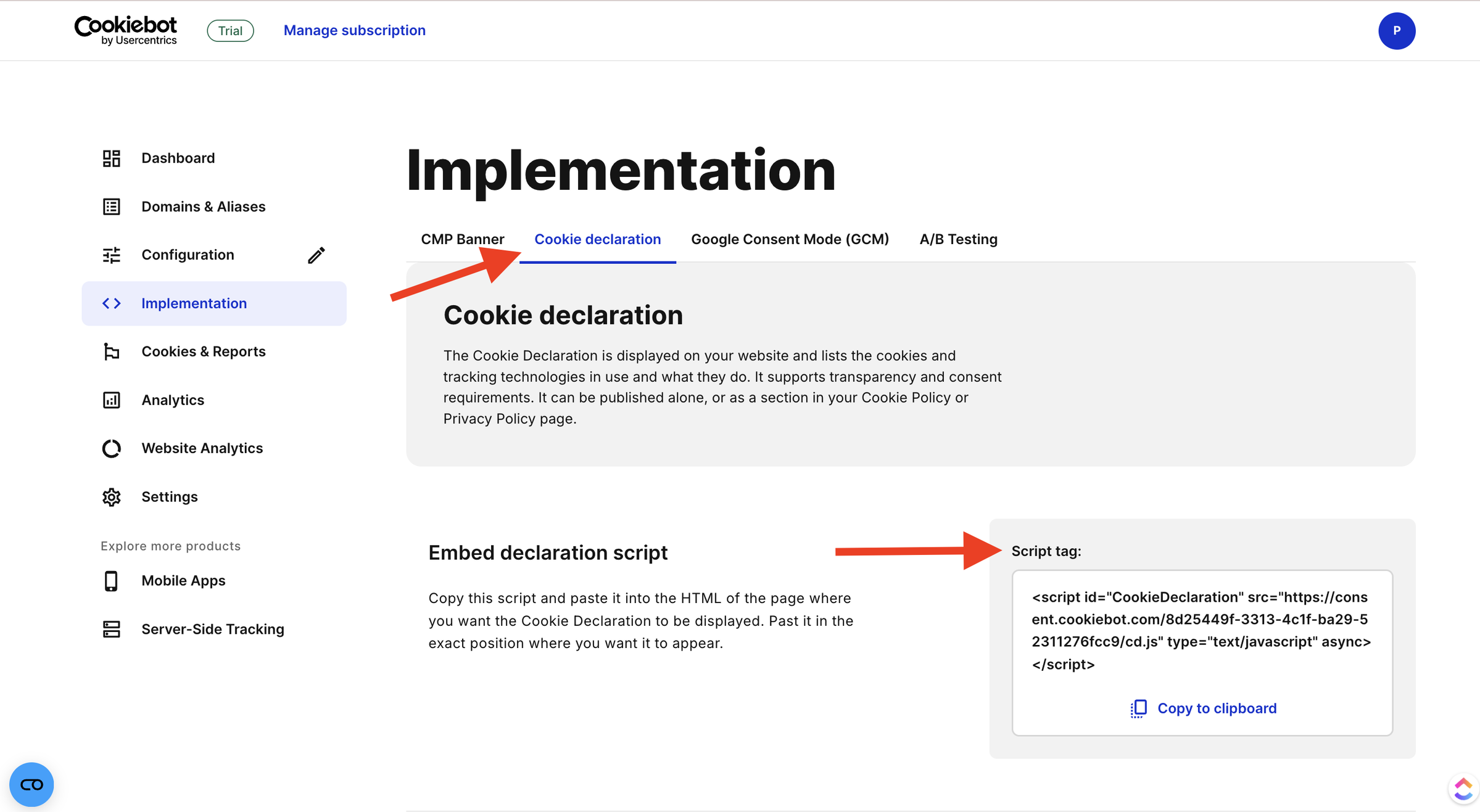
5. Review the scan report for any unclassified cookies and categorize them.
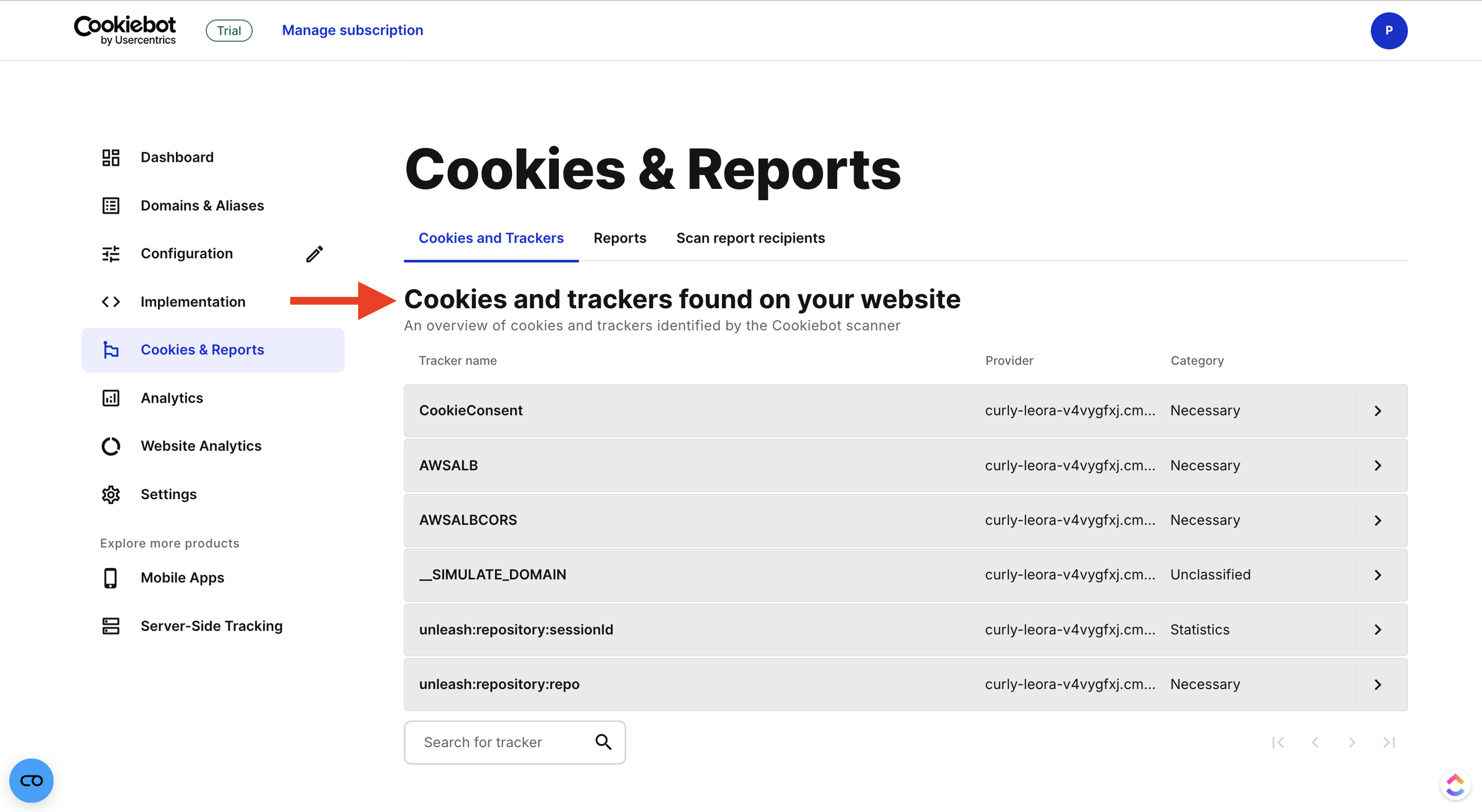
The step count is reasonable, but two documented realities slow the first session. The configuration step alone branches into five sub-settings. The initial scan then “can take up to 24 hours” before your plan size and cookie declaration settle. You finish the setup steps well before the product finishes sizing your account.
The Learning Curve: Who Will Struggle
Cookiebot’s ease of use splits sharply by background. Buyers comfortable with Google Tag Manager and Consent Mode tend to move through setup quickly.
One G2 reviewer found it “very easy to use, and very intuitive to both technical and non-technical users”. Beginners hit real friction.
A WordPress.org reviewer described “stumbling around for 15 to 20 minutes” before realizing the “system is quite complex”.
G2 users cite an “unintuitive admin dashboard” and “three separate platforms with different logins”. The multi-console experience is structural, not anecdotal.
Cookiebot’s docs keep separate getting-started articles for the Admin Interface and the Manager, and new accounts open in the Usercentrics Admin Interface. Usercentrics has even conceded the point.
In a public support reply, the team said it was “actively working to improve the onboarding process”. The honest verdict has two halves.
If you have configured tags before, expect a productive afternoon. If this is your first CMP, expect a steeper climb than the marketing implies.
How Much Does Cookiebot Cost?
Cookiebot is free for up to 50 subpages on one domain. Paid Premium tiers then run per domain, priced by subpage count, from $8/month (Lite) to $96/month per domain (XLarge). The plan auto-upgrades as a site grows, and Usercentrics Advanced is session-based, quoted by sales.
The table below lists every tier. The two sections after it break down what the free plan actually includes and why bills jump.
| Plan | Price (USD/mo, per domain) | Subpages per domain | Notable inclusions and limits |
|---|---|---|---|
| Free | $0 | Up to 50 | 1 domain, 1 language, manual blocking only; no customization, geotargeting, or analytics; no email support; consent expiry capped at 1 month |
| Premium Lite | $8 | Up to 50 | Adds banner customization, logo and branding, 47+ languages, geotargeting |
| Premium Small | $16 at 4+ domains; $34 at 1 to 3 domains | 50 to 349 | Full Premium feature set |
| Premium Medium | $34 | 350 to 3,499 | Analytics dashboard, CSV export, email support |
| Premium Large | $56 | 3,500 to 6,999 | All Premium features |
| Premium XLarge | $96 | 7,000+ | All Premium features |
| Usercentrics Advanced | Contact sales | Session-based | A/B testing, SSO and MFA, cross-device consent, dedicated CSM |
Two footnotes change the real cost. Daily scanning is a paid add-on at +EUR 99/month, still billed in euros even on the US page. Subdomains are also billed as separate domains. Cookiebot states that “example.com, it.example.com and uk.example.com are treated as 3 different domains”, while path locales like example.com/en stay a single domain. Pricing is verified live from Cookiebot’s pricing page for this review.
So is it competitive? For a single site, the per-domain model is predictable and reasonable, and Cookiebot’s “pricing based on pages, not traffic” pitch holds. It turns premium-to-expensive the moment you add domains or many subdomains. There is no multi-site bundle, and the tiers auto-upgrade. That is the honest answer to “why is Cookiebot so expensive”: the model is fair for one site and unfriendly to anyone running several.
Cookiebot’s Free Plan: What You Actually Get
Cookiebot’s free plan is real but heavily gated. It covers up to 50 subpages on one domain with an initial scan and Google Consent Mode. That is enough to put a basic banner live.
One nuance catches people out. The free tier is reached after the 14-day trial, and Cookiebot’s support docs confirm that only single-domain sites under 50 pages are then eligible. The constraints are steep. You get one language, no banner customization, no geotargeting, no analytics, and manual blocking only. Consent expiry is capped at one month, and daily scans cost extra. A second trigger catches people out.
Adding payment details to a free account upgrades it to a paid “Small” subscription.
That is why one G2 reviewer felt “forced into a premium account, even though free is promoted on their pricing page”.
If a scan exceeds 50 pages, the account is moved up a tier automatically.
The Auto-Upgrade Clause and Why Bills Jump
The auto-upgrade clause is the single biggest source of billing surprise. Cookiebot’s pricing page spells out the mechanism in its own words:
“If, at the end of your billing cycle, our scanner detects that your website has more subpages than your current plan allows, your subscription will automatically upgrade to the next appropriate tier.
Combine that clause with per-domain and per-subdomain billing and an August 2025 base-price increase.
One independent pricing analysis reports that Cookiebot “doubled its base” price that month. The complaints then make sense.
A TrustRadius reviewer, quoted in Google’s AI Overview, described going “back and forth” with support over “bogus variances of monthly charges”.
Another reported being “charged for the Premium M tier” with only one site. The mechanism is documented and real. The magnitude any one customer feels, whether a doubling or a surprise tier jump, is a reported experience rather than a fixed number.
What Are the Pros of Cookiebot?
Cookiebot’s genuine strengths are best-in-class automated scanning and a Google Gold Tier ad-tech pedigree. Add the trust that comes with 14 years and 600,000-plus customers. These are real advantages, evidenced below:
-
Deep automated scanning: The 13,000-plus cookie repository, behind-login scanning, and broad detection scope (HTTP, JavaScript, HTML5, pixels, beacons) make this the most-praised feature; a G2 reviewer called the automatic scanning “super helpful… finding all cookies… without manual effort.”
-
Google Gold Tier and ad-tech signaling: Google Consent Mode v2, plus Microsoft UET, Amazon, and IAB TCF v2.3 support, give Cookiebot a strong “keep Ads running” story that few budget CMPs can match.
-
Brand trust and scale: Fourteen years in market, 600,000-plus customers, a 4.2/5 rating across 178 G2 reviews, and a 2026 G2 Best Software Award make this a low-risk, well-supported choice.
-
Broad language coverage: 47-plus banner languages (60-plus on the enterprise tier) is wider than most SMB-tier CMPs and a real edge for international sites.
-
Automatic Global Privacy Control honoring: Cookiebot suppresses the banner and confirms the choice for visitors arriving with GPC enabled, a genuine capability for CCPA-conscious teams.
What Are the Cons of Cookiebot?
Cookiebot’s main weaknesses cluster around cost and complexity. They are cost-at-scale from per-domain and per-subdomain billing, billing surprises from automatic tier upgrades, a heavily gated free tier, and no terms-and-conditions generator. Each con below is specific and sourced:
-
Expensive at scale, with no multi-site bundle: Billing is per domain, and subdomains count as separate domains. Five single-site domains bill as five subscriptions; at the Small 4+ domain rate of $16 each, that is about $80/month, roughly $960/year (illustrative math from live pricing). On G2, cost-at-scale is the single most-tagged complaint: “the pricing… can become expensive when dealing with larger amounts of traffic or multiple domains.”
-
Automatic tier upgrades create billing surprises: The plan upgrades itself when a scan finds more subpages than your tier allows, and an August 2025 base-price increase compounded the effect; a TrustRadius reviewer cited “bogus variances of monthly charges.”
-
The free tier is heavily gated and converts to paid: One language, no customization, no analytics, manual blocking only, and adding card details silently upgrades the account to a paid Small plan, which is why users feel “forced into a premium account.”
-
No standalone terms-and-conditions generator: Cookiebot generates a privacy policy and the cookie declaration, but not terms and conditions, so a second tool is required for that document.
-
Dashboard and login complexity across two interfaces: Reviewers cite an “unintuitive admin dashboard” and “three separate platforms with different logins,” and new accounts are migrated into the Usercentrics Admin Interface, which adds setup friction.
-
A measured page-speed impact on ad-heavy pages: Style Factory measured “considerably worse” Interaction to Next Paint scores after installing Cookiebot on ad-containing pages, and Google’s own AI Overview lists “Site Speed Impact” as a con, since the script runs externally.
-
Email-only support on lower tiers: Support is email-only below enterprise with no documented live chat, and a Capterra reviewer found “the way they handle pricing, communication, and customer care… extremely disappointing.”
What Do Real Users Say About Cookiebot?
Sentiment is broadly positive but splits by platform. Cookiebot holds 4.2/5 on G2 (178 reviews) and 4.3/5 on Capterra (52 reviews). Trustpilot is the low outlier at 3.4/5 (290 reviews), where complaints skew toward billing. Praise centers on scanning and certification, criticism on cost.
Editorial roundups peg the average around 4.3 out of 5, and Google’s AI Overview repeats a “4.3 to 4.6” range. Read those as blended figures, since the live platform pages are the harder test, and Trustpilot’s 3.4 is the one to watch on billing transparency.
“The automatic scanning feature is super helpful… finding all cookies… without manual effort.” (G2)
“Cookiebot works reliably and the support team was friendly and…” (Trustpilot, 3/5)
“I have gone back and forth with their so-called customer service regarding the bogus variances of monthly charges. I’m forced to s[witch].” (TrustRadius)
Ratings summary:
G2 4.2/5 across 178 reviews; Capterra 4.3/5; Trustpilot 3.4/5 across 290 reviews; TrustRadius reviews current for 2026. Most-praised: automated scanning, the cookie declaration, and Google certification. Most-criticized: cost at scale, auto-upgrade billing, dashboard complexity.
Is Cookiebot Worth It?
Cookiebot is worth it for single-site owners and ad-tech-dependent teams that value certified, automated scanning. It is harder to justify for multi-domain or agency buyers on a budget, who feel the per-domain billing and auto-upgrades most. The verdict turns on your site count.
Choose Cookiebot if:
-
You run one site and want certified, set-and-forget scanning that keeps the cookie declaration current.
-
Google Ads and analytics continuity is your priority, and Consent Mode v2 plus Gold Tier certification matter.
-
You value a 14-year-old, widely trusted brand with strong reviews and award recognition.
-
You are a publisher who needs IAB TCF v2.3 for programmatic advertising.
Look elsewhere if:
-
You run several domains or many subdomains on a budget, where per-domain and per-subdomain billing stacks fast.
-
You need predictable, fixed bills without automatic tier upgrades.
-
You also need a terms-and-conditions document generated in the same tool.
-
You want one simple dashboard rather than a two-interface setup.
If any of these conditions describe you, it is worth comparing the best Cookiebot alternatives before you commit.
Considering an Alternative to Cookiebot?
If Cookiebot’s cost-at-scale, auto-upgrades, gated free tier, or missing terms generator are your sticking points, Consently is built to address those specific gaps. It is the platform behind this review. Here is the honest case for it, including where Cookiebot still wins.
Three differences map directly to the cons above.
First, Cookiebot bills per domain and counts subdomains separately. Consently uses flat multi-domain bundling instead: five domains for $199/year and ten for $499/year, not five separate subscriptions.
Second, Cookiebot’s plan auto-upgrades when a scan finds more subpages. Consently prices by capacity, domains plus pageviews, with no forced tier jumps or silent upgrades.
Third, every feature sits on every plan, including IAB TCF, Consent Mode v2, weekly scanning, geotargeting, three policy generators, and live chat. That answers the gated free tier, the email-only support, and the missing terms document in one move, because the third generator covers terms and conditions.
The honest caveat is that Cookiebot is genuinely stronger in several things. It offers more banner languages (47-plus versus 35), automatic GPC honoring, A/B testing, cross-device consent, and SSO on its enterprise tier. Consently matches none of those today.
Consently is the better fit for the cost-conscious, simplicity-first buyer, not a like-for-like enterprise replacement. For a feature-by-feature breakdown, see Consently vs Cookiebot, side by side. You can also check Consently’s pricing, then start a free Consently trial with a 14-day trial and no credit card required.
FAQs
Is Cookiebot free?
Yes, Cookiebot has a real free plan for up to 50 subpages on one domain, with an initial scan and Google Consent Mode. It is heavily gated, though: one language, no customization, no analytics, and manual blocking only. Adding payment details converts it to a paid Small subscription.
How much does Cookiebot cost?
Cookiebot is free for up to 50 subpages, then charges per domain by subpage count. Paid Premium tiers run from $8/month (Lite) to $96/month per domain (XLarge). Premium Small is $16/month per domain at four or more domains, or $34/month for one to three.
Is Cookiebot safe and legitimate?
Yes. Cookiebot is a Google Gold Tier certified CMP backed by ISO 27001 and 27701, run by Usercentrics since 2012 across 2.4 million sites and apps. It is a trusted, well-established platform; the common complaints are about billing and setup, not security.
Is Cookiebot better than CookieYes?
It depends on your priority. Cookiebot leads on scanning depth and Google certification, while CookieYes leads on entry price and ease of use. Neither offers flat multi-domain pricing. Since Usercentrics owns Cookiebot and sells the enterprise tier, the Cookiebot vs Usercentrics comparison clarifies which one fits a growing site.
Is Cookiebot good for beginners?
Cookiebot is capable but not the easiest for beginners. Setup spans two separate interfaces and an up-to-24-hour scan wait, and reviewers cite an unintuitive dashboard and multiple logins. It is a strong choice if you are comfortable configuring Google Tag Manager and Consent Mode, and a steeper climb if you are not.
Does Cookiebot have a terms and conditions generator?
No. Cookiebot offers a privacy-policy generator and an automatically generated cookie declaration, but it has no standalone terms-and-conditions generator. If you need a terms-and-conditions document, you would generate it in a separate tool that includes one.
What are the best Cookiebot alternatives?
The most-cited alternatives in 2026 are CookieYes, Complianz, Cookie-Script, Termly, and OneTrust, each suited to a different priority, from budget to enterprise. For a full breakdown of how they compare on price, features, and fit, see the Cookiebot alternatives guide linked in the verdict above.

