
Cookie Script is best for single-site owners, developers, and Google Tag Manager users who want fast, certified cookie compliance cheaply.
Skip it if you run many client sites and want flat multi-domain pricing, or need one advanced feature without buying the rest. Paid plans start at EUR 8 per month for two domains. The free plan is genuinely free and permanent, but it caps scanning at 10 pages and withholds geo-targeting, auto-blocking, and IAB TCF.
The key caveat is structural: domains sell only in fixed bundles, and the most-wanted compliance features sit behind the top PLUS plan.
Verdict: a strong, fairly priced CMP for one site that fits a bundle, and a frustrating one for multi-site and agency buyers.
Cookie Script Review Scorecard: 4.0 out of 5
Our review team scored Cookie Script across seven weighted dimensions, and it earns a solid 4.0 out of 5. The scorecard below shows where it leads and where it lags.
| Dimension | Score |
|---|---|
| Compliance and framework coverage | 4.5/5 |
| Cookie scanning and auto-blocking | 4.0/5 |
| Banner and consent experience | 3.5/5 |
| Ease of setup and integrations | 4.5/5 |
| Pricing and value | 3.0/5 |
| Performance and reliability | 4.0/5 |
| Support and reputation | 4.0/5 |
| Overall | 4.0/5 |
Verdict: a fast, certified, fairly priced CMP. It excels for a single site or a domain count that fits a bundle. It frustrates multi-site and agency buyers squeezed by per-domain bundles and top-tier feature gating.
We score every consent platform across the same seven weighted dimensions. Each draws on the live pricing page, the vendor’s documentation, a page-speed measurement of the live banner, certification records, and verified user reviews. See our full methodology for the weights and evidence behind each score.
Disclosure: This review is published by the Consently team, and Consently runs a competing consent management platform. The evaluation below applies the same standard used for every product reviewed on this site. It draws on Cookie Script’s own documentation, its current G2, Capterra, and Trustpilot reviews, and a live check of its pricing.
What Is Cookie Script?
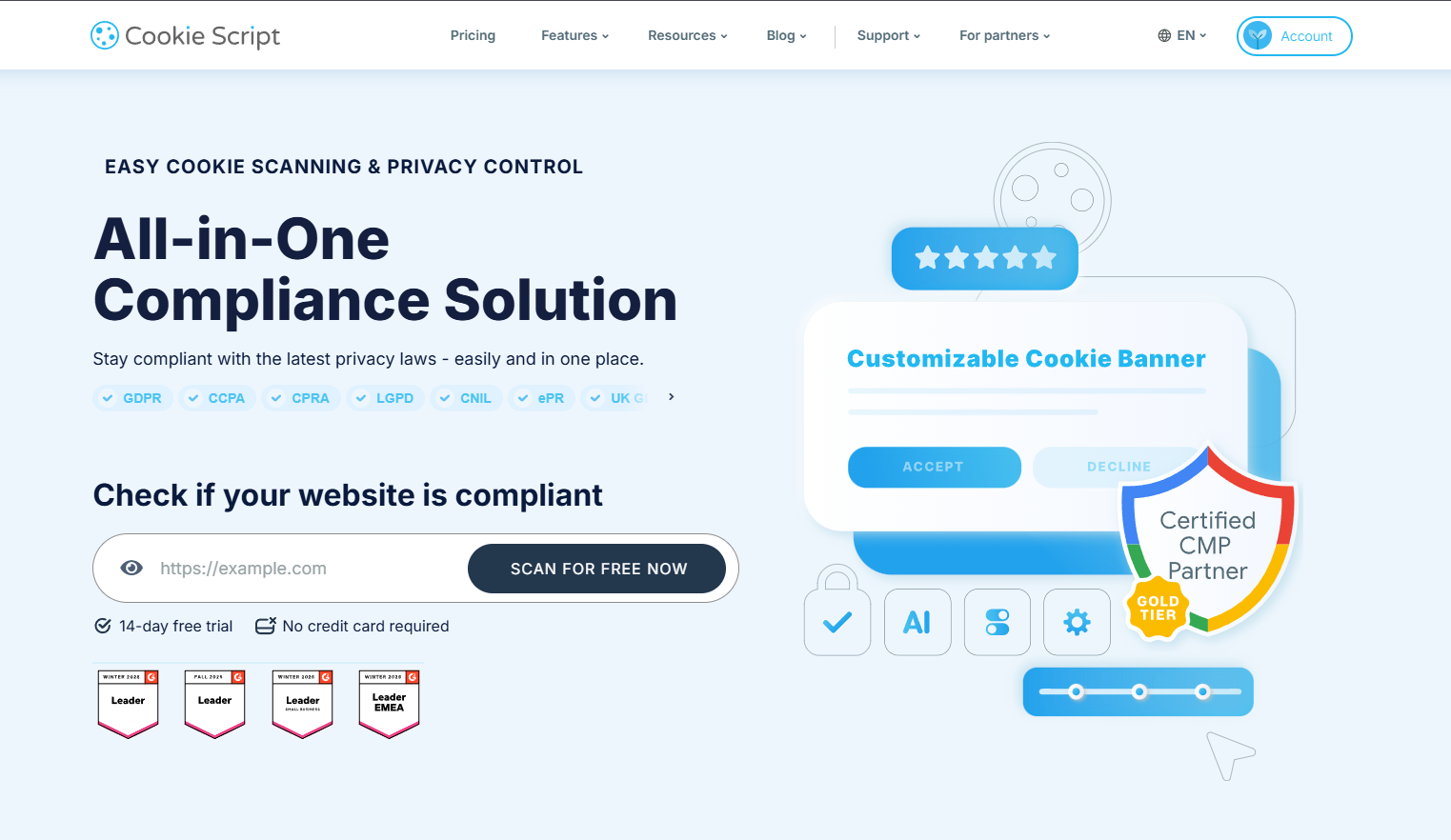
Cookie Script is an affordable, scanner-led consent management platform (CMP) operated by Objectis Ltd in Lithuania. It scans a website for cookies, runs a geo-targeting consent banner, blocks trackers before consent, and signals consent to Google. It is a Google-certified CMP and offers a permanent free plan.
The product targets cost-conscious site owners, web agencies, and developers who need GDPR, CCPA, and broader privacy-law cookie compliance without enterprise pricing. Its wedge is price and ease. It costs a few euros per domain, sets up in minutes, and ships a free no-registration scanner as the entry hook. That positioning has earned it a deep review base and a Google-certified-CMP credential. It is a regular contender whenever people compare the best CMP options.
Who Cookie Script Is For
-
Cost-conscious SMBs and single-site owners who want fast, cheap, certified compliance and are happy on a free or low single-domain plan.
-
Web agencies and freelancers managing several client sites who value the white-label dashboard, per-client access, and reseller model.
-
Developers comfortable with Google Tag Manager, self-hosted code, or the API who want a strong headless scanner.
-
EU and multilingual sites that need broad regulation coverage and a banner in up to 42 languages.
-
Google Analytics and Ads users who need Google Consent Mode v2, which Cookie Script includes on every plan, including the free one.
Who Cookie Script Is NOT For
-
Multi-site owners whose domain count falls between bundle steps. Domains sell only in fixed bundles (2, 5, 10, 20, 50, 100, 200), so three sites means buying the five-domain bundle and paying for two slots you do not use.
-
Buyers who need one advanced feature but not the rest. IAB TCF, consent records, banner analytics, cross-domain consent, and the API are all locked to the top PLUS plan, so one need forces the whole jump.
-
Teams that need a Terms and Conditions document generated too. Cookie Script’s generator produces Privacy and Cookie policies only.
-
Teams that want live chat or guaranteed fast help during setup. No live chat is advertised, and support runs through the help center and email, where speed is uneven.
-
Agencies that want to mix plan tiers in one account. That is not possible, which one agency CEO on
What Are Cookie Script’s Key Features?
Cookie Script’s core is four things. The first two are a headless cookie scanner with a 100,000+ cookie database and a customizable geo-targeting consent banner. The other two are automatic cookie and script blocking, plus Google Consent Mode v2 with IAB TCF. The catch is tiering: several of the most-wanted features sit behind the top PLUS plan.
Automatic script blocking needs at least STANDARD. Each capability below is evaluated on what it does, how well it does it, and where its limits are, rather than listed.
Cookie Scanner and Automatic Blocking
The scanner is Cookie Script’s strongest engineering. It uses a headless browser to load and execute a site’s pages. It then matches what it finds against a 100,000+ cookie database that the vendor says covers around 80% of a typical site’s cookies. It clears about 10 pages in 10 to 15 seconds. Page-scan caps scale by plan: 10 pages on Free, 100 on LITE, 1,000 on STANDARD, and 3,000 on PLUS, each per domain. Reviewers back the quality up. One COO on G2 calls the automatic scanning “reliable” and a real manual-work saver.
Automatic script blocking is what turns a scan into compliance, and Cookie Script handles it well because of how the code installs. The script sits first in the page head, so it loads before trackers and can hold them until consent. That ordering is the difference between a banner that records a choice and one that actually prevents pre-consent firing.
Two honest limits apply. First, the scanner occasionally misses third-party cookies. Cookie Script’s own common issues help section documents “Too few cookies were found,” scans that error out, and platform-specific scanning problems. One G2 reviewer notes the scanner “occasionally does not detect all third-party cookies, making a manual check necessary.” Second, misconfiguration can break a site. If a strictly-necessary cookie is missed or wrongly blocked, carts and features can stop working. The documented fallback is to check a “Keep unknown cookies” box. Cookie Script warns that this option “might be not fully compliant with GDPR” and to use it only as a last resort. Scan cadence is also gated. Automatic recurring scans need STANDARD or higher, and a manual scan is capped at once every 24 hours.
Consent Banner, Geo-Targeting, and Languages
The banner covers the category table stakes and a bit more. It supports accept, reject, and a preference center for granular category choices. Custom colors arrive from LITE, with custom CSS and a self-hosted code option for teams that want the script on their own infrastructure. Geo-targeting is the useful part. The banner switches consent model automatically by visitor region: a GDPR opt-in in the EU, a CCPA-style opt-out in the US. It ships in up to 42 banner languages.
The honest limit is design flexibility. Several reviewers find the customization shallower than they want. One freelance tracking specialist on G2 says banner design “is somewhat limited, more flexibility would be nice.” That theme recurs across roughly 16 G2 mentions. Localization is also uneven: the banner reaches 42 languages, but the companion policy generator covers only nine.
Consent Records, Analytics, and IAB TCF
This is where Cookie Script’s tiering bites. Google Consent Mode v2 and the Google-certified-CMP status apply across every plan, and Consent Mode is available even on Free, which is genuinely generous. But user consent recording, banner analytics, IAB TCF 2.3, cross-domain consent, banner sharing, and API access are all PLUS-only. A publisher who needs IAB TCF for ads must jump straight to the EUR 19 per month top plan. So must a business that needs an audit-ready consent log. The capabilities themselves are solid and certified. The friction is that the compliance features most buyers shop for are bundled into one upper tier rather than spread across the range.
| Capability | Plan that includes it |
|---|---|
| Google Consent Mode v2, basic banner, 42 languages | Free |
| Geo-targeting, Privacy Policy generator, self-hosted code, branding removal | LITE |
| Automatic monthly scans, automatic script blocking | STANDARD |
| IAB TCF, consent recording, analytics, cross-domain consent, banner sharing, API | PLUS |
Integrations and the Agency Toolkit
Cookie Script lists 12 platform integrations. The headline three are Google Tag Manager, a native WordPress plugin with WooCommerce support, and a native Shopify app. The rest are Squarespace, Joomla, Magento, Drupal, PrestaShop, Shopware, Wix, Weebly, and OpenCart. The Google Tag Manager path draws the most praise. One agency owner on G2 calls the GTM integration “extremely intuitive and quickly implemented.”
The agency layer is genuinely well-built, and it deserves full credit. An agency buys a multi-domain plan and resells domains to clients one by one. It manages every client banner from one account, and gives each client full or read-only access, so a client sees only their own banner. The white-label dashboard runs on the agency’s own domain and logo, with no development or programming required. Banner sharing and API client creation round it out for hosting companies. This reseller tooling is more developed than many budget rivals offer.
The integration weak spot is Shopify. The native app exists, but it draws the most complaints of any integration. The Shopify App Store rating sits at 3.4 out of 5 across 8 reviews, well below Cookie Script’s marks elsewhere. Capterra reviewers also reference Shopify-specific friction.
How Easy Is Cookie Script to Use?
Getting a banner live takes four documented steps. Setup is genuinely fast and beginner-friendly. Most of the friction shows up later, in fine-tuning the banner and configuring scans.
1. Sign up and create a banner in the dashboard.
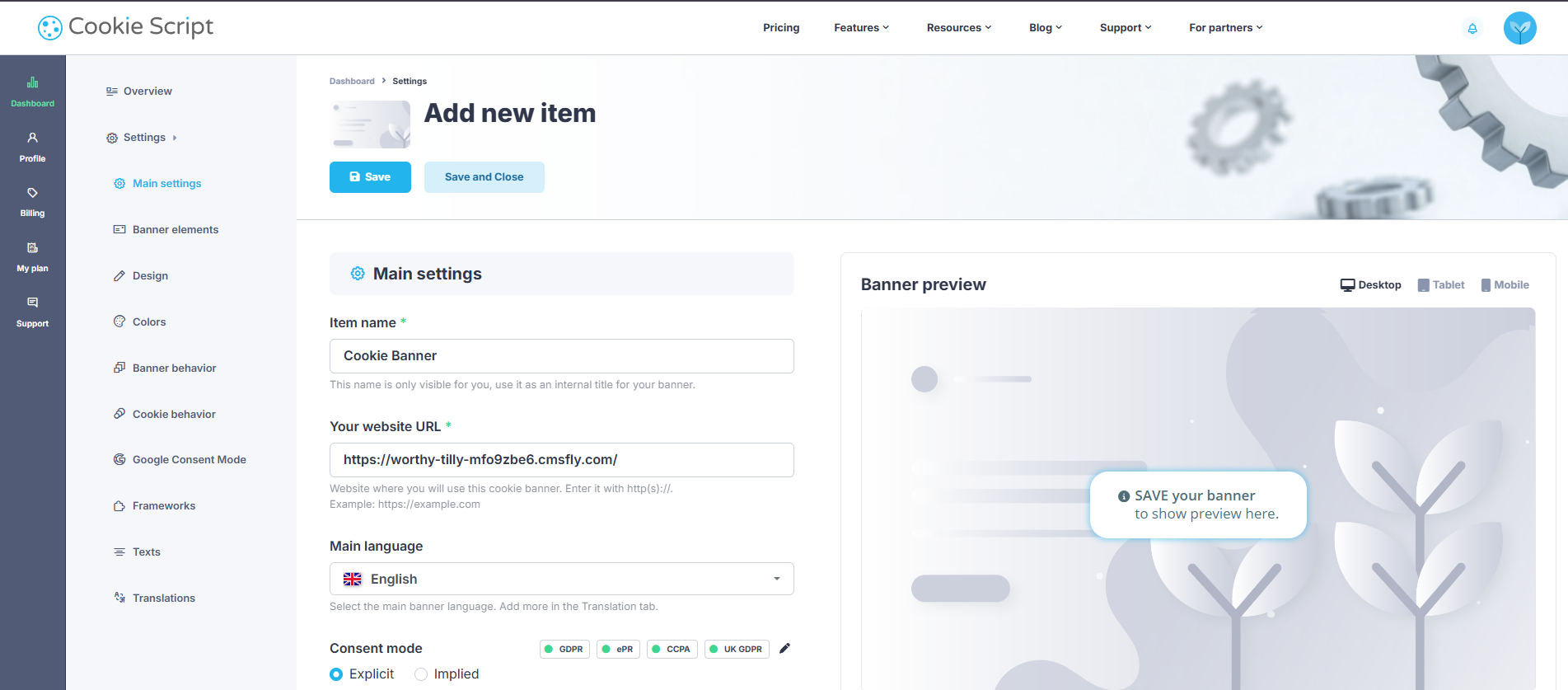
2. Configure the banner: open Settings, then the Installation subsection, and choose your geo-targeting.
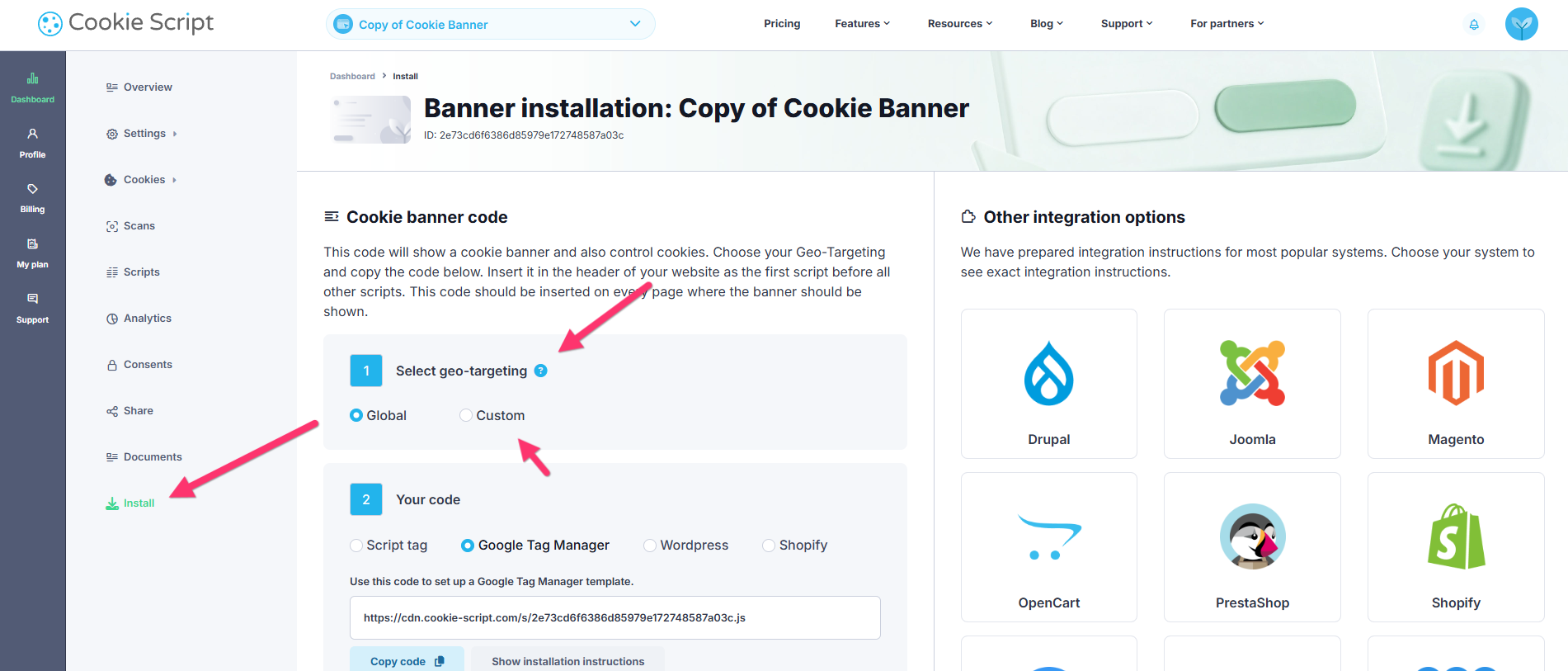
3. Copy the “global code” and paste it into the page header as the first script (before all others, so it blocks cookies before the page loads).
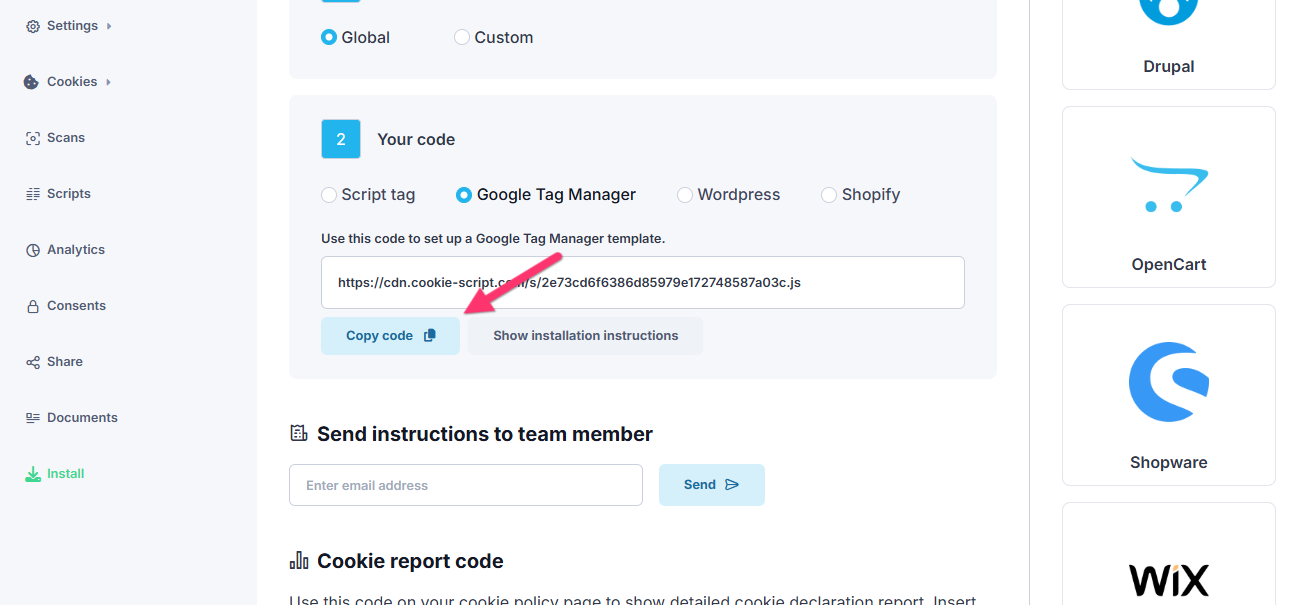
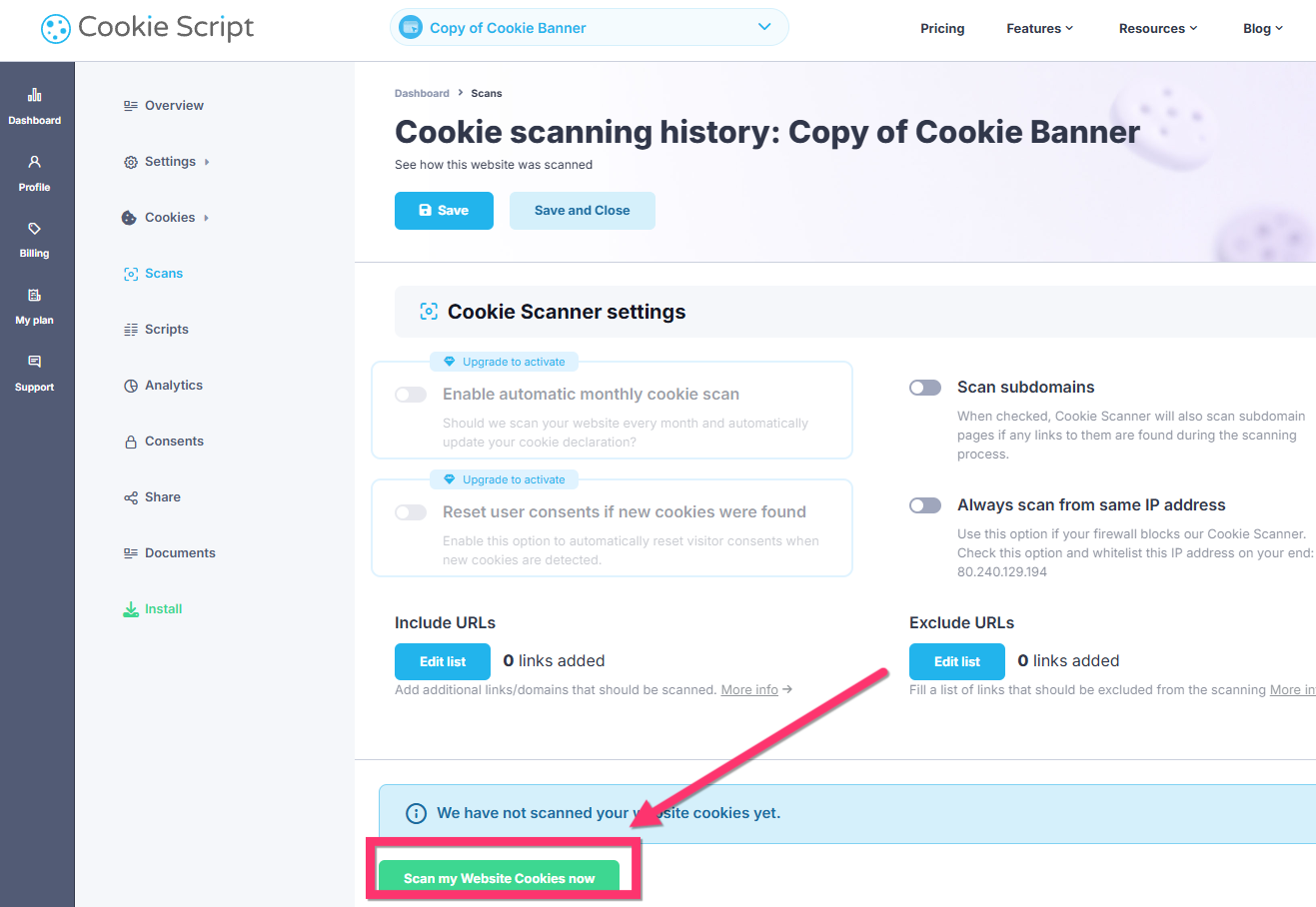
4. Run a first scan from the “scans” panel: enable automatic monthly scanning if on STANDARD or above, or trigger manually (capped at once per 24 hours).
The setup speed is not just documented, it is corroborated by users. One agency CEO on G2 reports only a few minutes to deploy on a client site. A Trustpilot reviewer says the setup “guides you step by step,” and Capterra rates Ease of Use at 4.7. So the headline is fair: first value comes quickly.
The learning curve is real once you go past the basics. Advanced configuration and edge cases are less intuitive, and the documentation can require digging. The recurring G2 note is that “Cookie Management” checkboxes feel clumsy. Reviewers add that documentation “could be clearer for complex multi-domain setups.” The site-breakage risk from earlier lives here too. If the scanner mishandles a strictly-necessary cookie, you may be debugging a broken cart before the banner behaves.
How Much Does Cookie Script Cost?
Cookie Script runs from a free plan up to PLUS, and it prices per domain in fixed bundles rather than per account. Paid tiers start at EUR 8 per month at the two-domain selector, and the most-wanted compliance features sit on the top PLUS plan. All paid plans bill annually.
| Plan | Price (per month, billed yearly) | Per-domain unit | Pages scanned / domain | Pageviews | Key inclusions |
|---|---|---|---|---|---|
| FREE | EUR 0 | n/a | 10 | 10,000/mo | 2 domains, basic banner, Google Consent Mode, 42 languages; no advanced GDPR tools |
| LITE | EUR 8 | EUR 4.00 | 100 | Unlimited | + Privacy Policy generator, self-hosted code, branding removal, geo-targeting, custom colors |
| STANDARD | EUR 15 | EUR 7.50 | 1,000 | Unlimited | + automatic monthly scans, + automatic script blocking |
| PLUS | EUR 19 | EUR 9.50 | 3,000 | Unlimited | + banner analytics, consent recording, IAB TCF, banner sharing, cross-domain consent, API |
Those figures are the two-domain prices and scale up as the bundle grows. Because domains sell only in fixed bundles, a three-site owner buys the five-domain bundle and pays for two unused slots. Paid plans carry a 7-day money-back guarantee, take Stripe, PayPal, and major cards, and all bill on a one-year cycle. PLUS is the only tier that offers a trial. These figures come from a live check of Cookie Script’s pricing page on 2026-06-23. Capterra, G2, and OMR all list the same EUR 8 to EUR 19 range.
On value, Cookie Script earns its reputation at the low end. Single-site owners get a certified CMP for a few euros a month, and reviewers repeatedly call the pricing fair. It reads as expensive to two groups, though. Smaller or low-traffic sites feel the cost. One consulting reviewer notes the “paid plans can be a bit expensive for small sites.” Multi-site buyers feel it twice. They pay first from bundle steps that force unused slots, and again when one needed feature, like IAB TCF, forces the jump to PLUS. The verdict on price is conditional. It is good value for one site that fits a bundle, and eroding for multi-domain buyers and anyone who needs a single PLUS-only feature.
What Are the Pros of Cookie Script?
Cookie Script’s genuine strengths are a fast, beginner-friendly setup and a strong, mature scanner with reliable auto-blocking. It pairs Google-certified compliance with a real agency toolkit at a fair entry price.
-
Fast, easy setup, with Google Tag Manager especially smooth. Four steps to a live banner; one agency CEO reports a “few minutes to deploy on a client site,” and Capterra rates Ease of Use 4.7.
-
A strong headless scanner with reliable pre-consent blocking. The 100,000+ cookie database and headless engine scan about 10 pages in 10 to 15 seconds, and because the script loads first in the head, it blocks trackers before consent.
-
Google-certified CMP with Consent Mode v2 on every plan. Consent Mode v2 ships even on Free, and IAB TCF 2.3 is available for ad-tech, so analytics and ad setups stay compliant.
-
A genuinely well-built agency and white-label layer. White-label dashboard on the agency’s own domain, full or read-only client access, banner sharing, API client creation, and a per-domain reseller model, more developed than many budget rivals.
-
A deep, positive, multi-platform review base.
-
A real free tier and a free no-registration scanner. You can scan a site and run a basic banner at no cost before paying anything.
What Are the Cons of Cookie Script?
Cookie Script’s main limitations are per-domain bundle pricing that makes you pay for slots you do not need. The most-wanted features sit behind the top PLUS plan, and there is no Terms generator or advertised live chat.
-
Per-domain bundle pricing in fixed steps. Domains sell only in 2, 5, 10, 20, 50, 100, 200 bundles, so covering three sites means buying five. One G2 reviewer calls the domain limitation “quite strict,” and the category pricing frustration is loud (“Why pay monthly for cookie consent?” runs 60+ comments on r/webflow).
-
The most-wanted compliance features are all locked to the top PLUS plan. IAB TCF, consent records, banner analytics, cross-domain consent, banner sharing, and the API each require PLUS at EUR 19 per month, so one needed feature forces the full upgrade. All paid plans bill annually.
-
You cannot mix plan tiers in one account. An agency that wants LITE for some clients and PLUS for others must run separate accounts. One agency CEO on G2 calls this “unnecessary administrative overhead.”
-
No Terms and Conditions generator. The generator produces Privacy and Cookie policies only, and it covers nine languages against the banner’s 42. All-in-one buyers still need a separate terms tool.
-
Support has no advertised live chat, and speed is uneven. Support runs through the help center and email, and Capterra rates Customer Service 4.6. One architecture-firm CEO reported responses “approximately once every four days.” Another reviewer was “helped in less than 24h,” so the speed is mixed rather than uniformly slow. The durable point is the structural gap: no advertised live chat channel.
-
A real but manageable performance cost. Running Cookie Script’s own banner, I measured a Lighthouse performance score of 94 and a 1.4 second largest contentful paint, so the script is light when implemented well. The catch is that Cookie Script’s help center itself documents loading-time, INP, and LCP issues and ships fixes (enable “improve INP metrics,” “show banner before page loads,” or self-host the script). One G2 reviewer confirms the script “can measurably affect LCP and FCP” on heavier sites, and Google’s own
-
Banner customization and iframe handling have gaps. Design customization “is somewhat limited” to several reviewers. Embedded third-party content such as YouTube videos and maps is not auto-blocked cleanly, and one G2 reviewer flags iframes as “the main limitation.”
What Do Users Say About Cookie Script?
Sentiment is broadly positive across platforms: Trustpilot 4.7 across 391 reviews, G2 4.6 across 505, and Capterra 4.8 across 57. Reviewers praise ease and value most; the per-domain pricing model and support speed are the most common gripes.
“CookieScript convinces me especially with its user-friendliness and fair pricing. The integration via Google Tag Manager is extremely intuitive and quickly implemented.” Thomas A., agency owner, G2
“The automatic cookie scanning is reliable and saves a lot of manual work, while the customization options (banner design, behavior, geo-targeting) are flexible enough.” Giacomo N., COO, G2
“My main frustration is the inability to mix different plans within a single account. This adds unnecessary administrative overhead.” Sebastien R., agency CEO, G2
“The only downside is that the limitation of Domains is quite strict.” Verified reviewer in Marketing and Advertising, G2
One outlier is worth explaining rather than hiding. Cookie Script’s Shopify App Store rating is 3.4 out of 5, far below its 4.6 to 4.8 elsewhere. It rests on just 8 reviews, and merchants there argue the score is unrepresentative. As one writes, the “average rating is very unfair,” calling Cookie Script an evolving, affordable, Google CMP partner. The small sample and the Shopify-specific integration friction together explain the gap.
Is Cookie Script Worth It?
Cookie Script is worth it for single-site owners and developers who want fast, certified, fairly priced compliance and fit a bundle. It is harder to justify for multi-site and agency buyers squeezed by per-domain bundles. It also frustrates anyone forced onto the top PLUS plan for one feature.
Choose Cookie Script if:
-
You run one site, or a domain count that fits a bundle, and want fast, beginner-friendly, certified compliance.
-
You live in Google Tag Manager and want the smoothest install path.
-
You need a strong scanner with reliable auto-blocking and Google Consent Mode v2 at a low entry price.
-
You want a free tier or a free scanner to start before committing.
Look elsewhere if:
-
Your domain count falls between bundles, or you manage many client sites and want flat multi-domain pricing; it is worth weighing the
-
You need IAB TCF, consent records, analytics, cross-domain consent, or the API, but not the rest, since those are all locked to the top PLUS plan.
-
You need a Terms and Conditions document generated alongside your privacy and cookie policies.
-
You want live chat or fast support during a time-sensitive setup.
For a single site that fits its model, Cookie Script remains one of the strongest budget CMPs. It is certified, fast to install, and backed by a real scanner. Teams prioritizing flat multi-domain pricing, every feature on every plan, or quick live support should evaluate alternatives.
Considering an Alternative to Cookie Script?
If Cookie Script’s per-domain bundles, PLUS-tier gating, missing Terms generator, or support speed are your sticking points, Consently is built to answer those specific gaps. It is the platform behind this review, and here is the honest, like-for-like case.
Start with the cons that matter most. Cookie Script’s strict domain limits and bundle steps make you pay for slots you do not use. Consently instead bundles multiple domains flat: five domains at $199 a year and ten at $499, on capacity-based pricing. Cookie Script locks IAB TCF, consent records, analytics, cross-domain consent, and the API to the top PLUS plan. Consently instead includes everything on every plan, with IAB TCF, weekly scans, geo-targeting, three policy generators, and live chat at the entry tier. Where Cookie Script generates only privacy and cookie policies, Consently adds a Terms and Conditions generator. Where Cookie Script advertises no live chat, Consently offers live chat on all plans. And where Cookie Script blocks mixing tiers in one account, Consently runs as a single capacity-based account.
To be fair, Cookie Script is genuinely ahead in places. Its agency white-label dashboard, with separate client logins and per-client access, is more developed than Consently’s single-account agency model. It also has far more reviews and domain authority, and it offers 42 banner languages to Consently’s 35. No single tool wins on everything.
For the full head-to-head, see the Consently vs Cookie Script breakdown, or check how Consently is priced. You can start a 14-day free trial with no credit card required.
FAQs
Is Cookie Script free?
Yes. The permanent free plan covers 2 domains, 10 pages scanned per domain, and 10,000 monthly pageviews, with a basic banner and Google Consent Mode v2. Advanced GDPR tools such as geo-targeting, automatic script blocking, and IAB TCF require a paid plan.
Is Cookie Script legit and safe to use?
Yes. Cookie Script is a real product from Objectis Ltd, a registered Lithuanian company (number 304037472), not a random snippet. It is a Google-certified CMP with Google Consent Mode v2, and it holds 391 Trustpilot reviews at 4.7 and 505 G2 reviews at 4.6. It also stores consent records on its own servers, so it is a legitimate, established consent tool.
Is Cookie Script good for agencies and multiple websites?
Partly. Cookie Script has a real agency toolkit: a white-label dashboard, full or read-only client access, and a per-domain reseller model. But per-domain bundles and the inability to mix plan tiers in one account add cost and overhead. Agencies managing many sites at different feature levels cite this as a recurring frustration.
Is Cookie Script better than Cookiebot?
Neither is strictly better; both are capable, scanner-led CMPs. Cookie Script is usually cheaper and is praised for its Google Tag Manager setup. Cookiebot is known for deeper automated scanning and broader language coverage. The right pick depends on budget, scan depth, and whether you need ad-tech features like IAB TCF.
Is Cookie Script easy to use for beginners?
Yes. Setup is four documented steps to a live banner, and reviewers consistently praise the ease. Trustpilot users say the setup guides them step by step, and Capterra rates Ease of Use 4.7. Advanced configuration, multi-domain setups, and scan tuning have a steeper learning curve.
Does Cookie Script slow down your website?
It can, though it is manageable. On Cookie Script’s own site I measured a Lighthouse score of 94 and a 1.4 second largest contentful paint. So the script is light when set up well. Cookie Script’s help center still documents loading-time, INP, and LCP issues. It offers mitigations: self-host the script, enable “improve INP metrics,” or show the banner before the page loads. These are simple toggles, but you have to know they exist.
What are the best alternatives to Cookie Script?
The strongest alternatives are CookieYes, Cookiebot, and Consently, each with different tradeoffs on multi-domain pricing, feature gating, and support. Consently, the publisher of this review, bundles every feature and flat multi-domain pricing on each plan. The right choice depends on how many domains you run and which features you need included.

