
Secure Privacy is best for mid-market and enterprise teams that need privacy governance and audit-grade, certified consent across many regions.
Skip it if you run several sites on a budget or just want a simple banner. Paid plans start at 15 USD per month per domain, with a free tier capped at 500 consents. The key caveat is per-domain billing that stacks fast.
Verdict: a certification-mature, governance-deep CMP, and overkill for a single small site.
Below: its features, current per-domain pricing, a documented look at setup, honest pros and cons, and who should and should not pick it.
Secure Privacy Review Scorecard
Secure Privacy scores 3.9 out of 5 overall. It is a certification-mature, governance-deep CMP: excellent for regulated mid-market teams, and overkill on price and complexity for a simple single-site banner.
| Dimension | Score |
|---|---|
| Compliance and framework coverage | 4.5/5 |
| Cookie scanning and auto-blocking | 4.5/5 |
| Banner and consent experience | 4.0/5 |
| Ease of setup and integrations | 3.5/5 |
| Pricing and value | 2.5/5 |
| Performance and reliability | 3.5/5 |
| Support and reputation | 4.5/5 |
| Overall | 3.9/5 |
Verdict: the most certification-mature CMP in the budget tier, and overkill for a simple single-site cookie banner.
We score every consent platform across seven weighted dimensions. The evidence is its live documentation and pricing page, framework and certification records, and verified G2, Capterra, and Trustpilot reviews. Compliance and scanning carry the most weight, reputation the least. See our full methodology for the rubric behind each score.
Full disclosure: this review is published by Consently, which competes with Secure Privacy in the consent-management category. It evaluates Secure Privacy on its own merits, scored with the same methodology we apply to every CMP we review. Every figure and limitation below traces to Secure Privacy’s own documentation, current pricing, and verified user reviews.
What Is Secure Privacy?
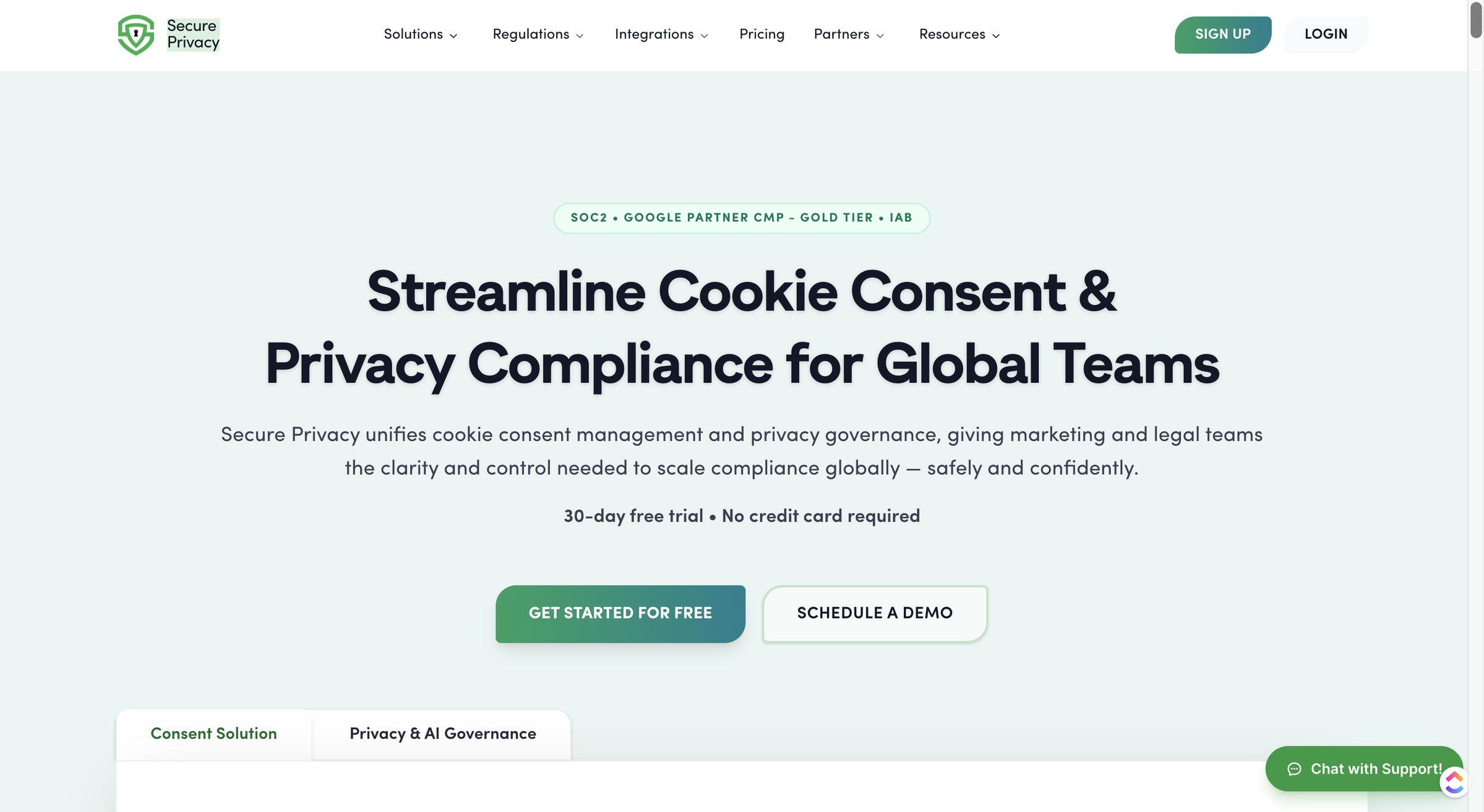
Secure Privacy is a unified consent management platform and privacy-governance suite. It pairs a cookie-consent CMP with a governance toolset. The CMP side covers banners, automatic scanning, tamper-proof consent logging, and policy generators.
The governance side adds DSAR, DPIA, vendor and risk management, and Article 30 records. It sells to mid-market and enterprise legal and marketing teams across 55+ laws.
Secure Privacy was founded in 2017 by Dan Storbaek and is headquartered in Copenhagen. It has run bootstrapped since day one (TermsFeed, May 2026; Secure Privacy on LinkedIn). It is an established brand, not a venture-backed newcomer.
The platform positions itself for two buyers at once. Marketing teams get certified Google Consent Mode v2 and IAB TCF support, plus native Meta Consent Mode, to keep ads and analytics measurement flowing. Legal and privacy teams get the governance modules that budget cookie tools omit entirely. Secure Privacy backs this with real credentials: SOC 2 Type II certification, Google CMP Partner status it describes as “Gold Tier,” and IAB TCF certification.
It also markets coverage of 95+ countries and 70+ banner languages. That combination of consent plus governance is the core of its pitch. The two halves are priced and gated differently, so it helps to compare consent management platforms before committing. For a wider field, see how the category stacks up in our roundup of the best consent management platforms.
Who Secure Privacy Is For
Secure Privacy fits buyers who need governance and certification, not just a banner:
-
Mid-market and enterprise legal or compliance teams that need DSAR, DPIA, and Article 30 (RoPA) automation alongside cookie consent, not a standalone cookie tool.
-
Global marketing teams running ads and analytics across regions who need certified Google Consent Mode v2 and IAB TCF across many jurisdictions.
-
Organizations that need audit-grade, SOC 2-backed consent proof to show auditors, security, or the board on demand.
-
Small businesses willing to start on the free tier that value certification depth and plan to grow into paid governance later.
Who Secure Privacy Is Not For
This is the harder, more useful list. Secure Privacy is a poor fit for the buyers below.
-
Cost-conscious owners or agencies running several domains. Billing is per domain at every paid tier, so costs stack fast as site count grows.
-
Teams that only need simple cookie consent. The governance breadth that justifies the platform reads as “a lot of customization options, which can be overwhelming” to reviewers who came for a banner.
-
Non-English-speaking admin teams. The admin dashboard is English-only despite the 70+ banner-language promise, a friction point multiple reviewers cite.
-
Buyers who want full banner customization or all features at the entry tier. Custom CSS is gated to the $59 Business plan and white-label is Advanced-only. If simplicity and multi-domain pricing matter most, it is worth seeing how the two compare directly before deciding.
What Are Secure Privacy’s Key Features?
Secure Privacy’s core capabilities span five distinct areas.
-
A branded banner with a preference center and geotargeting.
-
An automatic cookie scanner with pre-consent blocking.
-
Tamper-proof consent logging.
-
Privacy and legal policy generators.
-
A privacy-governance suite (DSAR, DPIA, vendor risk, and Article 30 records).
Each evaluates differently, so the sections below assess what each one does, how well it does it, and where its limits sit.
The Cookie Banner, Preference Center, and Geotargeting
Secure Privacy’s banner builder is a drag-and-drop visual editor with a template gallery, brand matching, and responsive layouts. A self-service preference center lets visitors manage their own cookie choices.
Geotargeting is genuinely useful. The banner auto-detects visitor location and serves the right consent model by region: GDPR-style opt-in for the EU and CCPA-style opt-out for US states. The honest caveat is customization depth.
Richer styling is gated: Custom CSS and Styling requires the Business plan at $59 per month per domain. A fully white-labeled banner is Advanced-only at $249. That gating is exactly what reviewers feel when they cite “the lack of broader customization options” on the entry tiers.
The Automatic Cookie Scanner and Pre-Consent Blocking
The scanner is Secure Privacy’s strongest feature, and it earns the praise. It runs a deep-site scan that detects and categorizes cookies, pixels, trackers, and iframes, with change monitoring and compliance reports. Capterra reviewers single out “the advanced website scanner detecting and categorizing cookies, pixels, and trackers.”
Two limits are worth knowing before you test it. Automatic pre-consent blocking starts on the Small plan; the Free tier offers manual blocking only, so you cannot evaluate true auto-blocking without paying. Scanning behind a login (authenticated pages) is reserved for the Advanced plan. For most buyers the scanner does what a CMP scanner should, and it does it accurately.
Consent Logging and Audit Records
Consent logging is where Secure Privacy’s governance ambition shows in the consent product. The platform records “every consent action with cryptographic proof for regulatory audits.” It offers tamper-proof, immutable logs with instant retrieval. That is a genuine governance-grade strength over budget CMPs that store a basic log and stop there.
Full admin audit logs are gated to the Advanced plan. The honest UX caveat comes straight from reviewers. Pulling up one visitor’s record is clunky. One reviewer notes that viewing “a user’s cookie preferences is a little cumbersome.” The proof is strong; the retrieval experience is not its best moment.
The Privacy and Legal Policy Generators
Secure Privacy’s Privacy Templates generate privacy policies, cookie policies, and other legal documents. Auto-updates and multi-jurisdiction support keep the language tracking the laws you operate under. The gate here is template count, and it is steep.
The Free plan includes 1 legal template and Small includes 5. The full library of 55+ templates, plus privacy-policy generation, arrives only on the Business plan at $59 per month per domain. For a single-template pilot the Free tier works; for real multi-document coverage you are on a paid plan quickly.
Privacy Governance: DSAR, DPIA, and Vendor Risk
This suite is the real differentiator versus budget CMPs, and it is why mid-market and enterprise legal teams shortlist Secure Privacy at all. It automates DSAR intake-to-fulfillment, runs DPIA workflows with templates and risk analysis, manages risk and vendor registers, and maintains Article 30 records (RoPA) continuously.
Two honest nuances matter. First, the governance core gates to Business and up: DSAR, cross-domain consent, and privacy policies all become available at $59 per domain. Second, the heavier governance services are sold as paid add-ons on the Business and Advanced plans, not bundled into the price. These include Vendor Risk Management, DPO as a Service, Data Mapping, Privacy by Design Consulting, and Training Programs.
Not every reader needs any of this, and that is the point. This breadth is also the source of the “overwhelming” verdict from buyers who only wanted cookie consent.
How Easy Is Secure Privacy to Use?
Secure Privacy’s own quick-start documents a four-step, API-oriented integration, so a developer is assumed. The platform is capable, but reviewers consistently call the interface complex, and the admin dashboard is English-only. Ease of use depends heavily on whether you need its full governance breadth or just a banner.
Getting Started: From Signup to a Live Banner
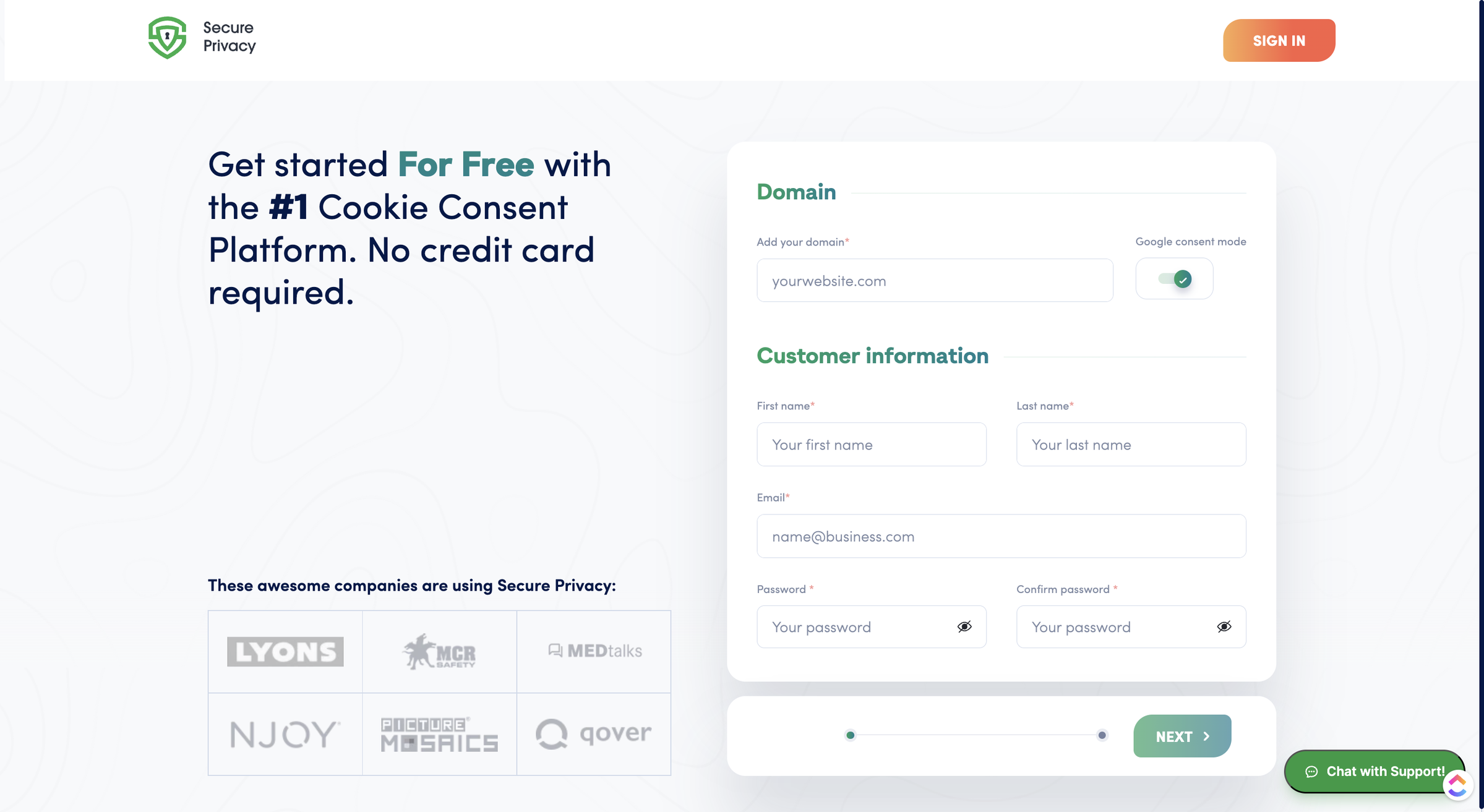
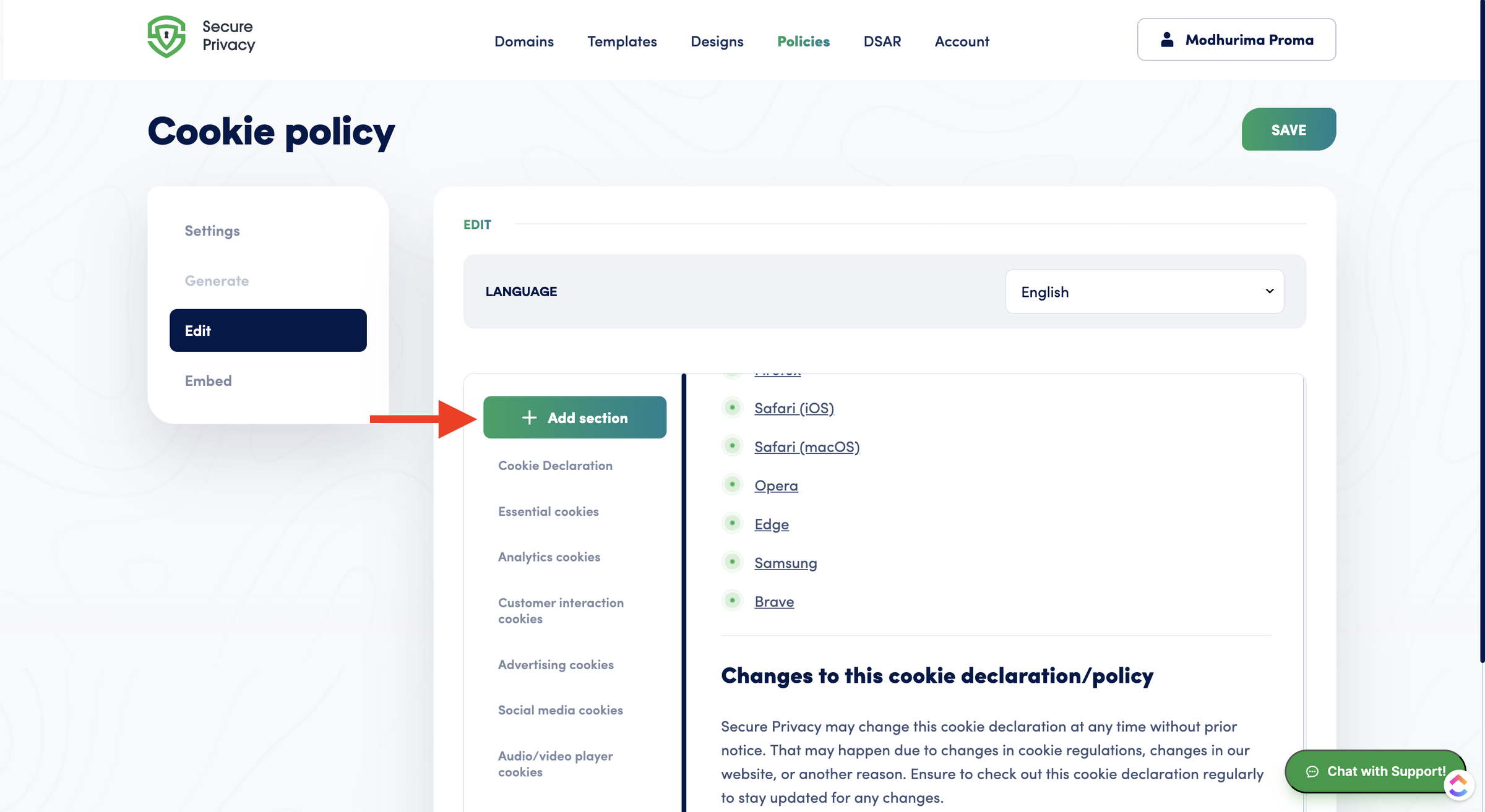
Secure Privacy’s own getting-started guide documents a four-step path from signup to a working integration:
1. Create a Secure Privacy account for free.
2. Add all your legal documents in the policies section.
3. Go to the Installation page and choose your installation method.
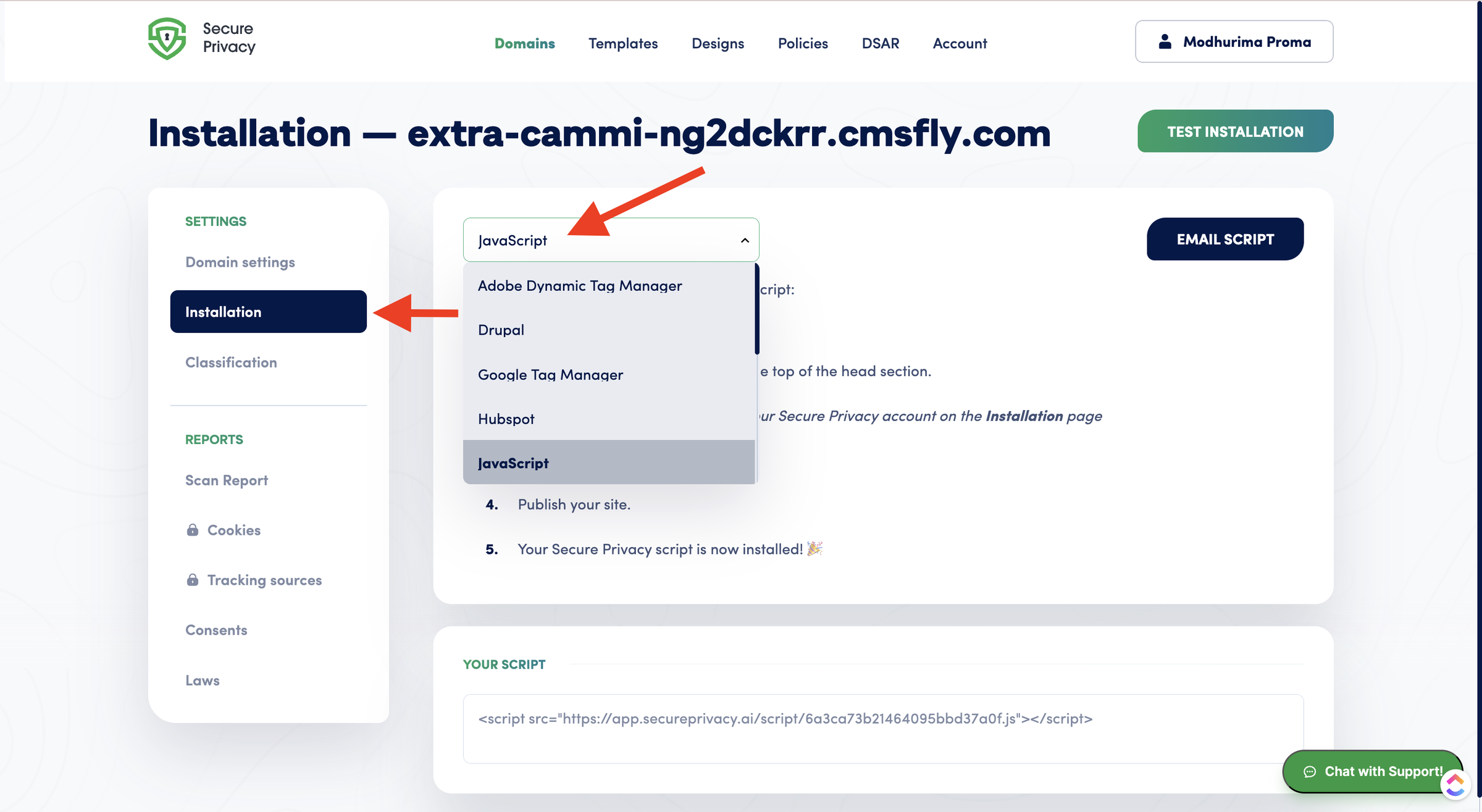
4. Install the code on your website.
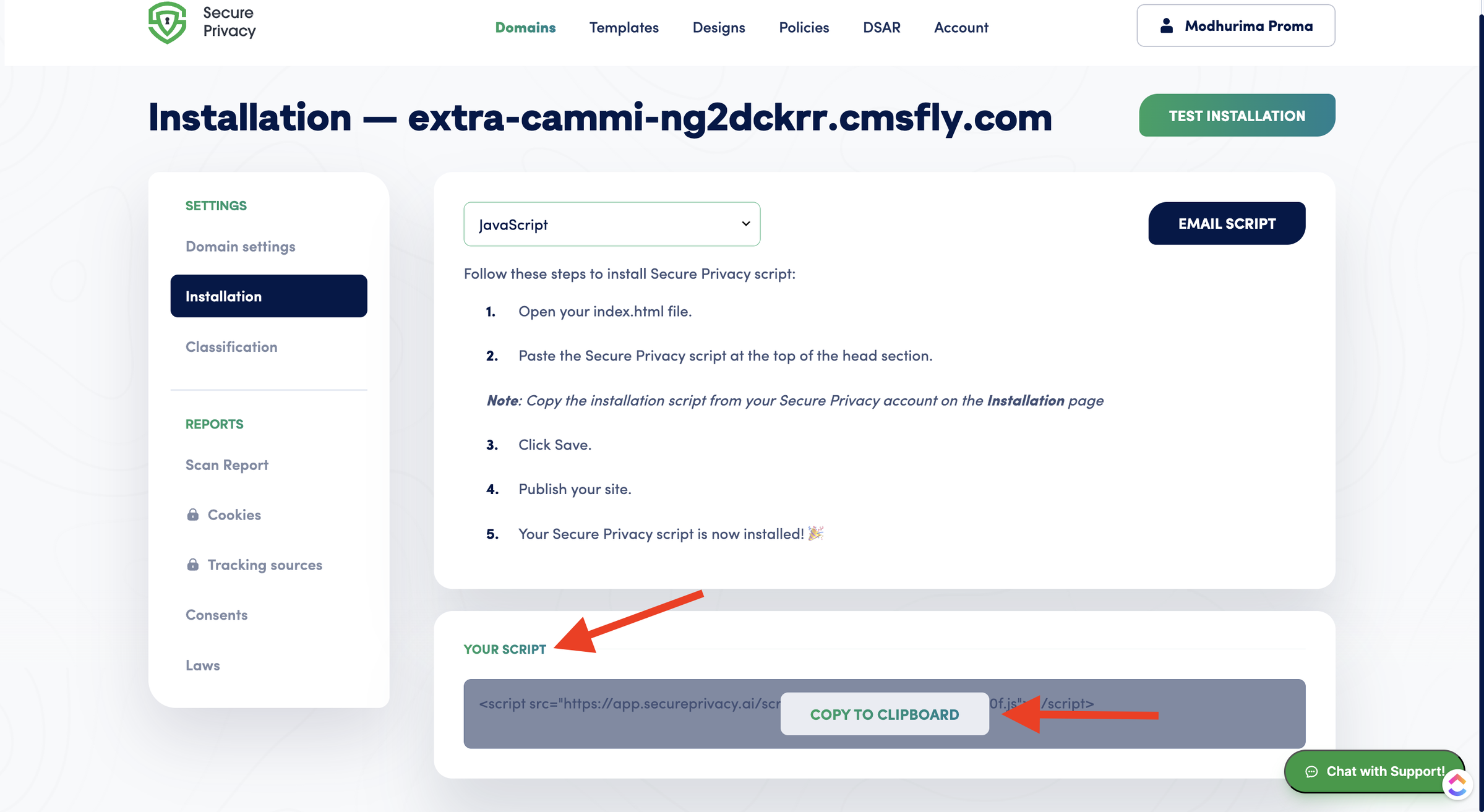
The number to sit with is what those steps assume. Secure Privacy’s documented quick-start centers on creating an API key and wiring the platform in through its API Reference. That assumes a developer is in the loop, not a marketer pasting one snippet.
Secure Privacy’s own JavaScript-installation guide did not resolve when I checked it. So its no-code banner path is thin in first-party docs, and no official setup-time estimate is published.
A current third-party walkthrough fills that gap. TermsFeed (May 2026) documents a six-step, no-code setup that runs from account creation to a verified, blocking banner. It reports that most sites finish in under 15 minutes. So the no-code path exists and is fast. It is Secure Privacy’s own documentation that leans developer-first.
The Learning Curve: Who Will Struggle
The learning curve splits cleanly by what you need. Teams that only want cookie consent hit real friction, captured in three recurring reviewer complaints:
-
“Its interface is a little complex.”
-
“The tool has a lot of customization options, which can be overwhelming.”
-
Viewing a visitor’s preferences is “a little cumbersome.”
Non-English-speaking administrators struggle further. The admin dashboard is English-only, even though banners render in 70+ languages. The flip side is fair. The teams that get value fast are the mid-market and enterprise buyers who actually use the governance breadth. If you came for a simple banner, expect a ramp. If you came for governance, the complexity is the product working as intended.
How Much Does Secure Privacy Cost?
Secure Privacy bills per domain, per month, and annual billing adds two free months. The paid tiers are Small at $15, Business at $59, and Advanced at $249 per domain. Business is flagged the “most popular” plan. A Free tier ($0, 10 domains, 500 consents per month) and a custom Enterprise plan sit at either end.
The model stacks for multi-site owners, because every domain is a separate license. A $59-to-$249 gap then forces a hard jump between the mid and top tiers.
| Plan | Price (USD/mo, per domain) | Consents/mo | Notable inclusions and gates | Best for |
|---|---|---|---|---|
| Free | $0 | 500 | 10 domains, 1 legal template, 40+ banner languages, Secure Privacy branding, manual blocking only | Pilots and small single sites |
| Small | $15 | 5,000 | Unlimited domains, 5 templates, IAB TCF 2.3, remove branding, automatic blocking and banner auto-translation | Single or few-domain SMBs |
| Business | $59 (“Most popular”) | 50,000 | All 55+ templates, DSAR, privacy policies, cross-domain consent, Custom CSS | Agencies and mid-market |
| Advanced | $249 | 5,000,000 | Audit logs, scan behind login, SSO, white-label banner, dedicated success manager | Enterprise |
| Enterprise | Custom | Unlimited | Global infrastructure, custom SLA, dedicated team | Large or complex orgs |
All pricing above is live-verified from Secure Privacy’s pricing page. Two footnotes shape the real cost. First, the governance professional services are paid add-ons on Business and Advanced, not included in the headline price. These are Vendor Risk Management, DPO as a Service, Data Mapping, and Training. Second, the pricing page’s own privacy-signals widget shows Global Privacy Control and Do Not Track both “Disabled” by default. So GPC is a documented feature you turn on, not an out-of-the-box behavior.
On value, the verdict is genuinely split. For a single or few-domain user on Free or Small, this is competitive. One G2 reviewer calls it “the most cost-effective cookie compliance solution available,” which holds at the entry tiers.
For multi-site owners and agencies it becomes premium to expensive, because every domain is its own license with no flat bundle. Five domains on the Business plan runs $295 per month, roughly $3,540 per year (illustrative, at list price). That math drives the recurring “could be more pocket-friendly” complaint from mid-sized businesses.
The Free Plan and What It Actually Includes
Yes, Secure Privacy has a real free plan, and it is generous on domains: 10 domains, 500 consents per month, and no credit card. The gates are where the catch lives. The Free tier includes 1 legal template, carries Secure Privacy branding, and offers manual cookie blocking only.
Automatic pre-consent blocking and banner auto-translation both start on the Small plan. As a way to pilot the banner and run a scan, the Free tier is a legitimate entry point. As a place to run a real, branded, auto-blocking deployment, it is not.
The $59-to-$249 Tier Gap
The pricing structure has one sharp edge that reviewers name directly. They report “no intermediate option” between the $59 Business plan and the $249 Advanced plan. Business at $59 per domain includes DSAR, privacy policies, cross-domain consent, and Custom CSS.
The next step up, Advanced at $249 per domain, adds audit logs, SSO, scan-behind-login, white-label, and a dedicated success manager. Nothing sits in between. A team that needs one Advanced feature, say SSO or audit logs, must jump more than four times in price per domain to get it. For a single site that is a budgeting decision; across several domains it compounds.
What Are the Pros of Secure Privacy?
Secure Privacy’s genuine strengths are privacy-governance depth that budget CMPs lack, an accurate and well-reviewed cookie scanner, and deep certification. SOC 2 Type II, Google CMP Gold Tier, and IAB TCF are backed by strong independent review aggregates. Specifically:
-
Privacy-governance automation budget CMPs do not offer: DSAR, DPIA, vendor and risk management, and Article 30 (RoPA) records put it in a different and larger category than a cookie tool, the clearest reason enterprise legal teams shortlist it.
-
An accurate cookie scanner with pre-consent blocking: The deep-site scanner detects cookies, pixels, trackers, and iframes with change monitoring, and reviewers consistently praise its detection quality.
-
Certification and trust depth: SOC 2 Type II, Google CMP Partner (“Gold Tier”), and IAB TCF certification are real, audited credentials, paired with strong aggregates (5.0/5 on Capterra across 82 reviews; 4.9/5 on G2 across 115, both verified against the live SERP).
-
Regulatory and language breadth: Coverage spanning 55+ laws, 95+ countries, and 70+ banner languages suits genuinely global deployments.
-
A genuine free tier for testing: 10 domains, 500 consents per month, and no credit card make it easy to evaluate the banner and scanner before paying.
What Are the Cons of Secure Privacy?
Secure Privacy’s main limitations are per-domain pricing that stacks for multi-site owners and a $59-to-$249 tier gap with no intermediate plan. The other two are an English-only admin dashboard despite the 70+ banner-language promise, and interface complexity that overwhelms teams who only need cookie consent. In detail:
-
Per-domain billing with no flat multi-domain bundle: Each domain is its own license, so cost rises linearly with site count: five domains on Business is roughly $3,540 per year at list (illustrative). Multi-site owners and agencies feel this first.
-
The $59-to-$249 gap with no intermediate plan: Needing a single Advanced feature means jumping more than four times in price per domain.
-
An English-only admin dashboard: Banners support 70+ languages, but the admin UI does not, which multiple reviewers cite as a real obstacle for non-English teams.:
-
Interface complexity and feature overwhelm for cookie-only teams: “Complex,” “overwhelming,” and “cumbersome” recur across reviews from buyers who wanted a banner, not a governance suite.
-
Banner customization gated behind upper tiers: Custom CSS is Business-and-up; white-label is Advanced-only, so entry-tier banners are less flexible than reviewers want.
-
Governance professional services are paid add-ons: Vendor Risk Management, DPO as a Service, Data Mapping, and Training cost extra on top of Business and Advanced, so the full governance story is not the headline price.
It is worth saying plainly that some of these “limitations” are strengths for the right buyer. Governance depth and granular controls are exactly what enterprise legal teams pay for. They only read as obstacles for SMB and cookie-only buyers who never needed them.
What Do Real Users Say About Secure Privacy?
Secure Privacy is strongly rated across platforms: 5.0/5 on Capterra (82 reviews), 4.9/5 on G2 (115 reviews), and 4.8/5 on Trustpilot (53 reviews). Software Advice and GetApp show the same 5.0/5 (82), drawn from the shared Gartner review pool. Praise concentrates on the scanner and governance depth; criticism concentrates on per-domain cost, the tier gap, the English-only dashboard, and interface complexity.
One caveat on sourcing. There is almost no organic Reddit or forum discussion of Secure Privacy. Review platforms, not community threads, are the primary source of user voice here.
Start with a genuinely positive note on the core job.
“Cookie consent management is painless and it helps with GDPR and CCPA.” (Capterra)
A mixed, context-dependent take captures the pricing nuance well.
“The most cost-effective cookie compliance solution available.” (G2) This holds at the Free and Small tiers; it does not at Business and Advanced once per-domain billing stacks.
A clear negative lands on the structural cost issue.
“No intermediate option between the Business plan at $59 and the Advanced plan at $249.” (G2)
The most-cited usability complaint is about language.
“The UI is only available in English and it’s not my main language.” (Capterra)
Aggregate ratings are drawn from the Capterra, G2, and Trustpilot profiles. All three star ratings and counts match the live search results as of June 2026.
Is Secure Privacy Worth It?
Secure Privacy is worth it for mid-market and enterprise teams that need governance automation and certified, audit-grade consent across many jurisdictions. It is harder to justify for cost-conscious, multi-domain, or simplicity-first buyers who will feel the per-domain billing and the dashboard complexity.
Choose Secure Privacy if:
-
You need DSAR, DPIA, vendor risk, and RoPA governance alongside cookie consent, not just a banner.
-
You are mid-market or enterprise and need SOC 2-backed, audit-grade consent proof across 55+ laws.
-
You are a marketing team that needs certified Google Consent Mode v2 and IAB TCF at scale across regions.
-
You can start on the free tier and grow into paid governance over time.
Look elsewhere if:
-
You run several domains on a budget and need flat, predictable pricing instead of per-domain stacking.
-
You want a simple, all-features-on-every-plan cookie tool without the governance breadth you will not use.
-
Your admin team is not English-first and needs a localized dashboard.
-
You only need one Advanced feature but cannot justify the $59-to-$249 jump per domain.
If any of those conditions describe you, compare the best Secure Privacy alternatives before you commit. On balance, Secure Privacy is a strong choice for governance-led buyers who need certified, defensible compliance across jurisdictions. It is a costly, heavy one for teams who only ever wanted a clean cookie banner.
Considering an Alternative to Secure Privacy?
Secure Privacy’s per-domain billing, the $59-to-$249 gap, and its governance complexity do not fit every buyer. Consently answers each limitation directly: flat multi-domain pricing, every feature on every plan, one simple dashboard, and a guided terms-and-conditions generator on every tier.
Secure Privacy stacks a separate license per domain. Consently instead bundles multiple sites into one flat price: five domains for $199 per year and ten for $499. That answers the per-domain cost complaint that hits agencies and multi-site owners. Where Secure Privacy gates basics behind the $59-to-$249 jump, Consently includes every feature on every plan. IAB TCF, Google Consent Mode v2, weekly scanning, three policy generators, and live chat are all in.
There is no tier to climb for one capability. And where reviewers call Secure Privacy “complex,” Consently is a purpose-built cookie tool with a single dashboard and no governance suite to learn.
In honesty, Secure Privacy is genuinely the stronger product in several areas, and Consently does not try to match them. Secure Privacy leads on privacy-governance automation (DSAR, DPIA, vendor risk, RoPA) and certification maturity (SOC 2 Type II, Google CMP Gold Tier).
It also leads on banner-language breadth (70+ versus Consently’s 35) and documents Global Privacy Control support, which Consently does not offer at all. Consently is the better fit for the cost-conscious, simplicity-first buyer, not a like-for-like replacement for an enterprise governance platform.
For a feature-by-feature breakdown, see Consently vs Secure Privacy, side by side. If the pricing and simplicity case fits, you can check Consently’s pricing and start a free 14-day trial with no credit card.
FAQs
Is Secure Privacy good for small businesses?
For a single or two-domain small business, yes: the free tier and the $15 Small plan are affordable entry points. The catch is scale. Per-domain billing climbs quickly with more sites, and the governance breadth can feel “overwhelming” for a team that only needs cookie consent.
Is Secure Privacy better than its alternatives?
Secure Privacy leads on governance depth (DSAR, DPIA, vendor risk) and certification maturity (SOC 2 Type II, Google CMP Gold Tier). So for governance-led buyers, it often is. It trails on per-domain cost and simplicity. For a structured head-to-head, see Consently vs Secure Privacy.
Does Secure Privacy have a free plan?
Yes, Secure Privacy offers a real free plan: 10 domains, 500 consents per month, and no credit card required. It is gated, though. The Free tier includes only 1 legal template, carries Secure Privacy branding, and supports manual cookie blocking only. Automatic blocking and auto-translation start on the Small plan.
Is Secure Privacy easy to use?
Secure Privacy is capable but not the simplest option. Reviewers call the interface “complex,” and the documented quick-start is API and developer oriented. It is strong for teams that use its full governance breadth, and harder for those who want a single, simple cookie tool live quickly.
Does Secure Privacy support multiple languages?
The banner and policies support 70+ languages, which is excellent for global sites. The admin dashboard, however, is English-only, a friction point reviewers consistently cite. If your team needs a localized admin interface, not just localized banners, this is a real gap to weigh.
What are the best alternatives to Secure Privacy?
The category surfaces several: Cookiebot, Usercentrics, CookieYes, Termly, iubenda, OneTrust, and Osano, each with a different price and feature profile. For a full rundown of how they compare on cost, features, and fit, see our roundup of the best Secure Privacy alternatives.

