
ConsentManager is best for publishers, agencies, and ad-supported sites that need certified IAB TCF signaling. Skip it if you want a guided three-step setup or a flat all-features price. Paid plans start at EUR 23 per month, but the defining ad-tech features begin at EUR 59. The free plan covers 3,000 views on one site.
Our verdict: the most certified ad-tech CMP in the mid-market, and overkill for a simple site. This review covers its features, live pricing and the gating catch, the real setup steps, evidenced pros and cons, and who it actually fits.
Our Verdict and Scorecard
ConsentManager scores 3.9 out of 5 overall. It earns its highest marks on compliance and ad-tech certification, and its lowest on pricing predictability for non-publishers.
| Dimension | Score |
|---|---|
| Compliance and framework coverage | 4.5/5 |
| Cookie scanning and auto-blocking | 4.0/5 |
| Banner and consent experience | 4.0/5 |
| Ease of setup and integrations | 3.5/5 |
| Pricing and value | 3.0/5 |
| Performance and reliability | 4.5/5 |
| Support and reputation | 3.5/5 |
| Overall | 3.9/5 |
Verdict: the most certified ad-tech CMP in the mid-market, and overkill for a simple, non-advertising site.
We score every consent platform across seven weighted dimensions. The evidence is the live pricing page, product documentation, framework and certification records, a page-speed measurement, and verified user reviews. See our full methodology for the weights and rubric.
Disclosure: this review is published by the Consently team, which competes with ConsentManager in the consent-management category. We scored it with the same method we apply to every product, and we credit its genuine strengths from real evidence.
What Is ConsentManager?
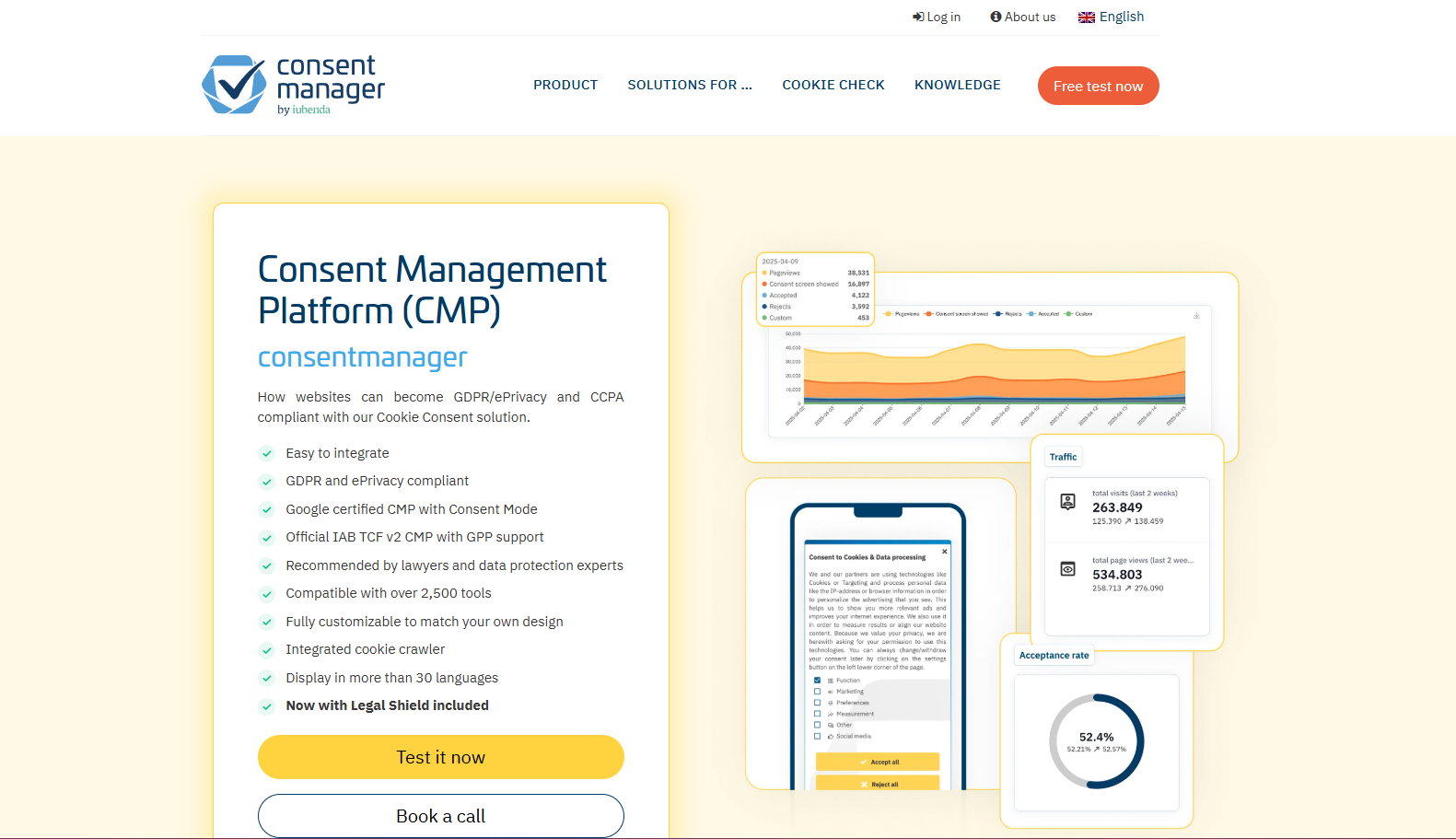
ConsentManager is a software-as-a-service consent management platform (consentmanager.net). It collects, stores, and manages visitor consent across websites, mobile apps, and connected TV. Its design centers on IAB TCF certification for ad-supported sites. It stores all consent data on its own servers in the European Union.
The product goes well past a cookie banner. A customizable, script-blocking banner sits at the core. It is backed by the Cookie Crawler (the “Cookie Robot”), which scans a site and classifies cookies. ConsentManager markets a database of more than three million cookies and 2,500 vendors. The platform is a registered IAB CMP, ID 31, and a Google-certified CMP partner with Consent Mode v2. It signals consent to advertising partners and manages consent for in-app and connected-TV environments. It also ships a broader compliance suite with a whistleblowing tool, an accessibility scanner, and a compliance monitor. For ad-supported sites, that certified signaling is the reason ConsentManager exists. It is one option worth weighing among the best consent management platform choices for publishers.
Who ConsentManager Is For
ConsentManager fits a specific, ad-tech-leaning buyer. These are the strongest matches.
-
Publishers and ad-supported media sites that run programmatic advertising and need a registered IAB TCF and GPP CMP to keep serving ads.
-
Online shops on DACH and EU commerce platforms (Shopify, Magento, WooCommerce, Shopware, PrestaShop) that want plugin-based blocking before consent.
-
Agencies managing many client sites that need branded, multilingual banners and white-label deployment.
-
International companies operating across jurisdictions that want one banner serving GDPR, CCPA, and LGPD by geolocation, with EU-only data residency.
-
Teams that care about acceptance-rate optimization, since built-in A/B testing and machine-learning consent optimization aim directly at lifting opt-in rates and ad revenue.
Who ConsentManager Is NOT For
ConsentManager is a poor fit for several buyers. Naming them matters more than any feature list.
-
First-time or non-technical site owners who want a guided three-step setup. The core flow runs about nine documented stages and centers on mapping vendors to purposes, which is real work.
-
Single-site owners who do not run programmatic ads but would still pay per-domain pricing. The defining features are also gated to the EUR 59 tier.
-
Buyers who need cookie-policy and terms-and-conditions documents generated in the tool. ConsentManager generates a privacy policy only.
-
US-first or CCPA-first buyers who expect non-EU setup to be fully automated and richly documented. Independent reviewers note the CCPA and LGPD documentation is thinner than the GDPR guidance.
What Are the Key Features of ConsentManager?
ConsentManager’s standout features are dual IAB TCF v2.2 and v2.3 certification and the Cookie Crawler with automatic script blocking. A third is built-in A/B testing with machine-learning consent optimization. It also covers multiple frameworks by geolocation across web, mobile app, and connected TV from a single configuration.
Each feature carries real depth and real limits, so the sections below evaluate them rather than list them.
IAB TCF v2.2 and v2.3 Certification
ConsentManager is a registered IAB Europe CMP, ID 31, certified for both TCF v2.2 and v2.3. The platform auto-transitioned customers to v2.3 in February 2026, ahead of Google’s 28 February 2026 requirement. Holding both certifications is genuinely uncommon, and it matters for ad-supported sites. In practice, the banner encodes a visitor’s purpose and vendor choices into a TC string. It then passes that string to ad servers and demand-side platforms, and syncs the IAB Global Vendor List so vendor data stays current. The gating is the catch. IAB TCF and GPP support begin on the Essential plan at EUR 59 per month and are struck through on both Free and Starter. The capability ConsentManager is best known for sits behind its third tier.
Cookie Crawler and Automatic Blocking
The Cookie Crawler (marketed as the “Cookie Robot”) scans a site and pre-populates the vendor list. ConsentManager backs it with a database of more than three million cookies and 2,500 vendors. Crawl frequency scales by tier, from one scan per week on Free to ten per day on Essential and up to unlimited on Ultimate. Once consent is configured, the platform blocks scripts and cookies before consent and reloads them only after a visitor agrees. The crawler earns its reputation. A verified Capterra reviewer noted the cookie crawler “reliably finds tools,” and that matches what the documentation shows. One honest caveat survives the praise. After the crawl runs, you still classify unknown cookies by hand and assign each vendor to a purpose and legal basis. The scan starts the job rather than finishing it.
A/B Testing and Consent Optimization
ConsentManager builds A/B testing and an automatic “consent optimizer” directly into the platform. The machine-learning optimizer shifts traffic toward the banner variant that earns the highest acceptance rate. It measures both acceptance and bounce rate as it goes. ConsentManager reports an average acceptance-rate uplift of “over 15%.” That is the vendor’s own figure, not an independently audited one. The capability itself is real and revenue-relevant. Most mid-market CMPs do not offer machine-learning consent optimization at this price, so it is a genuine differentiator. The same gate applies. A/B testing begins on Essential at EUR 59 per month and is struck through on Free and Starter.
Multi-Framework and Geolocation Coverage
One ConsentManager configuration serves a GDPR opt-in banner, a CCPA opt-out banner, and an LGPD banner, switching by IP geolocation. It covers more than 20 jurisdictions, including FADP and PIPEDA. All consent data stays on ConsentManager’s own EU servers, which the company frames as “Schrems II safe.” The honest limit shows up outside Europe. Independent reviewers report that CCPA and LGPD documentation is “noticeably thinner” than the GDPR guidance. Non-EU setup also needs more manual configuration. The framework breadth is real; the support for using it well is uneven by region.
Server-Side and Client-Side Deployment
ConsentManager runs in two modes, and the choice is a genuine edge at this price. Client-side is the standard option: a JavaScript tag loads in the browser, usually through a tag manager. Server-side processes consent before content reaches the browser, integrated at the server or CDN level. The independent reviewer TermsFeed calls server-side deployment a differentiator at this price point. It suits high-traffic publishers and ad-tech operators who want faster load times and stronger protection against script-level consent bypasses. Most SMB-focused CMPs offer client-side only.
Mobile App and Connected TV SDKs
ConsentManager reaches surfaces most SMB-focused CMPs never touch. It ships in-app SDKs for Android, iOS, Unity, React Native, and Flutter, plus AMP support and an HbbTV and connected-TV SDK. The SDK passes the main programmatic signals, supporting IAB TCF v2.2, GPP, Google Consent Mode v2, and AdChoices. For a publisher or app developer who needs consent inside a mobile app or on a smart TV, that reach is a genuine advantage. The evidence on reliability splits, so report both sides. One verified Capterra software engineer integrated the SDK “with minimum code changes” and praised the support. A separate Capterra reviewer running an app reported the React Native SDK “never worked” across a multi-month support struggle. Read the negative as an edge-case warning on hard app integrations, not as proof the SDKs fail across the board.
Consent Logs and Reporting
ConsentManager stores audit-ready consent logs on its EU servers. Each entry records a timestamp, the banner version, per-purpose and per-vendor choices, the TC string, and an anonymized visitor ID. Retention runs from 13 to 36 months by tier. That record supports GDPR Article 7, and the dashboard reports opt-in and opt-out rates alongside A/B results. The weak spot is polish. Reviewers and independent reviews describe the reporting interface as dated. Custom reporting leans on exporting data (CSV, PDF, or API on Professional) into external tools. The compliance record is solid; the analytics layer around it looks its age.
How Easy Is ConsentManager to Use?
Getting from signup to a live ConsentManager banner runs about nine documented stages. One of them maps each vendor to a purpose and legal basis. Day-one setup is moderate rather than three-click, though day-to-day technical support earns frequent praise once you are running.
The two sections below walk the documented path, then compare it step for step against a preset-led alternative.
Getting Started: From Signup to a Live Banner
Working from ConsentManager’s own help documentation, the path from signup to a live banner runs through roughly nine stages.
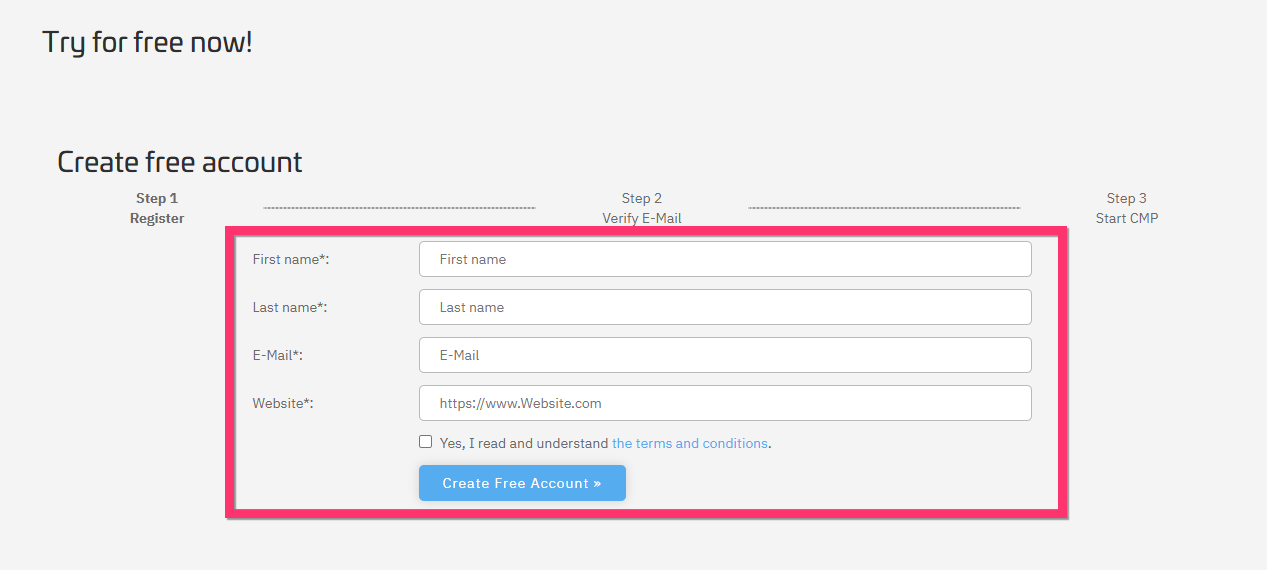
1. Create an account
Register for an account and verify your email using the confirmation link sent to your inbox. Without verification, you won’t be able to access the platform.
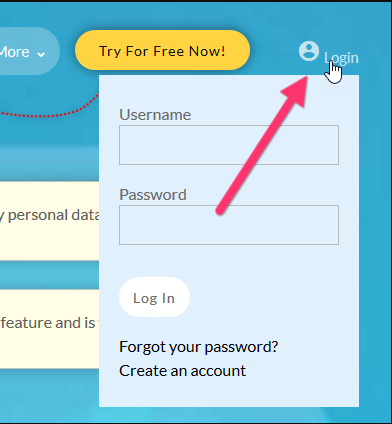
2. Login
Once your account is verified, log in to the dashboard to begin setting up your consent management platform.
3. Create a CMP
Set up a CMP (Consent Management Platform), which acts as the central place for all your settings, including legal configuration, design, and consent behavior. Each CMP will generate a script for your website.
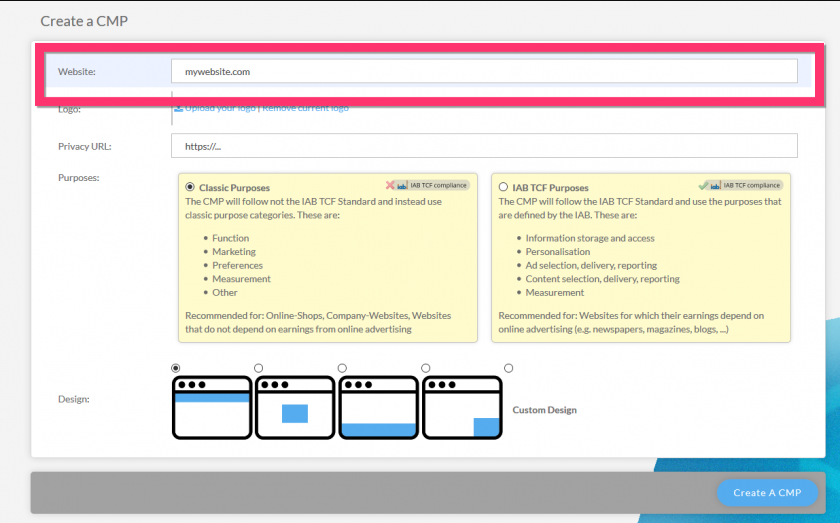
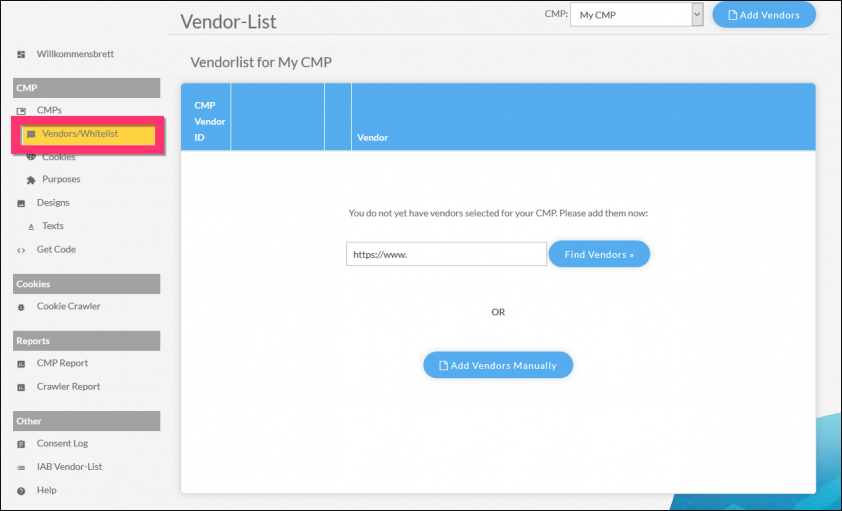
4. Manage vendors and cookies
Allow the system to run an initial scan of your site. After the scan, review and assign detected cookies and vendors to the appropriate purposes.
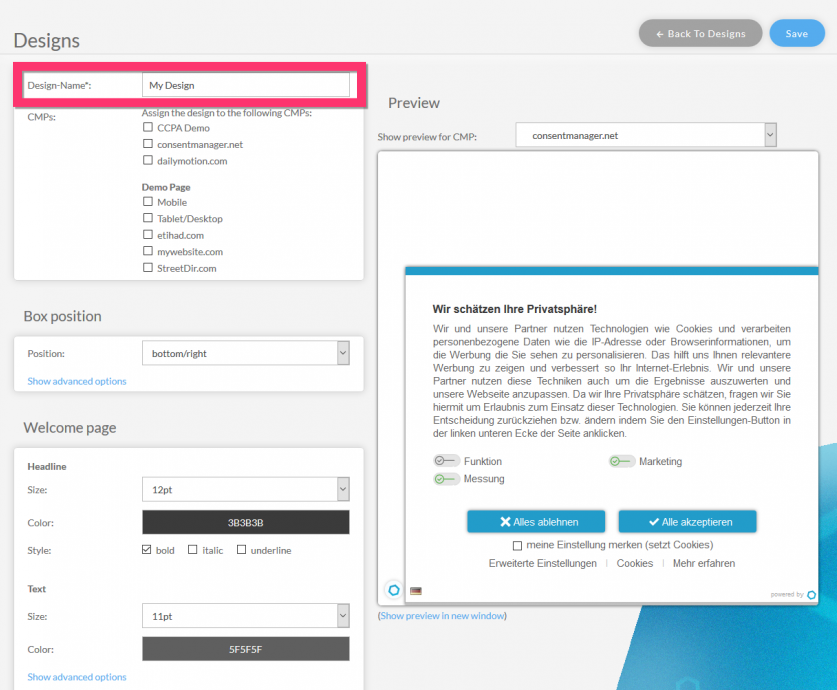
5. Create your own design and texts
Customize the look and messaging of your consent banner. You can adjust styles, wording, and layout to match your brand and compliance requirements.
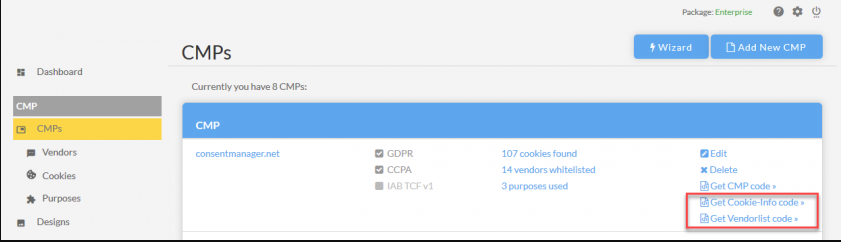
6. Integrate the CMP code into your website
Copy the generated CMP script and add it to your website. This can be done directly in your site’s code, through a tag manager, or via a supported plugin.
7. Block third-party codes and cookies
Configure your website so third-party scripts (like analytics or ads) are blocked until user consent is given, ensuring proper compliance.
8. Update your privacy policy
Revise your privacy policy to clearly state that you are using consentmanager and explain how user consent is collected and managed.
9. Insert a “Do not sell my personal information” link for CCPA compliance
If applicable, add a visible link on your website labeled “Do not sell my personal information” to meet CCPA requirements.
A few prerequisites gate the start. You need an active account, a registered domain, and access to the site header or a tag manager. IAB-TCF-registered vendors require the Essential plan or above. The learning curve splits by site type. On a simple site without TCF, setup is genuinely fast: one G2 reviewer reported a banner live in about an hour.
A Trustpilot reviewer found the GoDaddy install easy. Both track the documented light path you get when you skip vendor mapping. The other half of the story is a 47-minute official setup webinar. Its existence tells you a full TCF and ad-tech configuration is a real, multi-step project, not a quick install.
How Much Does ConsentManager Cost?
ConsentManager runs from a free plan (3,000 views, one site) to EUR 219 per month for Professional, plus a custom Ultimate. The defining catch is that IAB TCF and A/B testing start at the EUR 59 Essential plan, not on Free or Starter. Pricing is metered by page views.
| Plan | Price (monthly) | Sites/Apps | Monthly views | Key inclusions and gating |
|---|---|---|---|---|
| Free | EUR 0 | 1 | 3,000 | GDPR banner, premade designs only, 1 crawl/week, Google Consent Mode v2, ticket support. No IAB TCF, no A/B testing, no white-label. |
| Starter | EUR 23 | 1 | 100,000 | Customizable designs, 3 crawls/day, Privacy Policy Generator, Legal Shield, ticket support. Still no IAB TCF, no A/B testing. |
| Essential (“Very Popular”) | EUR 59 | Up to 3 | 1,000,000 | Adds IAB TCF and GPP, A/B testing, whistleblowing tool, up to 5 languages, 10 crawls/day, ticket and email support. No white-label, no extra user accounts. |
| Professional | EUR 219 | Up to 20 | 10,000,000 | 50 crawls/day, 10 user accounts, phone support, personal account manager, 32 languages. No white-label. |
| Ultimate | Custom | Unlimited | Unlimited | Unlimited everything, full white-label, personal account manager, 99.9% SLA. |
Paid plans include a 14-day free trial with no credit card. Metered overage runs per additional thousand views beyond the allowance. It drops from EUR 0.11 on Starter to EUR 0.05 on Essential to EUR 0.02 on Professional and Ultimate. Free and Starter cover a single site each, and multi-site coverage starts on Essential. White-label is gated all the way to Ultimate, struck through on every plan below it. One bundling gap is worth flagging. ConsentManager generates a privacy policy only, with no cookie policy or terms-and-conditions generator at any tier. The Privacy Policy Generator itself starts on Starter rather than Free.
On value, the read splits cleanly by buyer. For a publisher, Essential at EUR 59 per month covers three domains with full TCF and A/B testing. That is competitive against enterprise CMPs, where OneTrust runs roughly $10,000 or more per year. For a single non-ad-tech site, the same product looks pricier and less predictable than flat, all-features-included rivals. The defining features sit behind the EUR 59 tier, and per-view overage compounds as traffic grows. A busy agency managing many high-traffic client sites feels that compounding most.
What Are the Pros of ConsentManager?
ConsentManager’s genuine strengths are dual IAB TCF v2.2 and v2.3 certification, built-in A/B testing at mid-market pricing, and broad reach across mobile-app and connected-TV consent. It also offers competitive three-domain pricing on Essential. Each one is specific and evidenced:
-
Dual IAB TCF v2.2 and v2.3 certification with an automatic v2.3 transition before Google’s February 2026 deadline. Few CMPs hold both, and for ad-supported sites this is a real, hard-to-fake credential (TermsFeed).
-
Built-in A/B testing and machine-learning consent optimization, which most mid-market CMPs lack at this price. ConsentManager reports an average acceptance-rate uplift of “over 15%,” stated as a vendor claim (ConsentManager).
-
Broad surface reach: web plus mobile-app SDKs (Android, iOS, Unity, React Native, Flutter), AMP, and connected-TV and HbbTV. Multi-framework geolocation runs in one configuration (ConsentManager).
-
Server-side and client-side deployment, with server-side a genuine edge at this price for high-traffic publishers (TermsFeed).
-
Competitive multi-domain ad-tech pricing. Essential covers three domains with full TCF plus A/B testing at EUR 59 per month, well under enterprise CMP pricing (ConsentManager pricing).
-
Frequently praised day-to-day support and a reliable crawler. One G2 reviewer called support “fast enough” with setup “too easy” compared to rivals. A Capterra reviewer cited an excellent Shopify integration and a crawler that reliably finds tools, and another described a video onboarding call within 24 hours.
What Are the Cons of ConsentManager?
ConsentManager’s main limitations are a configuration-heavy setup, ad-tech features gated to the EUR 59 tier, and per-view pricing that compounds. It also lacks policy generators beyond privacy, and it carries recurring contract complaints. Each one below is stated at the severity the evidence supports.
-
Configuration-heavy onboarding. The core flow runs about nine stages and hinges on manually mapping each vendor to a purpose and legal basis. A 47-minute official setup webinar underlines the learning curve for a full TCF configuration.
-
The defining features are gated. IAB TCF, GPP, and A/B testing all begin on Essential at EUR 59 per month and are struck through on Free and Starter. Cheaper-tier buyers cannot reach the capabilities ConsentManager is known for.
-
No cookie-policy or terms-and-conditions generator. ConsentManager generates a privacy policy only, and even that generator starts on Starter rather than Free. Buyers who need a full document set look elsewhere or buy it separately.
-
Per-domain and per-view pricing compounds. Overage is billed per thousand views on every paid tier, which adds up for high-traffic sites and multi-client agencies. Reviewers also report the plan structure is hard to parse on the pricing page.
-
Recurring contract and dispute-support friction. Across Trustpilot and Capterra, reviewers describe billing continuing after cancellation, refusals of refunds once a service was used, and slow responses on disputes. One verified account cited “over 2,200 euros gross” billed by a contract’s end. ConsentManager publicly rebuts these, stating that some reviewers use rating portals to pressure an early contract exit, and day-to-day technical support is genuinely well reviewed. Two smaller limits round it out: the non-EU CCPA and LGPD documentation is thinner, and the reporting interface looks dated.
What Do Users Say About ConsentManager?
ConsentManager review sentiment is broadly positive on capability and day-to-day support, and mixed on interface polish and contract handling. Across platforms the picture is consistent rather than glowing. The public US review base is also thin and EU-skewed.
The current ratings are Trustpilot 3.8/5 across 30 reviews and Capterra 4.1/5 across 11 reviews (ease of use 4.0, customer service 4.2). There is also a single 5-star G2 review, plus GetApp and Software Advice both at 4.1/5 across 11. There is no ConsentManager profile on TrustRadius, and the volume overall is modest, so individual reviews carry weight.
The excerpts split the way the ratings do. On the positive side, a verified G2 reviewer praised the support and said setup was “too easy” compared to rivals. A Capterra e-commerce manager praised the Shopify integration and a reliable crawler. A Capterra software engineer who integrated the mobile SDK said it asked for consent with “minimum code changes” and praised the technical support. On the negative side, a 1-star Capterra reviewer running an app reported that their “React Native SDK never worked” across months of support. The cross-platform contract-and-billing complaints described above recur on Trustpilot. One Reddit user mentioned switching away to Termly, with ConsentManager lingering in their Analytics configuration afterward. The throughline is clear: strong on core capability and responsive on routine support, weaker on hard integrations and contract handling.
What’s New in ConsentManager (2026)?
Two genuine, recent changes matter to a 2026 buyer. The first is ownership. ConsentManager was founded by Jan Winkler in 2018 and rooted in Västerås, Sweden. It joined iubenda under the team.blue group in October 2022. G2 and iubenda’s seller pages now list the product as “consentmanager by iubenda.” It keeps its own brand, pricing, and CEO. Still, the iubenda ownership is worth knowing if you are weighing vendor stability or already evaluating iubenda or other team.blue products.
The second is the IAB TCF v2.3 transition. ConsentManager auto-moved all customers to TCF v2.3 in February 2026, ahead of Google’s 28 February 2026 requirement, so existing customers stayed compliant without manual work. Both updates are well sourced. Independent reviews and the iubenda seller pages corroborate the founder and ownership history. The product’s own documentation confirms the TCF v2.3 transition.
Is ConsentManager Worth It?
ConsentManager is worth it for publishers, agencies, and ad-supported sites that need certified IAB TCF and GPP signaling and A/B-optimized consent rates. It is harder to justify for non-technical single-site owners who want a fast, all-features-included setup.
The decision comes down to one question. Do you need ad-tech depth enough to absorb the configuration work and the tier gating that come with it?
Choose ConsentManager if:
-
You run programmatic ads and need a certified TCF v2.2 and v2.3 CMP that signals correctly to ad partners.
-
You want native A/B testing and machine-learning optimization to lift acceptance rates and ad revenue.
-
You need consent inside a mobile app or on connected TV.
-
You want EU-only data residency on the vendor’s own servers.
Look elsewhere if:
-
You are a non-technical SMB wanting a guided three-step setup without vendor mapping.
-
You need cookie, privacy, and terms documents generated in one tool rather than a privacy policy alone.
-
You want flat, all-features-on-every-plan pricing without TCF gating or per-view overage.
-
You are US or CCPA-first and want non-EU setup fully automated. In that case, start with a list of
ConsentManager remains the stronger choice for ad-tech-heavy publishers who need genuine TCF depth and acceptance-rate optimization. Teams that prioritize speed to launch, an all-in-one document set, or flat predictable pricing should weigh a simpler alternative.
Considering an Alternative to ConsentManager?
If ConsentManager’s setup depth, tier gating, or per-view pricing is your sticking point, Consently answers those limitations directly. It bundles cookie, privacy, and terms generators on every plan. It includes all features with no TCF or A/B gating, and prices flat by capacity rather than by views.
The advantages map directly to the cons above. Where ConsentManager’s setup centers on manual vendor mapping, Consently uses a preset, banner-first flow that skips it for a simple site. ConsentManager gates IAB TCF, A/B testing, and its policy generator by tier, and meters overage by the thousand views. By contrast, Consently’s flat pricing includes every feature on every plan. It starts at $99 per year for one domain or $199 per year for five. Where ConsentManager offers only a privacy-policy generator, Consently’s full feature set includes three generators: cookie policy, privacy policy, and terms and conditions. And where reviewers describe contract and dispute friction, Consently runs a self-serve subscription with a 14-day free trial and live chat on all plans.
One honest concession belongs here. ConsentManager is the stronger product for deep IAB TCF and GPP ad-tech, machine-learning A/B testing, and mobile-app and connected-TV reach. Consently does not match those. Consently is the better fit specifically for cost-conscious SMBs, agencies that want flat multi-domain pricing, and non-technical owners who want every feature without gating.
Start your free 14-day Consently trial at app.consently.net, no credit card required.
FAQs
Is ConsentManager free?
Yes, ConsentManager has a permanent free plan: one site, 3,000 views per month, premade designs, Google Consent Mode v2, and ticket support. The features it is best known for, IAB TCF, A/B testing, and customizable designs, are not on Free. Paid plans start at EUR 23 per month with a 14-day trial.
Is ConsentManager good for beginners?
Partly. Day-to-day support is well reviewed, and a simple site can go live quickly. However, the full setup runs about nine documented stages, including manual cookie and vendor mapping. A non-technical first-timer who needs TCF signaling faces a real learning curve, which is why the 47-minute official setup webinar exists.
Is ConsentManager good for publishers?
Yes, this is its core strength. ConsentManager is a registered IAB TCF v2.2 and v2.3 CMP with GPP and Google Consent Mode signaling. It adds built-in A/B testing to optimize acceptance rates, plus SDKs for mobile apps and connected TV. Those capabilities make it well suited to ad-supported publishers, available on the Essential plan and above.
Is ConsentManager worth it?
ConsentManager is worth it for publishers, agencies, and ad-supported sites that need certified IAB TCF and GPP signaling and A/B-optimized consent. It scores 3.9 out of 5 in our review. It is harder to justify for a non-technical single-site owner who wants flat pricing and a fast, all-features setup.
Is ConsentManager better than Cookiebot?
It depends on need. ConsentManager offers built-in A/B testing and dual TCF v2.2 and v2.3 certification. Cookiebot leads on automated scanning and broader language coverage, and both are mid-market CMPs rather than enterprise platforms. The right pick turns on whether ad-tech optimization or scanning breadth matters more to your site.
Does ConsentManager support CCPA and US privacy laws?
Yes. Through geolocation, ConsentManager serves CCPA and CPRA opt-out banners and LGPD banners alongside its GDPR opt-in banner. The caveat is documentation. Independent reviewers note that non-EU setup needs extra manual configuration, and that the CCPA and LGPD guidance is thinner than ConsentManager’s GDPR documentation.
What are the best alternatives to ConsentManager?
The strongest alternatives depend on what pushed you away. SMB-focused and all-in-one tools like Consently, CookieYes, and Termly suit simpler or budget-conscious sites. Cookiebot and Usercentrics compete on scanning and enterprise scale. For a full breakdown by use case, see our guide to ConsentManager alternatives.

