
A covered business complies with the CCPA by posting a privacy policy, giving notice at collection, and offering a "Do Not Sell or Share" opt-out. It must also honor opt-out signals, fulfill consumer rights requests within 45 days, contract its vendors, and secure the data. Starting in 2026, larger data-heavy businesses also face new risk assessment, cybersecurity audit, and automated decision-making rules.
This checklist walks through all 8 requirements in order, what changed for 2026, and the mistakes that trigger the most enforcement action.
What Are the CCPA's Compliance Requirements? (Quick Overview)
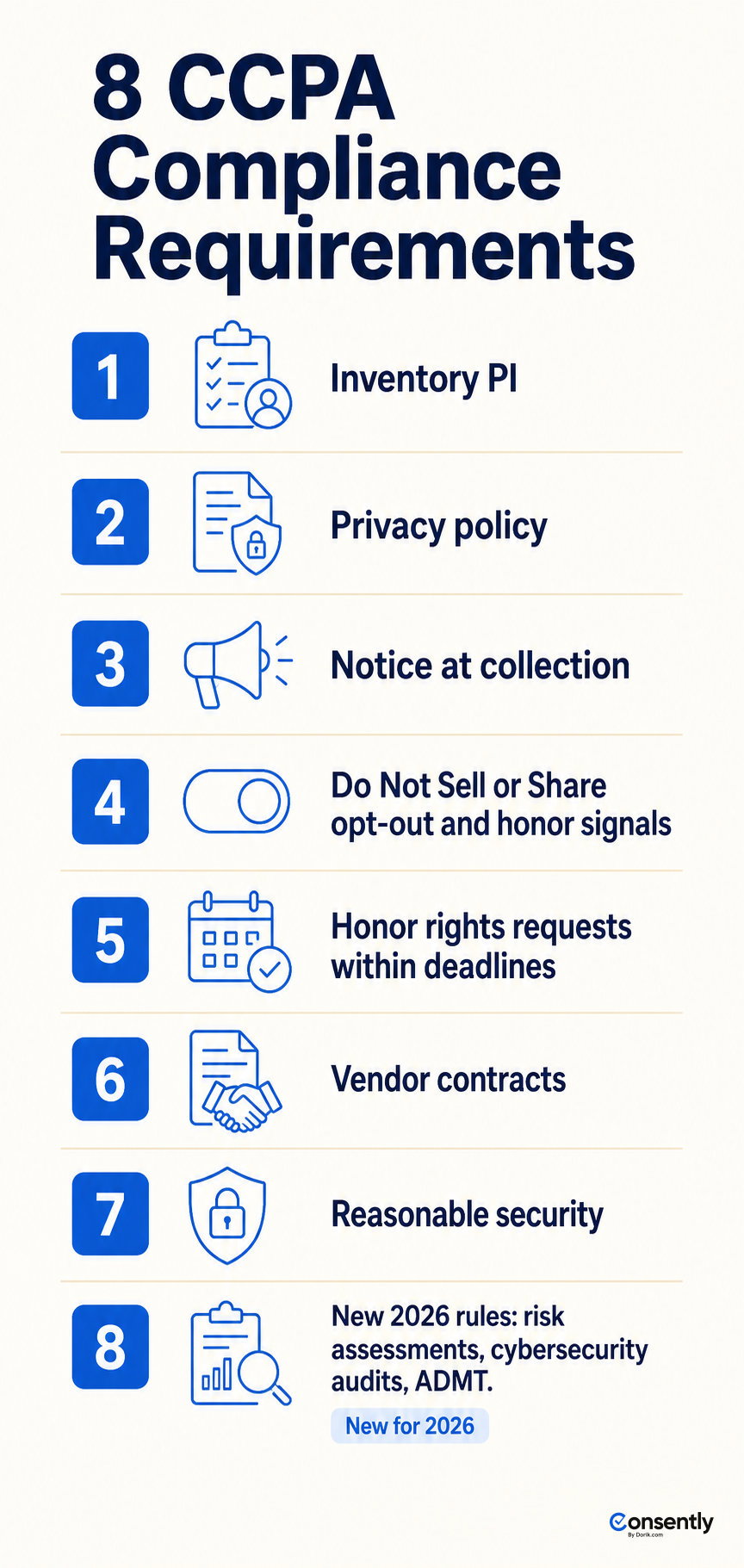
The CCPA compliance requirements break down into 8 obligations. A covered business must complete each one to avoid enforcement action from the California Attorney General or the California Privacy Protection Agency (CPPA).
-
Inventory the personal information you collect.
-
Post and update a compliant privacy policy.
-
Give notice at the point of collection.
-
Offer a "Do Not Sell or Share" opt-out and honor opt-out signals.
-
Honor consumer rights requests within the deadlines.
-
Put service-provider and vendor contracts in place.
-
Apply reasonable security safeguards.
-
Meet the new 2026 rules on risk assessments, cybersecurity audits, and automated decision-making technology (ADMT).
Requirements 1 through 7 have applied since the CPRA amendment took effect. Requirement 8 is new. The CPPA's regulations on risk assessments, cybersecurity audits, and ADMT became effective January 1, 2026. Compliance deadlines are phased through 2027 and 2028.
This page is the requirements reference; for the task-by-task setup order, follow the step-by-step guide to comply with the CCPA.
Who Has to Comply with the CCPA?
The CCPA applies to a for-profit business doing business in California that meets any one of three thresholds. It does not need to meet all three, and it does not need to be based in California.
-
Gross annual revenue over $25 million (statutory), adjusted to $26,625,000 effective January 1, 2025, per the California Privacy Protection Agency.
-
Buys, sells, or shares the personal information of 100,000 or more California consumers or households.
-
Derives 50% or more of annual revenue from selling or sharing California consumers' personal information.
Nonprofits and government agencies are generally excluded. The law reaches businesses headquartered outside California if they do business there and cross one of the three thresholds. California is not the only state with a comprehensive privacy law; see US state privacy laws for how the other 19-plus states compare.
Does the CCPA Apply to Small Businesses?
Most small businesses fall below the CCPA's thresholds and are not covered. A solo founder or small team stays exempt while under $26,625,000 in revenue, under 100,000 California consumers, and under 50% of revenue from selling data.
Crossing any single prong pulls a small business in. The most common trigger is the 100,000-consumer count for a high-traffic site, or the 50%-from-selling prong for a data broker. Reddit threads on r/webdev confirm the common confusion: most small businesses assume the law applies broadly. In practice, only one of three specific triggers brings coverage.
Affiliate sites and content sites with heavy traffic should check the consumer count first. That threshold is the one that high-traffic, low-revenue sites cross unexpectedly.
For the full statute, history, and complete rights set, see what the CCPA is.
Requirement 1: Inventory the Personal Information You Collect
Every CCPA requirement below depends on knowing what personal information (PI) you collect, where it comes from, and who you share it with. Build a data inventory before touching the rest of the checklist.
List every category of PI you collect: IP address, browsing history, device identifiers, cookies, account details, and any data from forms or checkout flows. For each category, record its source, its business purpose, and every third party you share it with.
Cookies and trackers are the part of this inventory most website owners miss. They accumulate silently as marketing tags and analytics scripts get added over time. Consently's automatic cookie scanning discovers every cookie, tracker, script, and iframe running on your site, covering the website layer of the inventory.
It does not map your CRM, order database, or other back-office systems; those need a separate inventory pass.
For a deeper breakdown of what counts as personal information under the CCPA, see what personal data means.
Requirement 2: Post and Update a Compliant Privacy Policy
A CCPA-compliant privacy policy discloses what you collect, why, who you share it with, and how consumers exercise their rights. Update it at least every 12 months.
The policy must include:
-
The categories of personal information you collect, sell, or share.
-
The business or commercial purposes for collecting each category.
-
The third parties you share data with.
-
All six consumer rights and how to exercise them.
-
The "Do Not Sell or Share My Personal Information" disclosure, if you sell or share data.
Consently's Privacy Policy generator produces this document from a guided workflow, with rich-text editing and direct embedding on your site. The Cookie Policy generator covers the separate cookie-specific disclosure.
These tools produce assistance, not legal advice: they help you generate the document, but they do not certify that your business practices are compliant.
A cookie policy explains what your site's cookies do; see what a cookie policy is for the difference from a privacy policy.
Requirement 3: Give Notice at the Point of Collection
Notice at collection means telling consumers what you collect and why, at or before the moment you collect it. It cannot be buried later in a privacy policy. On a website, this notice is delivered through the cookie or consent banner.
The notice must list the categories of personal information collected and the purposes for collecting them. It must also link to your privacy policy and your "Do Not Sell or Share" opt-out.
Consently's cookie and consent banner delivers notice at collection automatically when a visitor lands on your site. The CCPA/US opt-out template is the correct model for US visitors. It presents an opt-out choice rather than the EU's opt-in model, matching how US privacy law structures consent.
See what a consent banner is for how banners differ across jurisdictions.
Requirement 4: Offer an Opt-Out ("Do Not Sell or Share") and Honor Opt-Out Signals
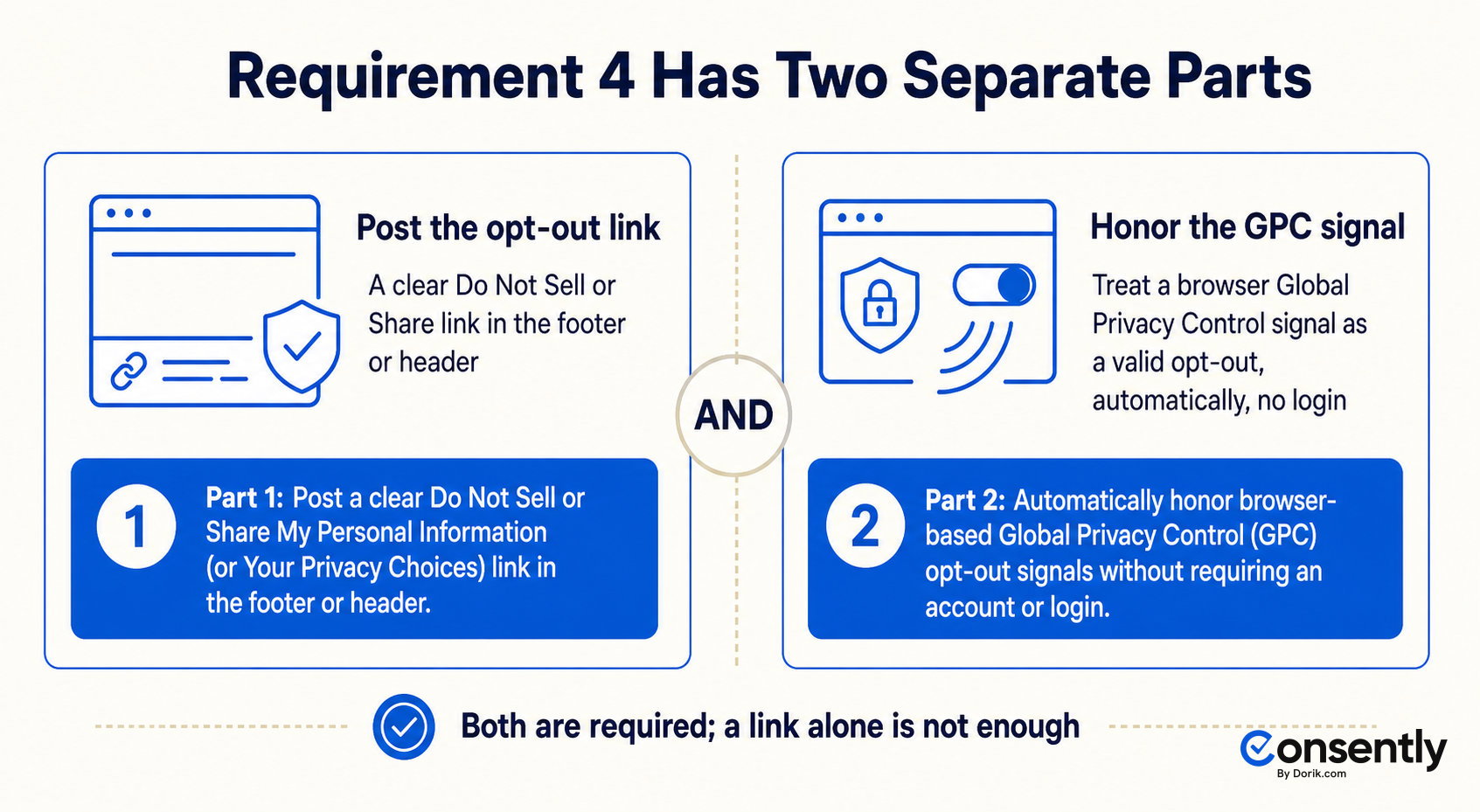
This requirement has two distinct parts, and conflating them is the single most damaging CCPA mistake a website owner makes. The first part is a link. The second part is honoring a browser signal automatically.
-
Post the opt-out link: If you sell or share personal information, place a clear, conspicuous “Do Not Sell or Share My Personal Information” or “Your Privacy Choices” link in your site’s footer or header, visible on the homepage.
-
Honor opt-out preference signals automatically: The CCPA requires covered businesses to treat a browser-based opt-out signal, most commonly the Global Privacy Control (GPC), as a valid opt-out request without a manual form. As of the CPPA’s amended regulations effective January 1, 2026, this honoring must be frictionless. A business cannot require a consumer to create an account or log in to process the signal. The site must also display a visual confirmation the signal was honored, such as an “Opt-Out Request Preference Signal Honored” message. If the GPC signal conflicts with a consumer’s prior account-level privacy setting, the GPC signal overrides it.
Consently delivers the first part. The US/CCPA opt-out banner template, the Do-Not-Sell / opt-out control, and region-based display put the consumer-facing link and banner in place. Consently does not detect or honor GPC signals automatically. That is a separate technical obligation the business meets through other means.
One common approach is a script that reads the browser's GPC header and adjusts tracking behavior. A CMP that supplies the opt-out link is not the same as GPC signal detection. Treating them as interchangeable is how businesses end up non-compliant with this requirement specifically.
Minors under 16 require opt-in consent rather than an opt-out mechanism.
For the opt-out link and GPC mechanism in depth, see the Do Not Sell or Share opt-out explained and opt-out preference signals.
Requirement 5: Honor Consumer Rights Requests Within the Deadlines
A consumer rights request invokes one or more of the six CCPA rights: Know, Delete, Correct, Opt-Out, Limit, and Non-Discrimination. Businesses must offer at least two methods for submitting a request and respond within fixed deadlines.
-
Offer at least two request methods, such as a web form and an email address (email alone is sufficient for online-only businesses).
-
Verify the requester's identity before acting on the request.
-
Confirm receipt within 10 business days.
-
Substantively respond within 45 calendar days, extendable once by another 45 days (90 days total) with notice to the consumer.
-
Complete opt-out or limit requests within 15 business days.
-
Retain records of requests and responses for at least 24 months.
Consently's consent logs and export give you the opt-out record and audit trail, the proof that you honored a consumer's opt-out choice. This is not a full access, correction, or deletion request portal; it covers the opt-out record specifically, not the broader rights-fulfillment workflow.
See data subject rights for the full rights set and what a DSAR is for how access requests work in practice.
Requirement 6: Put Service-Provider and Vendor Contracts in Place
Every vendor, contractor, and service provider that touches your consumers' personal information needs a written contract restricting them to your contracted business purpose. Without this contract, a vendor legally becomes a third party. Sharing data with a third party can trigger the "sale" or "sharing" definitions the CCPA regulates.
The contract must prohibit the service provider from selling, sharing, retaining, using, or disclosing the personal information outside the agreement's stated business purpose. It must also bar combining that data with data from other sources. This applies to cloud hosts, analytics vendors, email platforms, and any tool processing consumer data on your behalf.
See service providers and processors for how the CCPA's service-provider role compares to the GDPR's controller and processor roles.
Requirement 7: Apply Reasonable Security Safeguards
Reasonable security safeguards mean encryption, access controls, and a documented breach-response plan proportional to the sensitivity of the data you hold. This requirement matters more than any other line item on this checklist for one reason. It is the trigger for the CCPA's only private right of action.
Consumers can sue a business directly if a data breach exposes their nonencrypted, nonredacted personal information due to a lack of reasonable security. Statutory damages run from $100 to $750 per consumer, per incident, or actual damages if greater, under the California Attorney General's CCPA guidance.
Before suing, the consumer must give the business written notice of the violated sections and 30 days to cure them. Community reports from site owners implementing CCPA compliance point to a consistent pattern. Security gaps, not banner or policy defects, are the root cause of the lawsuits that actually reach a courtroom.
For the breach-response side of this requirement, see data breach notification rules.
Requirement 8: Meet the New 2026 Rules (Risk Assessments, Cybersecurity Audits, ADMT)
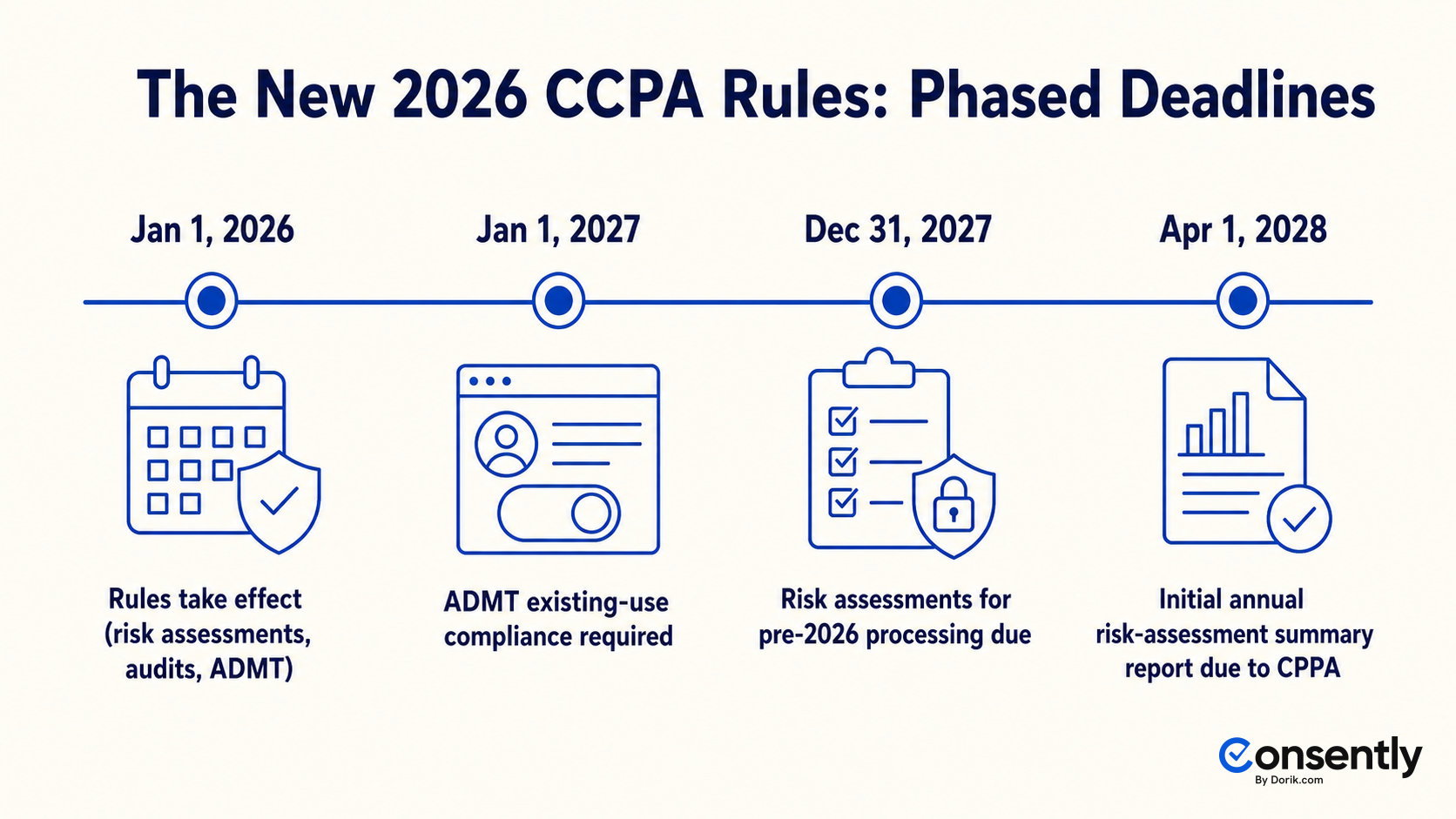
The CPPA's regulations on risk assessments, cybersecurity audits, and automated decision-making technology (ADMT) became effective on January 1, 2026. Compliance deadlines are phased through 2027 and 2028. This is the freshness beat that separates a current CCPA guide from an outdated one.
-
Risk assessments: Required before processing that involves ADMT for significant decisions, sensitive personal information, or activity posing significant risk to consumer privacy, including selling or sharing data. For processing that began before January 1, 2026, businesses have until December 31, 2027 to complete and document the assessment. The initial annual summary report, covering assessments from 2026 and 2027, is due to the CPPA by April 1, 2028.
-
Cybersecurity audits: Annual audits required for businesses whose processing poses significant risk to consumer privacy or security. Phased in based on business revenue and data volume.
-
ADMT transparency and opt-out: Consumers can opt out of automated decision-making used for significant decisions, such as employment, housing, healthcare, or financial services. Limited exceptions apply, including a human appeal process. Compliance for existing ADMT use is required by January 1, 2027.
These rules mostly hit larger, data-heavy businesses running significant automated processing. A small website with a cookie banner and a privacy policy should note the dates. It does not need to build a risk-assessment program unless its processing crosses into ADMT, sensitive data, or high-risk territory.
For how the CPRA amendment reshaped the original CCPA statute, see CCPA vs CPRA.
What You Need Before You Start
Most CCPA compliance work fails not from missing legal knowledge, but from starting without the right inputs already assembled. Gather these four things before you begin the checklist.
Roles: the site owner or a designated privacy lead handles the website-layer requirements (privacy policy, notice at collection, opt-out link). Legal counsel should review edge cases and the 2026 rules if your business processes sensitive data or runs automated decision-making.
Time: the website layer, the banner, the policy, and the opt-out link, is realistically an afternoon of setup once the data inventory is done. A full compliance program for a data-heavy business spans risk assessments, vendor contracts, and security review. That runs as an ongoing, multi-team effort, not a single sitting.
Inputs: a data inventory covering every category of personal information you collect. Also needed: a list of every third party or vendor you share data with. Admin access to your site or CMS to install a banner and publish policies rounds out the list.
Tools: a consent management platform or cookie-banner tool, a privacy-policy generator, and a system to receive and log consumer requests. Any of these can be separate tools or a single platform that bundles all three.
Common CCPA Compliance Mistakes to Avoid
The most damaging CCPA mistake is treating an opt-out link as the whole requirement while ignoring the separate obligation to honor browser-based opt-out signals automatically. Five mistakes account for most enforcement exposure.
-
Assuming you're too small without checking the thresholds: A high-traffic content site with modest revenue can still cross the 100,000-consumer prong. Check all three thresholds before assuming the law does not apply.
-
Believing "we don't sell data" means full exemption: Transparency obligations, the privacy policy, and consumer rights fulfillment still apply even if you never sell or share personal information. Not selling data exempts you from the opt-out requirement only.
-
Adding an opt-out link that doesn't stop the tags or honor GPC: A “Do Not Sell or Share” link that displays but doesn’t actually change tracking behavior, or a site that ignores the GPC signal, is non-compliant regardless of the link’s presence. The link and the signal-honoring are two separate technical requirements.
-
Neglecting security safeguards: The private right of action is breach-triggered, and most CCPA lawsuits that reach litigation trace to a lack of reasonable security, not a banner or policy defect.
-
Treating compliance as one-time: Annual privacy policy updates, 24-month record retention, ongoing cookie re-scans as you add new tools, and the new 2026 rules all make CCPA compliance a continuous process rather than a single project.
How Consently Helps You Meet CCPA Website Requirements
Consently covers the website and consumer-facing slice of CCPA compliance: the notice, the opt-out link, the policies, and the audit trail. It does not cover vendor contracts, internal security programs, or the 2026 ADMT and risk-assessment rules.
The cookie and consent banner deliver notice at collection (Requirement 3). The US/CCPA opt-out template, the Do-Not-Sell control, and region-based display put the consumer-facing opt-out link in place (Requirement 4). GPC signal detection itself is a separate obligation Consently does not perform.
The Privacy Policy and Cookie Policy generators produce the required disclosures (Requirement 2). Automatic cookie scanning covers the website layer of your data inventory (Requirement 1). Consent logs with export give you the opt-out record (Requirement 5).
Consently is website and cookie-compliance tooling, not a full enterprise privacy suite, and it does not replace legal advice. For the requirements it maps to, see the CCPA compliance solution.
Getting the website layer of CCPA compliance right takes a fraction of the effort of the full 8-step checklist above. Consently's cookie and consent banner, US/CCPA opt-out template, region-based display, and Privacy and Cookie Policy generators cover that layer in one setup.
Start free with Consently and get your notice, opt-out link, and policies live.
FAQs
What are the main requirements of the CCPA?
A covered business must inventory its data, post a privacy policy, and give notice at collection. It must also offer a "Do Not Sell or Share" opt-out, honor opt-out signals, and fulfill consumer rights requests within deadlines. Contracting its vendors, securing the data, and, since 2026, meeting new risk-assessment, audit, and ADMT rules round out the list.
Do I have to comply with the CCPA if I don't sell data?
Yes, if you meet a threshold. Not selling or sharing personal information exempts a business from the opt-out requirement specifically. Transparency, the privacy policy, and the consumer rights obligations still apply. You can state in your policy that you do not sell data.
Does the CCPA apply to small businesses?
Only if a small business crosses one of the three thresholds. Most small businesses stay under $26,625,000 in revenue, under 100,000 California consumers, and under 50% of revenue from selling data, so most are not covered. A high-traffic site can still hit the 100,000-consumer count.
How long do I have to respond to a CCPA request?
Confirm receipt within 10 business days. Substantively respond within 45 calendar days, extendable once by another 45 days for 90 days total. Complete opt-out or limit requests within 15 business days.
Do I need a "Do Not Sell or Share My Personal Information" link?
Yes, if your business sells or shares personal information. Post the link, or the alternative label "Your Privacy Choices," clearly in your site's footer or header, visible from the homepage.
Does the CCPA require me to honor Global Privacy Control (GPC)?
Yes. Covered businesses must honor GPC and other opt-out preference signals as valid opt-out requests, automatically and without requiring an account or login. This is required under the CPPA's amended regulations, effective January 1, 2026.
What is the CCPA revenue threshold for 2026?
The statutory threshold is $25 million in gross annual revenue. The current, inflation-adjusted figure effective January 1, 2025 is $26,625,000.
What are the new CCPA requirements for 2026?
Risk assessments, cybersecurity audits, and automated decision-making technology (ADMT) rules became effective January 1, 2026. Risk assessments for pre-2026 processing are due by December 31, 2027, with ADMT-specific compliance required by January 1, 2027.
What happens if I don't comply with the CCPA?
The California Attorney General or the CPPA can bring civil penalties of up to $2,663 per violation, or up to $7,988 for intentional violations. Consumers can also sue directly over a data breach of unencrypted personal information after a 30-day cure notice. See CCPA fines and enforcement for the full penalty structure.

